Vue lecture
GIMP 3.2 RC2: Second Release Candidate for GIMP 3.2
After several weeks of bugfixes and polishing, we’re ready to share our second release candidate for GIMP 3.2!
As the GIMP team continues to close issues, the release of 3.2 gets nearer, with many new features, bug fixes and performance improvements. Please do continue to report problems you find to help us make GIMP as good as possible!
Release Highlights
While there are no major new features in this release, we do want to highlight some of the more impactful fixes and some minor updates. The full changelog can be read in our code repository.
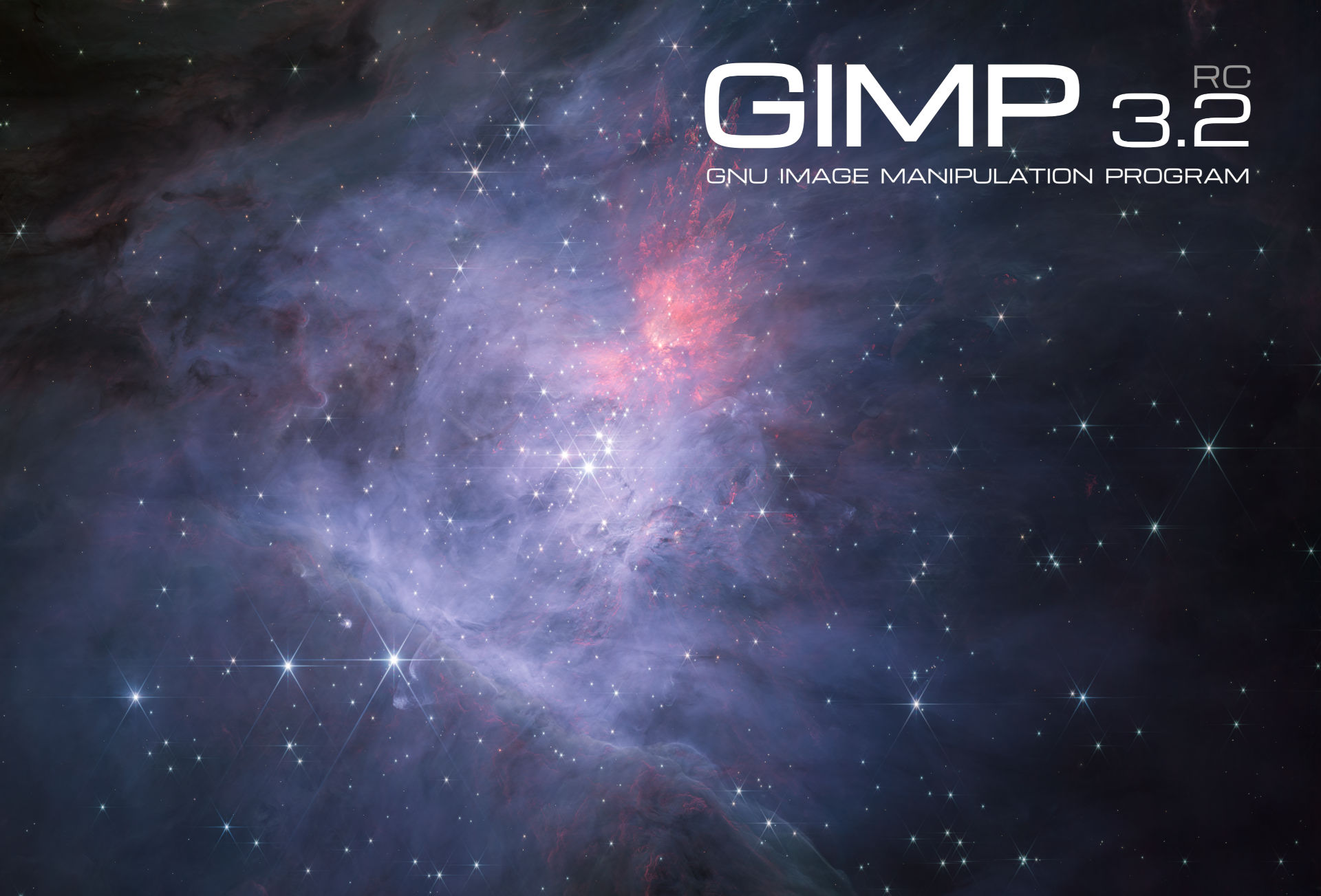
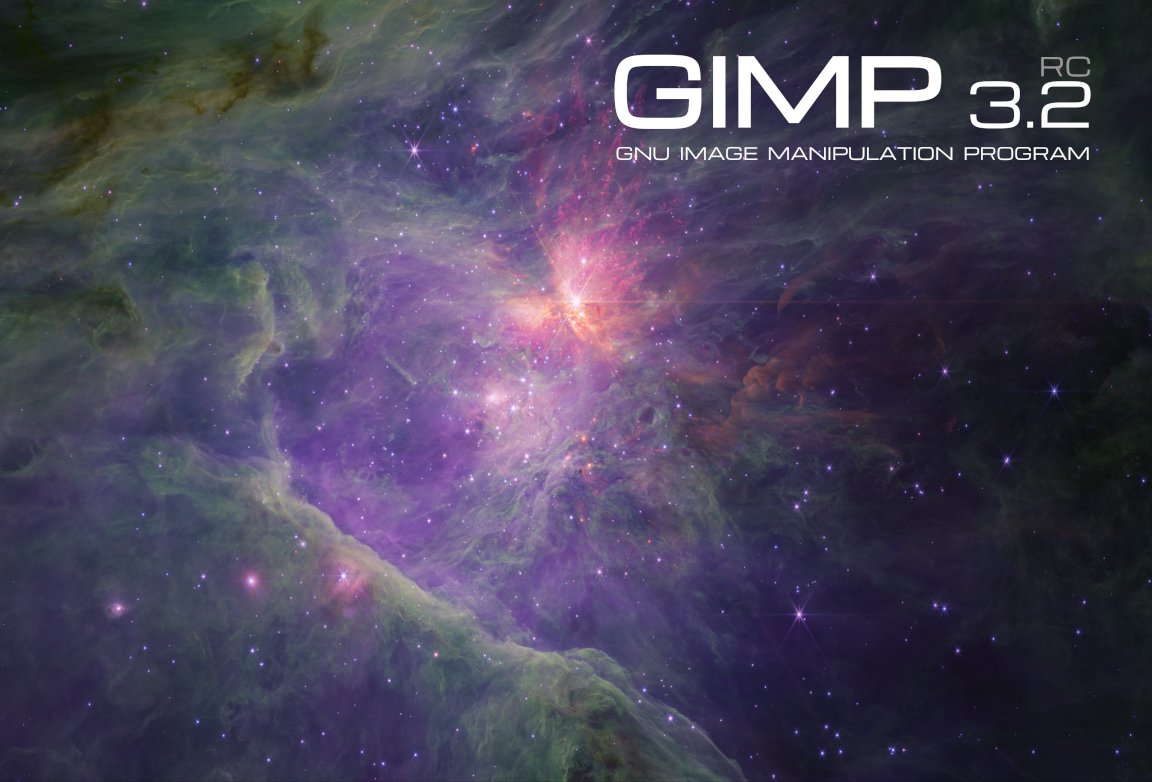
You may also notice that we got a second splash screen image, also created and contributed by astronomer Mark McCaughrean. It is a shot of the same area of space as for the first splash image candidate, the “Trapezium Cluster & inner Orion Nebula”, again captured with the James Webb Space Telescope, but this time in the short-wavelength channel. The final 3.2 splash image shall be one of these two variants!
Removing Restrictions
In GIMP 2.10, you could not export an image unless you had a layer selected due to a limitation of our export API. Due to the improvements in GIMP 3.0, this is no longer required. Therefore, we’ve removed the code that prevents you from choosing the Save or Export options in the menu when there’s no layer selected.
Similarly, the Clipboard Brush and Clipboard Pattern previously had a size limit of 1024 pixels. This was because that was the largest safe value for 32 bit computers to handle. Since most users now have 64 bit computers, we’ve increased the limit to 8192 pixels for the 64 bit builds. This means artists can make and use much larger temporary brushes and patterns as they work.
Paths
GIMP has supported importing SVGs as paths for a long time. However, some SVG paths were shown incorrectly due to our import code being based on an older version of librsvg. Based on suggestions and assistance from Federico Mena Quintero, one of the lead developers of the library, we updated our code to better handle different types of SVG paths.
Paint Select Tool
The Paint Select tool has been in the test Playground section of GIMP since it was first developed by Thomas Manni in 2020. Recently, Jehan has begun reviewing it (and the Foreground Selection tool) as part of the planning for the GIMP 3.4 roadmap. He’s made a number of improvements already, both to the UI and to the tool’s performance.
Start-up time
We’ve received reports that GIMP takes a while to load for users with a large number of fonts. This includes our resident typographer, Liam Quin. They worked with Idriss Fekir to test a change to our font loading code that noticeably speeds up our loading time. This is an area we continue to work on, so if you notice any regressions, please let us know!
UX/UI
-
Ondřej Míchal and Jehan have improved spacing between buttons in the Transform tool overlays to make it easier to click the right one.
-
Notifications have been added to the Filter merge-down button when users try to merge down a filter on a non-raster layer.
-
Gabriele Barbero fixed the wording on our Keyboard Shortcuts dialog to more clearly explain how to change a shortcut.
-
Minor fixes have been made to the theme to prevent issues on certain platforms.
Minor Updates
-
Jehan finished the stylus barrel rotation implementation in our earlier Mypaint Brush 2 port, connecting it to the Wheel value already recognized by GIMP. Note that very few styluses actually provide this feature, so it likely won’t impact your workflow unless you have one of the rare ones.
-
Thanks to Alx Sa, our PSD importer now loads legacy Outer Glow layer effects. The filter information was already loaded in the PSD plug-in during GIMP 3.0’s development, it just was not rendered before.
-
A long outstanding patch by Niels De Graef was finally merged to include a Bash completion file in GIMP. This feature shows the list of available options when pressing Tab in the command line. On a related note, the
--show-debug-menuoption is now visible in the command line--helpoption as well.
Minor Fixes
-
Anders Jonsson noticed that our default PostScript unit was changed from
millimetersin GIMP 2.10 toinchesin GIMP 3.0, without the size being adjusted to match. He fixed the default setting to load images at the right size. -
Jacob Boerema fixed a bug for plug-in developers, where plug-ins set to be always available would not be usable when there was an open image with no layers added.
-
Jehan and Gabriele Barbero corrected a mistake made during vector layer development that caused the offsets not to be visible in the Layer Attributes dialog.
-
We now prevent loading XCF files as link layers when it will create an infinite loading cycle (if the linked XCF itself loads the initial XCF, at any level).
Security
Alx Sa and Gabriele Barbero have implemented fixes for the following Zero Day Initiative reported issues on some of our image plug-ins:
- ZDI-CAN-28311
- ZDI-CAN-28273
- ZDI-CAN-28158
Build Process
Thanks to Jehan‘s work, babl and GEGL can now be compiled as relocatable! This is especially useful for builds where the build prefix is not the same as the runtime prefix. As a result, two bugs were fixed on the AppImage package: the GEGL filters are now fully localized and the third-party GEGL filters can now be found and used on those environments.
He also fixed a bug that affected not only the AppImage but other environments too: the language list sometimes was not being displayed translated in the Preferences dialog. Now, when building GIMP, it will instruct packagers to prevent that.
A user named Kruthers contributed a fix for a long-standing bug on AppImage: the inability to run CLI commands that point to relative paths. Thanks to their fix, the AppImage is now even more on par with a regular installation of GIMP.
Bruno re-implemented support for building GIMP on Windows with the MSVC
compiler, which is now possible due to the existence of the clang-cl wrapper
(we used to have direct MSVC support, without a wrapper, but it stopped working).
As a result, we now have build logs about correct Windows API usage etc.
But note that we will not distribute MSVC binaries, because, after all,
they mostly depend on MSYS2 due to vcpkg design which has much fewer features.
In short, MSYS2 is still the recommended way to build GIMP on Windows.
GEGL and babl
Øyvind Kolås has released new updates to babl and GEGL, the underlying color management engines for GIMP.
As noted above, babl 0.1.118 and GEGL 0.4.66 have been updated to be compiled as relocatable. In addition, a number of contributors have done some code clean-up and build process updates to GEGL.
Release stats
Since GIMP 3.2.0 RC1, in the main GIMP repository:
- 40 reports were closed as FIXED.
- 24 merge requests were merged.
- 201 commits were pushed.
- 13 translations were updated: Basque, Chinese (China), Danish, Georgian, Greek, Italian, Lithuanian, Norwegian Nynorsk, Slovenian, Swedish, Thai, Turkish, Ukrainian.
23 people contributed changes or fixes to GIMP 3.2.0 RC2 codebase (order is determined by number of commits; some people are in several groups):
- 10 developers to core code: Jehan, Alx Sa, Bruno Lopes, Øyvind Kolås, Anders Jonsson, Gabriele Barbero, Idriss Fekir, Jacob Boerema, Ondřej Míchal, Sabri Ünal.
- 6 developers to plug-ins or modules: Bruno Lopes, Alx Sa, Ondřej Míchal, Gabriele Barbero, Anders Jonsson, lloyd konneker.
- 13 translators: Sabri Ünal, Aefgh Threenine, Kolbjørn Stuestøl, Yuri Chornoivan, Anders Jonsson, Asier Saratsua Garmendia, Martin, Ekaterine Papava, luming zh, Alan Mortensen, Marco Ciampa, dimspingos, Aurimas Černius.
- 2 theme designers: Alx Sa, Jehan.
- 5 build, packaging or CI contributors: Bruno Lopes, Jehan, Jernej Simončič, Niels De Graef, Øyvind Kolås.
- 2 contributors on other types of resources: Jehan, Niels De Graef.
- The gimp-data submodule had 3 commits by 1 contributor: Jehan.
- The splash images for the 3.2 series were authored by Mark McCaughrean under license Creative Commons By-SA 2.0.
Contributions on other repositories in the GIMPverse (order is determined by number of commits):
- Our UX tracker had 1 reports closed as FIXED (and many more incrementally worked on).
- babl 0.1.118 is made of 36 commits by 5 contributors: Bruno Lopes, Øyvind Kolås, Jehan, Jacob Boerema, Joe Da Silva.
- GEGL 0.4.66 is made of 62 commits by 11 contributors: Bruno Lopes, Øyvind Kolås, Jehan, Sabri Ünal, Alfred Wingate, Ondřej Míchal, Alan Mortensen, Alexander Alexandrov Shopov, Jeremy Bícha, Marco Ciampa, Ulf Martin Prill.
- ctx had 40 commits since 3.2.0 RC1 release by 1 contributor: Øyvind Kolås.
- The
gimp-macos-build(macOS packaging scripts) release had 3 commits by 1 contributor: Lukas Oberhuber. - The flatpak release had 6 commits by 1 contributor: Bruno.
- Our main website (what you are reading right now) had 27 commits by 4 contributors: Jehan, Bruno Lopes, Alx Sa, Sabri Ünal.
- Our developer website had 25 commits by 2 contributors: Jehan, Bruno Lopes.
- Our 3.0 documentation had 24 commits by 6 contributors: Sabri Ünal, Jacob Boerema, Anders Jonsson, Matthew Leach, Richard Gitschlag, lloyd konneker.
Let’s not forget to thank all the people who help us triaging in Gitlab, report bugs and discuss possible improvements with us. Our community is deeply thankful as well to the internet warriors who manage our various discussion channels or social network accounts such as Ville Pätsi, Liam Quin, Michael Schumacher and Sevenix!
Note: considering the number of parts in GIMP and around, and how we
get statistics through git scripting, errors may slip inside these
stats. Feel free to tell us if we missed or mis-categorized some
contributors or contributions.
Around GIMP
Books
Sabri Ünal has been hard at work updating our books page. In addition to historial books about prior versions of GIMP, we now have listings for several GIMP 3 books. If you know of any books on GIMP that we’re missing, please let us know!
Note: We are not interested in listing or promoting books that are generated from GenAI. Please check if the book was authored by a person before submitting. Thanks!
Downloading GIMP 3.2 RC2
You will find all our official builds on GIMP official website (gimp.org):
- Linux AppImages for x86 and ARM (64-bit)
- Linux Flatpaks for x86 and ARM (64-bit)
- Linux Snaps for x86 and ARM (64-bit)
- Universal Windows installer for x86 (32 and 64-bit) and for ARM (64-bit)
- Microsoft Store for x86 and ARM (64-bit)
- macOS DMG packages for Intel/x86 and Apple/ARM hardware (64-bit)
Other packages made by third-parties are obviously expected to follow (Linux or *BSD distributions’ packages, etc).
There is no development release for the manual, but you can continue to use the existing GIMP 3.0 documentation.
What’s next
This is nearly it! We are so close to GIMP 3.2 release that we can feel it in the air. When I first introduced the new accelerated release policy, I was both confident and wary of falling short. In the end, I’m quite satisfied; it really worked out well for this first iteration. 😄
Considering how few reports of major issues we had during this RC1, this might be the last release candidate, though only the coming period will tell. Sometimes people, mistaking us for a corporation, ask us about quality assurance policy or the like. Well we are not a company, we are a community and our QA is the world, it’s me, you, anyone. Therefore we really really enjoin everyone to test this development version and report any issue you find, especially if it feels like it should be a blocker issue.
Among the few things which come to mind, I had to touch and reorganize
our XCF-loading code for detecting link layer cycles; and as you may
imagine, this is a very sensitive area of our codebase. So we welcome
massive testing in file loading and link layer creation during this RC2
phase, in order to detect any regression!
And of course, any deep testing, especially of the new link and vector
layers,
but also of any other major feature you are often using will be very
appreciated. We want to avoid both releasing broken new features,
and adding regressions to existing features.
Don’t forget you can donate and personally fund GIMP developers, as a way to give back and accelerate the development of GIMP. Community commitment helps the project to grow stronger! Wouldn’t it be fitting with the coming holiday season? 🎁🎄🤗
In the meantime, we’ll continue to work hard for delivering GIMP 3.2.0 soon, and wish you all a very nice holiday season and a lot of fun and joy with family and friends! 🥳🍾🥰
Relaunching ODF Advocacy as ODF News
Winners in the Month of LibreOffice, November 2025 – Grab your free sticker pack 😊
LibreOffice Conference 2026 and 2027
Welcome Dan Williams, new LibreOffice Developer focusing on UI/UX
The Document Foundation announces the approval of the Open Document Format (ODF) v1.4 standard by OASIS Open
Monthly News – November 2025
Many thanks to our donors, sponsors and to all the people who support our project.
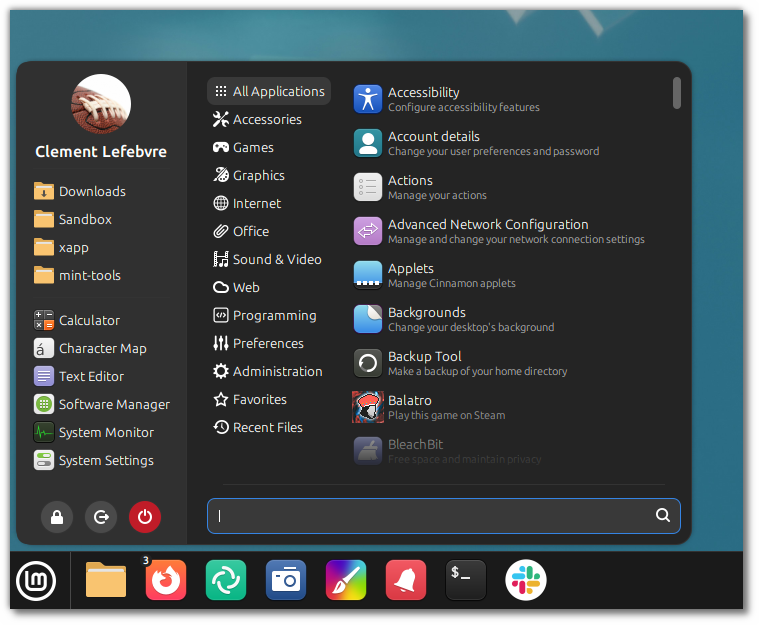
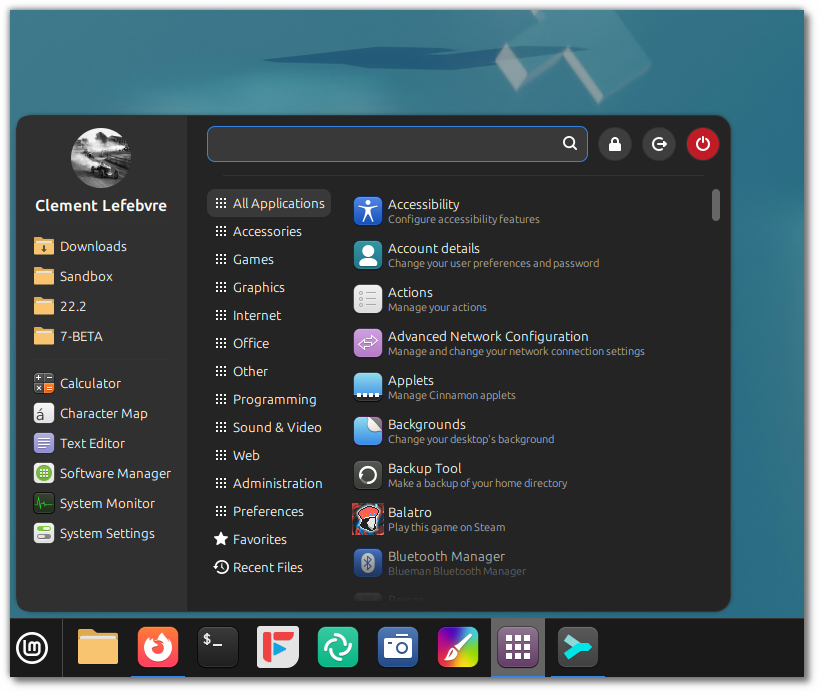
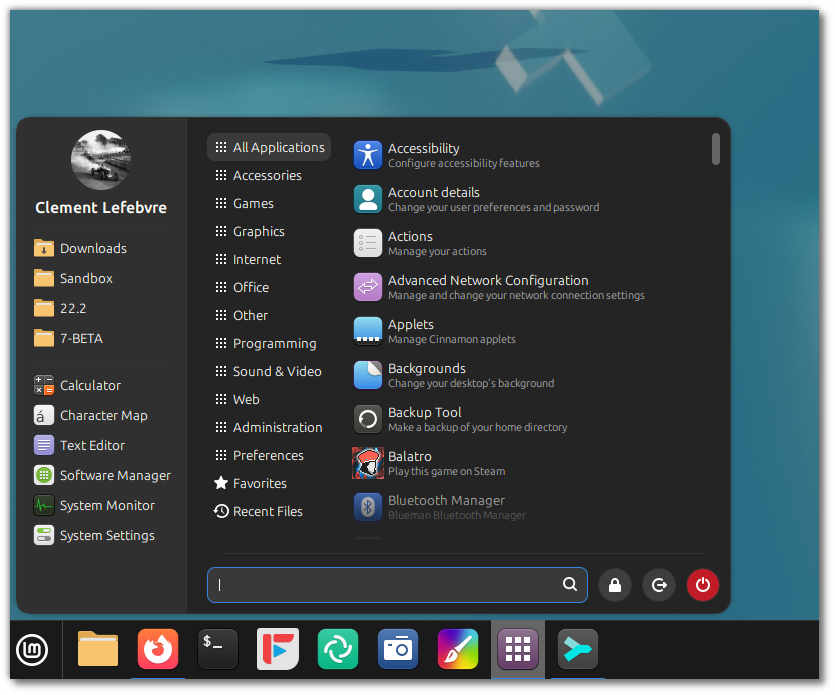
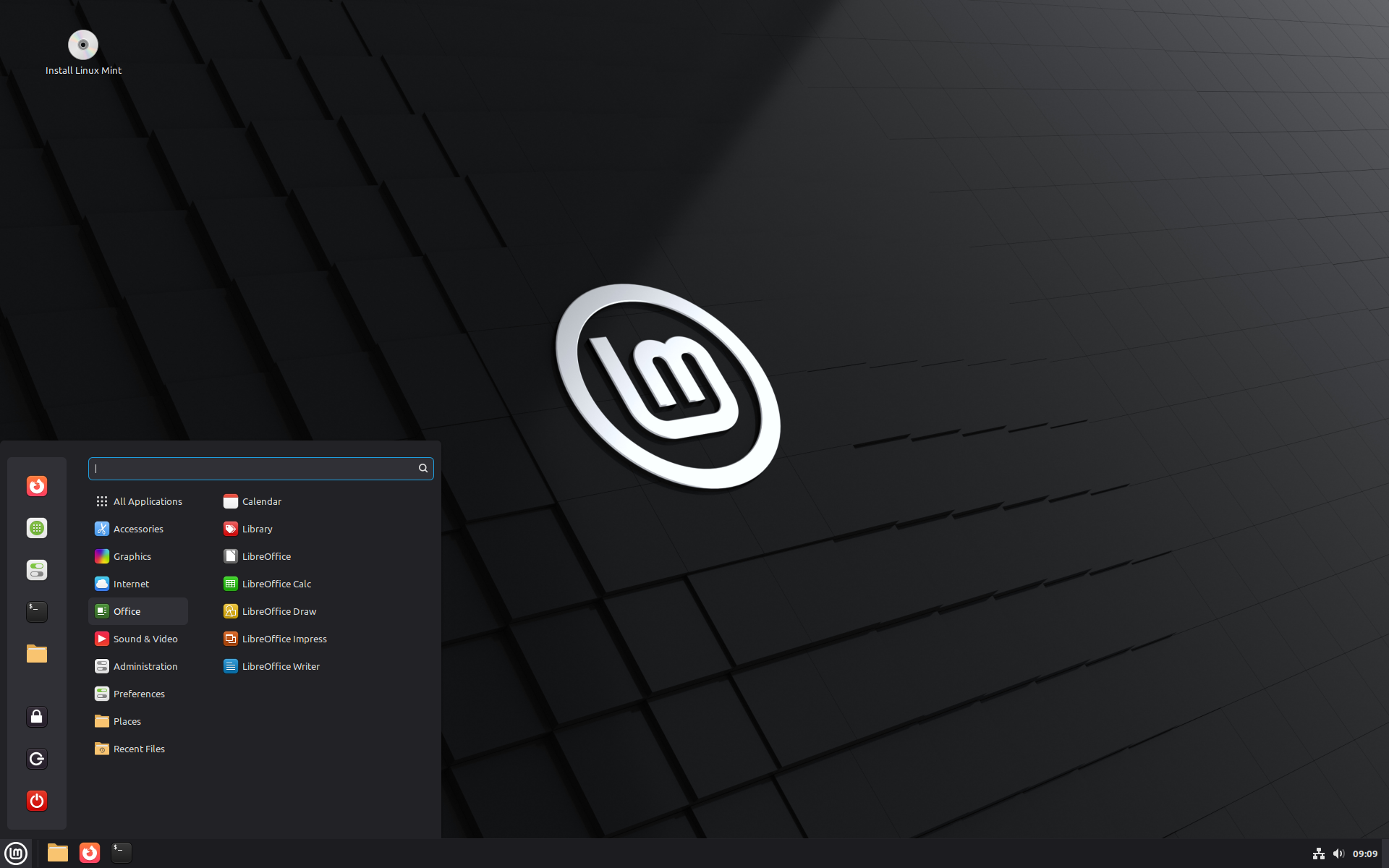
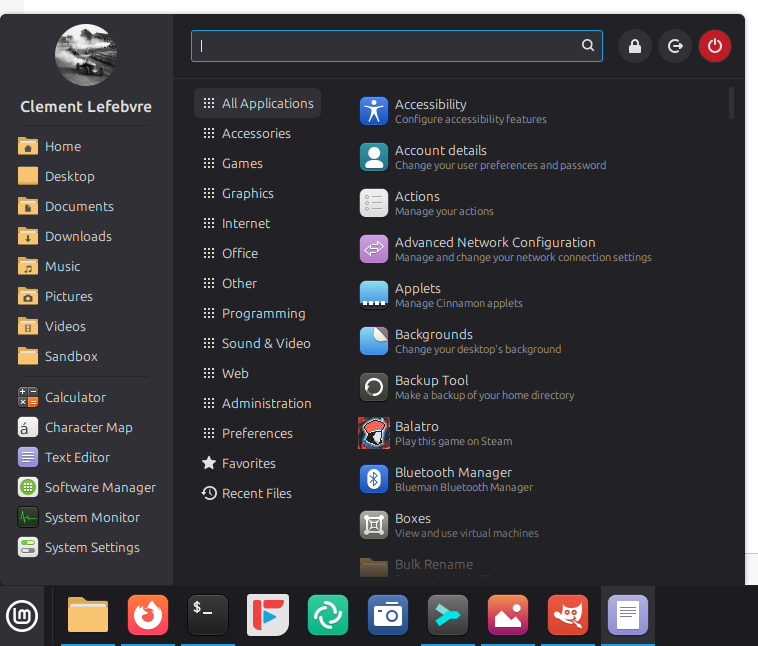
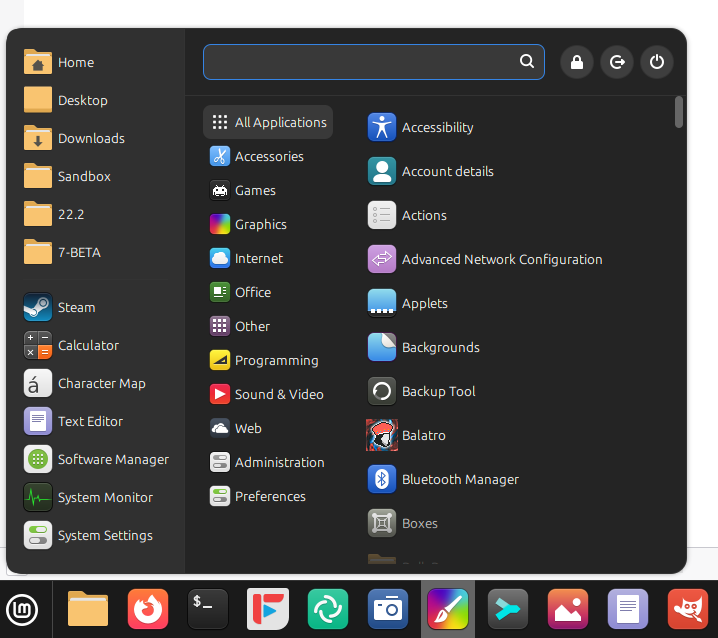
Cinnamon Menu
The new Cinnamon menu received symbolic category icons.
This was made possible thanks to the new XApp Symbolic Icons (XSI) initiative.
Linux Mint 22.3 ‘Zena’
The codename for Linux Mint 22.3 is Zena.
We covered some of the new features included in 22.3 on this blog:
- System information tool
- System admin tool
- New Cinnamon menu
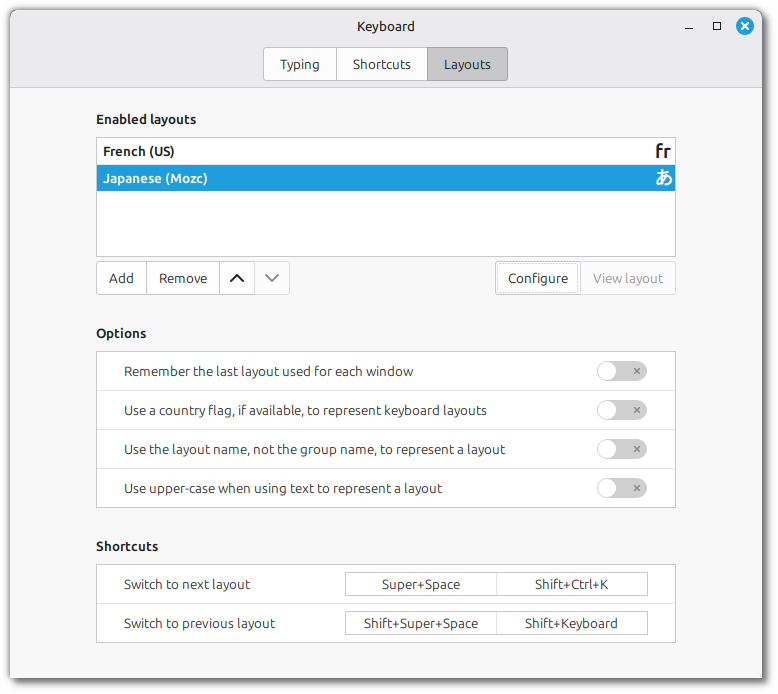
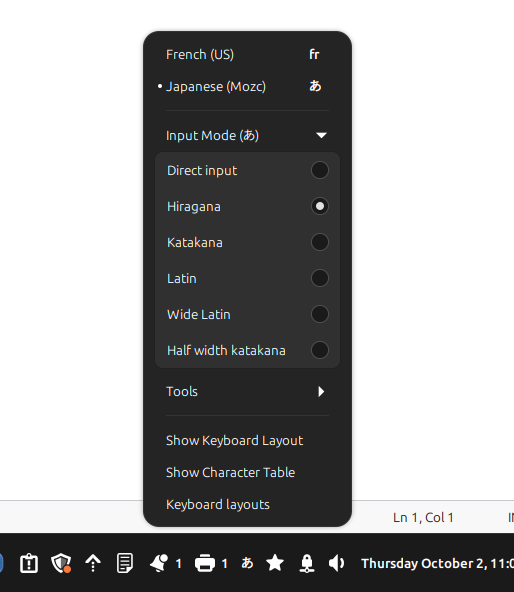
- Wayland-compatible keyboard/IM handling
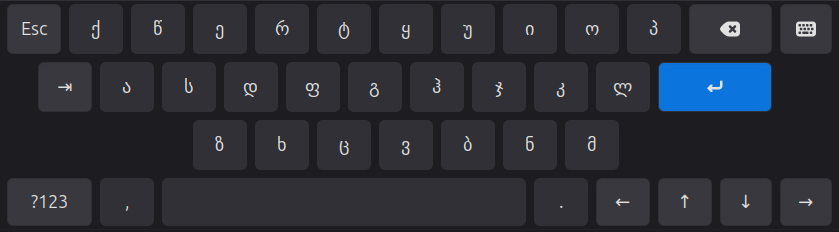
- Improved on-screen keyboard
There are many more… the ability to pause file operations in Nemo, or snapshots in Timeshift, text messaging in Warpinator, Always-on night light, template management, per-app panel notification indicators… etc.
We’re very close to a release now. Most of the projects have been tagged and packaged in 22.3’s repositories.
We’re preparing a BETA release for the first half of this month.
Sponsorships:
Linux Mint is proudly sponsored by:
| Gold Sponsors: Silver Sponsors: ![]() |
Bronze Sponsors:![]() ![]() ![]() ![]() |
Donations in October:
A total of $23,362 were raised thanks to the generous contributions of 764 donors:
$1111 (6th donation), acocorinacio aka “A. Inácio”
$1000, E. S. Caiser
$700 (2nd donation), Justin B.
$290, Alain B.
$265, Bernhard L.
$256, A F.
$250 (6th donation), Neil K.
$212, Anne S.
$212, Hagen S.
$200, Eric G.
$169, Peter M.
$150 (2nd donation), Adam S.
$127, Christof B.
$117, Mark B.
$116, David A.
$107, Konstantin Q.
$106 (12th donation), Jiří B.
$106 (6th donation), CH
$106 (6th donation), Peter A.
$106 (5th donation), Marek Stapff
$106 (4th donation), Bernd E.
$106 (2nd donation), Johannes A.
$106 (2nd donation), Stefan F.
$106, Arno W.
$106, CARLOS V. H.
$106, Friedrich N.
$106, Peter-Michael K.
$106, Simon H.
$106, The Incredibly Useful Company Limited
$106, Thomas F.
$100 (27th donation), John Mc aka “Land Research Project“
$100 (26th donation), Hans J.
$100 (18th donation), Alfred H. aka “Varmint Al“
$100 (13th donation), James F.
$100 (3rd donation), Scott Mc.
$100 (2nd donation), Donald W.
$100 (2nd donation), gerald S.
$100 (2nd donation), Mark S.
$100, Andrew B.
$100, Carter G.
$100, Ed McDougal
$100, George L.
$100, Leslie B. B.
$100, Meisam S. S.
$100, Raven T. S.
$90, Edgar R.
$84, Dillmann A.
$75 (7th donation), David B.
$60 (2nd donation), maurice A.
$60, Anonymous
$55 (3rd donation), Greg P.
$53 (24th donation), Bernard H.
$53 (23rd donation), Bjarne K.
$53 (15th donation), Torsten P.
$53 (14th donation), Christian G. aka “Chrissy”
$53 (13th donation), Jyrki A.
$53 (8th donation), Uwe O.
$53 (7th donation), Rhydwen V.
$53 (5th donation), Reijo H.
$53 (4th donation), Hannu H.
$53 (4th donation), Mark L.
$53 (4th donation), Wolfgang R.
$53 (3rd donation), Arvis S.
$53 (3rd donation), Joao D.
$53 (2nd donation), Alexander K.
$53 (2nd donation), Christoph K.
$53 (2nd donation), Frank P.
$53 (2nd donation), Ivaylo A. aka “Iceman11”
$53 (2nd donation), Johannes B.
$53 (2nd donation), Kuno G.
$53 (2nd donation), Matthias M.
$53 (2nd donation), Mohamed E.
$53 (2nd donation), Peter W.
$53, Anthony T.
$53, Barbara R. B.
$53, Bruno N.
$53, Christian R.
$53, Daniel F.
$53, David B.
$53, Florent R.
$53, Frédéric L.
$53, France S.
$53, Franz F.
$53, gerhard Z.
$53, Gianni B.
$53, H. F. R.
$53, Internationale Christliche Mission
$53, Jürgen D.
$53, Jan B.
$53, Jan B.
$53, Jelle V.
$53, Julius K.
$53, Katharina S.
$53, Marcel M.
$53, Marcel R.
$53, Michael J.
$53, Miriam B.
$53, Moritz W.
$53, Norbert E.
$53, R.W aka “Resonanter”
$53, Ragnar S.
$53, Rene V.
$53, Richard N.
$53, Sébastien B.
$53, Stefan A.
$53, Stefan B.
$53, THOMAS M.
$53, Thomas P.
$53, Tim N.
$53, Tristan A.
$53, Uwe K.
$53, Uwe S.
$53, Vincenzo D.
$53, Waldemar H.
$52 (2nd donation), VIESTURS P.
$52, Trina L. M.
$50 (13th donation), Mothy
$50 (11th donation), Wade T.
$50 (10th donation), Anthony C. aka “Ciak”
$50 (9th donation), Daniel M.
$50 (7th donation), Anthony L.
$50 (7th donation), Gerard S.
$50 (7th donation), Tom D.
$50 (6th donation), Oswaldo H.
$50 (5th donation), Jay V.
$50 (5th donation), M G U.
$50 (4th donation), Arestor B.
$50 (4th donation), Chris R.
$50 (4th donation), David J.
$50 (4th donation), Derrick1120
$50 (3rd donation), Jeffrey J.
$50 (3rd donation), Khalid A.
$50 (3rd donation), Mr D.
$50 (3rd donation), Richard M.
$50 (3rd donation), Walter K.
$50 (2nd donation), Arthur J.
$50 (2nd donation), Gary B.
$50 (2nd donation), Michael H.
$50, Amar Moturu
$50, Chuck B.
$50, David R. D.
$50, Donn C. M.
$50, Edward B.
$50, eli H.
$50, Encore Int’l Trading, Inc.
$50, ISHAAN G.
$50, Jacob D. S.
$50, John H.
$50, John S.
$50, John S.
$50, Jonathan F.
$50, Joseph H.
$50, Joshua F. aka “Akasen”
$50, Kiyoko A.
$50, Lawrence D. W.
$50, LUIS F. K.
$50, Marc D.
$50, Martha D.
$50, Peter A. C.
$50, Richard L.
$50, Richard M.
$50, Robert L.
$50, Robert L.
$50, Sandy B.
$50, Stacey K.
$50, Thomas L.
$50, Timothy R.
$50, Wiggo R. O.
$50, william T.
$44 (2nd donation), J.T. aka “rotz”
$42 (11th donation), Joerg B.
$42 (6th donation), Csongor
$42, Alois F.
$42, Jasmin K.
$42, Kees B.
$42, Olof K.
$40 (9th donation), John S.
$40 (7th donation), Colin S.
$40 (2nd donation), Ronald B.
$36 (3rd donation), jan W. V. D.
$36, Fatih A. L.
$35, Philippa K.
$31 (14th donation), H ScottB
$31 (12th donation), Lars-gunnar S.
$31 (8th donation), Thomas K.
$31 (3rd donation), Antoine M.
$31, alessandro T.
$31, Andrew N.
$31, B I.
$31, Guido Samuel Rifesser aka “Gigi”
$31, Joerg E.
$31, Josef F.
$31, KLaus M.
$31, Maxim G.
$31, Michael L.
$31, Raj aka “SinghForceOne”
$31, Wolfgang M.
$31, Wolfgang P.
$31, Yvonne D. R.
$30 (2nd donation), Saverio N.
$30, Diego M.
$30, Eric S.
$30, John S.
$30, Joshua L.
$30, Leland G.
$30, Maxbash
$28, Keine Ahnung
$26, Benjamin M.
$26, j.w.franken
$26, James J.
$26, t L. H.
$25 (56th donation), Linux Mint Sverige
$25 (21st donation), Richard N.
$25 (17th donation), John W.
$25 (15th donation), Mihnea Rădulescu
$25 (9th donation), Bruce I.
$25 (9th donation), John N.
$25 (7th donation), Reuben N.
$25 (6th donation), Peter J, aka “Dr Peter”
$25 (4th donation), Robert W.
$25 (4th donation), Theron K.
$25, James Z.
$25, Nelson R.
$25, Paul S.
$25, Ryan S.
$25, TMCC
$25, Vladyslav K.
$22, Sascha A.
$21 (64th donation), Peter E.
$21 (31st donation), Stefan W.
$21 (26th donation), Benjamin W. aka “UncleBens”
$21 (25th donation), Marek S.
$21 (15th donation), Marc S.
$21 (12th donation), Juergen M. B.
$21 (12th donation), Rob B.
$21 (10th donation), Geoffrey Allgood
$21 (9th donation), Manfred W.
$21 (8th donation), Chistoph B.
$21 (8th donation), Mario N.
$21 (7th donation), Cevad O.
$21 (6th donation), Florian S.
$21 (6th donation), Frank W.
$21 (5th donation), Erwin S.
$21 (5th donation), Lennart J.
$21 (5th donation), Ulrich W.
$21 (4th donation), Mack
$21 (4th donation), Luis D.
$21 (4th donation), Matthias Versen aka “Matti”
$21 (3rd donation), Curd-Juergen S.
$21 (3rd donation), Heiko S.
$21 (3rd donation), Rodney Mc B.
$21 (2nd donation), Davy V.
$21 (2nd donation), Florian K.
$21 (2nd donation), Grégory C.
$21 (2nd donation), Ian S.
$21 (2nd donation), Joachim Paul M. aka “JPFM”
$21 (2nd donation), Jonathan B.
$21 (2nd donation), Kevin Schnurbusch aka “Istalrî”
$21 (2nd donation), Livio G.
$21 (2nd donation), Lucian U.
$21 (2nd donation), Olaf W.
$21 (2nd donation), Pedro F.
$21 (2nd donation), peter R.
$21 (2nd donation), Rodion S.
$21 (2nd donation), Sascha B.
$21 (2nd donation), Sebastian P.
$21 (2nd donation), Stefano B.
$21, Alexander S.
$21, Alice B.
$21, Anatolii A.
$21, Andreas B.
$21, Arjan D.
$21, Arne F.
$21, Axel R.
$21, Bernat F.
$21, Bernd G.
$21, Bernhard B.
$21, Bjørn S.
$21, Bjoern
$21, Boris M.
$21, Camille L.
$21, Christian C.
$21, Christian K.
$21, Daniel W.
$21, Dinko G.
$21, Emilien D.
$21, ERIC B.
$21, FRANCESCO A.
$21, Francesco C.
$21, Frieder B.
$21, Gert Y.
$21, Harald B.
$21, Harry T. H.
$21, Isto H.
$21, Jakob L.
$21, Jens L.
$21, johann H.
$21, johannes V.
$21, Josep T.
$21, Kelvin W.
$21, KEVIN M.
$21, Léo R.
$21, L. W. aka “The Dead Frog Project”
$21, Laureano P. C.
$21, Lorenzo S.
$21, Louis A. J. R.
$21, Maik L.
$21, Mario B.
$21, Martin L.
$21, michael B.
$21, MIGUEL G. B.
$21, Miguel V. B.
$21, MM
$21, OLEKSANDR K.
$21, Pedro C.
$21, Peter G.
$21, Peter M.
$21, PHILIPPE R.
$21, Robert M.
$21, ROZE P.
$21, Ruggero S.
$21, Runar W.
$21, Siegfried S.
$21, Simon E.
$21, Simon H.
$21, Sophie G.
$21, Stefan B.
$21, Stephen J.
$21, Thomas D.
$21, Thomas W.
$21, Thomas W.
$21, TURBOKAN_TR
$21, Verena
$21, Werner W.
$21, XAVIER C.
$21, Yoann M.
$20 (72nd donation), Bryan F.
$20 (49th donation), John D.
$20 (14th donation), Eric W.
$20 (11th donation), Pablo L. aka “LAFO”
$20 (6th donation), Leela A.
$20 (6th donation), Samuel S.
$20 (5th donation), Gunnar A.
$20 (4th donation), Randall W.
$20 (3rd donation), A M W.
$20 (3rd donation), Carlton S.
$20 (3rd donation), Gilles S.
$20 (3rd donation), Randy M.
$20 (2nd donation), Curtis A.
$20 (2nd donation), Ian D.
$20 (2nd donation), Ian T.
$20 (2nd donation), Jan A.
$20 (2nd donation), Jeroen B.
$20 (2nd donation), John W.
$20 (2nd donation), Krzysztof O.
$20 (2nd donation), Lance L.
$20 (2nd donation), Russell N.
$20, ALEXANDER M.
$20, alfred J.
$20, Alyssa A.
$20, Andrew Z.
$20, Ansel Y.
$20, Benjamin G.
$20, Brett D.
$20, Brian S.
$20, Carl D. S.
$20, Christopher W. C.
$20, Clyde T.
$20, Dale B.
$20, Daniel W.
$20, David B.
$20, Francisco B. B. R.
$20, Hugh D.
$20, Israel S. J.
$20, James H.
$20, Javier Munguia aka “rojomx”
$20, Jesse L.
$20, Jill B. B.
$20, John P.
$20, John W.
$20, Jose P.
$20, Karl S.
$20, Kenneth A.
$20, Kurt M.
$20, L M.
$20, Linsey W.
$20, Luke M.
$20, Matthew S.
$20, MattL aka “Phulcrum”
$20, Meditation Perfection
$20, Michael S.
$20, Mitchel H.
$20, Nathan M.
$20, OT
$20, Pat C.
$20, peter T.
$20, Robert M.
$20, Sergio V.
$20, snerd
$20, Someone
$20, Stephen I.
$20, Sven K.
$20, Tate F.
$20, Terence H.
$20, Thomas B.
$20, Thomas C.
$20, Tiberius L.
$20, Tim A.
$20, Tim S.
$20, WILBEN C.
$20, William P.
$19, Robert L.
$16 (11th donation), Peter L. aka “Myfathersson”
$15 (6th donation), Ravi S.
$15 (5th donation), mitch K.
$15 (4th donation), Lars Otto N.
$15 (2nd donation), Helmut R.
$15, Janos P. P.
$15, Joris V. R.
$15, Martin R.
$15, Nico J. F.
$15, Pfaff A.
$13, Mr R. M. W.
$12 (2nd donation), A P. B. aka “AnnieB”
$12, Christophe P.
$12, Grzegorz P.
$12, KEVIN F.
$11 (112nd donation), Johann J.
$11 (11th donation), Alessandro S.
$10 (115th donation), Thomas C.
$10 (59th donation), Philip Woodward
$10 (42nd donation), Tugaleres.com
$10 (39th donation), Denys G. aka “GD Next“
$10 (29th donation), Wilson G.
$10 (28th donation), Bruce M.
$10 (25th donation), Christopher R.
$10 (21st donation), Slobodan Vrkacevic
$10 (20th donation), Michael P. aka “www.perron.de“
$10 (18th donation), Felipe P.
$10 (18th donation), Yves R. aka “Long_Time_User”
$10 (16th donation), Philip E.
$10 (15th donation), Giorgio C.
$10 (13th donation), Dimitar S.
$10 (13th donation), Michael P.
$10 (11th donation), Andrei Sinkevich
$10 (10th donation), Abe Z.
$10 (10th donation), Martin H.
$10 (9th donation), Antonio C.
$10 (9th donation), Artem Ignatyev aka “ZaZooBred”
$10 (9th donation), blueredgreen
$10 (9th donation), Francisco F.
$10 (9th donation), Jacques V.
$10 (9th donation), Mario M.
$10 (8th donation), Marcus K.
$10 (8th donation), Michael S.
$10 (6th donation), Christophe C.
$10 (6th donation), Didier P.
$10 (6th donation), Ja P.
$10 (6th donation), Kai Uwe Joppich
$10 (6th donation), M.B.
$10 (6th donation), Mariusz B.
$10 (6th donation), Udo M.
$10 (5th donation), Carlos P.
$10 (5th donation), Denis P.
$10 (5th donation), Edgar T.
$10 (5th donation), Lars-erik J.
$10 (5th donation), Matthias H.
$10 (5th donation), Sebastian S.
$10 (5th donation), Sergei Petrov
$10 (4th donation), Arlen A.
$10 (4th donation), John L.
$10 (4th donation), KONSTANTINOS I. B.
$10 (4th donation), Marc L. aka “Néliox”
$10 (4th donation), Massimo M.
$10 (4th donation), Norberto C. N. aka “Konbini-San”
$10 (4th donation), Volker K.
$10 (3rd donation), Alberto M.
$10 (3rd donation), Alessio R.
$10 (3rd donation), Danilo R.
$10 (3rd donation), Giacomo B.
$10 (3rd donation), James P.
$10 (3rd donation), Josef P.
$10 (3rd donation), Ralf H.
$10 (3rd donation), T.H.
$10 (3rd donation), Wiebke G.
$10 (3rd donation), William M.
$10 (2nd donation), alphabus
$10 (2nd donation), Adam J. V. R.
$10 (2nd donation), Ana B.
$10 (2nd donation), Ari G.
$10 (2nd donation), Claudio B.
$10 (2nd donation), Gerhard F.
$10 (2nd donation), Guillermo M.
$10 (2nd donation), Juan D. A. B.
$10 (2nd donation), Juan G.
$10 (2nd donation), Ken B.
$10 (2nd donation), Kenneth H.
$10 (2nd donation), Korora Solutions
$10 (2nd donation), Krystian K.
$10 (2nd donation), Pedro S.
$10 (2nd donation), Piotr R. aka “_PAPCIO_”
$10 (2nd donation), Renaud A.
$10 (2nd donation), Toni
$10 (2nd donation), Μιχάλης Π.
$10, Adam K.
$10, Adam M.
$10, Alessandro V.
$10, Alexander R.
$10, AMIT K. P.
$10, Anders B.
$10, Andreas B.
$10, Andreas G.
$10, Andreas K.
$10, Andreas R.
$10, Andreas S.
$10, Andrii
$10, Andrius S.
$10, Anon
$10, Anonymous
$10, Antero S. B. aka “abento”
$10, ANTHONY M.
$10, anthony T.
$10, Antonio S. R.
$10, Apolinar G.
$10, Arnaud
$10, Aurélio Araújo
$10, Bernd H.
$10, Bernhard B.
$10, BOHDAN K.
$10, Boris D.
$10, Brenden R. S.
$10, Brian K.
$10, Brice C.
$10, Carlos F.
$10, christophe B.
$10, christophe C.
$10, Clarke E.
$10, Damien B.
$10, Daniel Š.
$10, Dariusz M.
$10, Daron M.
$10, David J.
$10, David K.
$10, David S.
$10, Denis L.
$10, Dennis H.
$10, Dexue S.
$10, Doron S.
$10, Ed H.
$10, Edijs Z.
$10, Edward
$10, Eliseo M.
$10, Emil D.
$10, Enrica R.
$10, Erick B.
$10, Erwann F.
$10, Finn W.
$10, Franz J.
$10, Frits A.
$10, Gabriel C. B. R.
$10, Gene B.
$10, Germain C.
$10, Giorgio G.
$10, Héctor M. C.
$10, Heijo W. A.
$10, Henk B.
$10, Henk C.
$10, Henk-jan R.
$10, Henry R. P.
$10, Heritiana R. R.
$10, Horst S.
$10, Ilija O.
$10, inashdeen
$10, J. W. aka “Pipapo”
$10, J.T. Chuang
$10, Jackson B.
$10, Jake V.
$10, Jambalak
$10, James B.
$10, Jay H.
$10, JCPM V.
$10, Jeroen C.
$10, Jeron V. D. S.
$10, Joakim K.
$10, Johan P.
$10, John L.
$10, John L.
$10, John L.
$10, John V. P.
$10, José H.
$10, Joy
$10, juan A. C. M.
$10, Julie S.
$10, Karel M.
$10, Kay R.
$10, Kevin K. M.
$10, Kevin M.
$10, Kinh H.
$10, LALISOU R.
$10, Lars J.
$10, Lars K.
$10, Le Nass
$10, LHJ R.
$10, Lixie L.
$10, Lloyd C.
$10, Luis P.
$10, LUIS S. B.
$10, Lyn F.
$10, M K.
$10, Manuel Doncel Martos aka “manuelarte“
$10, Mark B.
$10, Marko M.
$10, Markus S.
$10, Martial L.
$10, Martin P.
$10, Martin P.
$10, Massimo D. M.
$10, Matt Hayes
$10, Matthias O.
$10, Matthieu V. A.
$10, Mauro S.
$10, michele G.
$10, Miguel C. C.
$10, Nevil E.
$10, Nic D.
$10, Nikolay S. N.
$10, Noman S.
$10, Oleg T.
$10, Patric S.
$10, Paul H.
$10, Peeter S.
$10, Philipp H.
$10, Ram B.
$10, Reinhold Z.
$10, Renke S.
$10, Richard B.
$10, Richard J.
$10, RICHARD M. I.
$10, Robert K.
$10, Robert M.
$10, Roberto P. J.
$10, Ron W.
$10, Rueben M.
$10, Sascha R.
$10, Sergei L.
$10, Shimi M.
$10, Siegfried R.
$10, Silviu M.
$10, Simon A.
$10, Simon H.
$10, Stanley W.
$10, Stefan S.
$10, Stephan S.
$10, Steve M.
$10, sven S.
$10, Thomas S.
$10, Tomá G.
$10, Tomasz S.
$10, TONY A. P.
$10, Tony R.
$10, Urszula S.
$10, Uwe B.
$10, Vincent C.
$10, Vitor R.
$10, Volker J.
$10, Werner T.
$10, William W.
$10, wissels J. aka “wisjos”
$10, www.SmartPage.net
$9, Lukáš F.
$8, Cristian K.
$8, MARCELO F. D. F.
$7 (3rd donation),
$332 from 84 smaller donations
If you want to help Linux Mint with a donation, please visit https://www.linuxmint.com/donors.php
Patrons:
Linux Mint is proudly supported by 1,846 patrons, for a sum of $4,525 per month.
To become a Linux Mint patron, please visit https://www.patreon.com/linux_mint
Code of Ethics and Fiduciary Duties for TDF’s Board of Directors
The Role of ODF in Digital Identity and Authentication
LibreOffice Asia Conference 2025 Japan is coming!
2.16.0 released
🚀 Features
- Added suggested feeds to the Search UI (#964) by @JaredTweed in #964
🌐 Translations
- Updated Slovak translation using Weblate by @GitLenin in #953
- Updated Portuguese (Brazil) translation using Weblate in #961
- Updated German translation using Weblate by @Kachelkaiser in commit
- Updated Hungarian translation using Weblate by @summoner001 in commit
- Updated Spanish translation using Weblate by @jesusFx in commit
- Updated French translation using Weblate by @Matth7878 in commit
- Updated Italian translation using Weblate by @Wiccio in commit
- Updated Polish translation using Weblate by @Aga-C in commit
- Updated Chinese (Simplified Han script) translation using Weblate in commit
- Updated Serbian translation using Weblate by @eevan78 in commit
- Updated Slovenian translation using Weblate in commit
- Updated Danish translation using Weblate in commit
- Updated Bulgarian translation using Weblate in commit
- Updated Swedish translation using Weblate by @spacecowboy in #966
❤️ New Contributors
- @summoner001 made their first contribution
- @Kachelkaiser made their first contribution
- @JaredTweed made their first contribution in #964
- @GitLenin made their first contribution in #953
Announcing the LibreOffice US community!
GIMP 3.2 RC1: First Release Candidate for GIMP 3.2
We’re thrilled to share our first release candidate for GIMP 3.2! It represents a major step in our roadmap, and months of hard work by contributors. We look forward to your feedback as we move towards the stable release of GIMP 3.2! Note that this is still a development snapshot, not yet a final release: please do report any problems or crashes you find.
New Splash Screen
Our super cool 3.2 release candidate splash screen was created by astronomer Mark McCaughrean!
It shows the Orion Nebula at infrared wavelengths made using the James Webb Space Telescope, and is one of his many photographs of space, processed in GIMP as an important tool in his workflow.
As with our previous splash artist Sevenix, we will have an interview with him detailing his design process and motivation that we hope to share in the near future.
Release Highlights
This news post will cover some of the main updates since our last development release. If you haven’t already tested out GIMP 3.1.2 and 3.1.4, we encourage you to read over the prior news posts to see the other new features and fixes. As always, the full changelog can be seen in the NEWS section of our repo.
Link and Vector Layer Updates
We’ve made a number of bugfixes and improvements to the new link and vector layers, thanks to your feedback from GIMP 3.1.4. Jehan in particular has been focused on internal updates and UI improvements for both features. The “Rasterize” and “Revert Rasterize” operations have been made much clearer, allowing for easy changes between different states. These changes apply to text layers as well, since they are a type of vector layer too.
We discovered that link layer monitoring was not working on Windows due to a bug in the GLib library. Jehan has submitted an upstream patch with a proper fix, but for now we have a temporary workaround so that this feature works on Windows.
Text Editor
Gabriele Barbero has continued his work on the text editor from his Google Summer of Code project. One major aspect has finally been merged - the ability to move the on-canvas editor across the screen! This allows you to move it out of the way while working on close-up text, without having to hide it in the tool options. You can also click the reset button on the editor to place it back in its original position.
Idriss Fekir has continued their work on making text editing more robust. They’ve updated the internal code to support text rendering even on very large dimensions.
Also, a new patch by Lleu Yang lets you use Shift + Ctrl + V in the on-canvas editor to paste unformatted text. This follows a previous update that added a shortcut for Bold, Italics, and Underline styling.
Swap Tools shortcut
Jehan revived one of his older projects and added support for swapping between your current tool and the previous one
you used. By default, you can press Shift + X to switch back and forth between your paintbrush and
eraser while drawing. Of course, you can also change the shortcut with the Edit -> Keyboard Shortcuts dialog.
This new feature also allows us to help with a common point of confusion. Internally, GIMP considers filters to be a tool just like the rotate or airbrush tools. This means that when you’re applying a Brightness-Contrast filter to your image, you’re actually “switching” to the Brightness-Contrast tool.
Thanks to Jehan‘s update, we now automatically switch back to your prior tool once the filter is applied, which we believe is more in-line with what users expect to happen.
Non-destructive filters
We continue to update our non-destructive filter code. One request we’ve received a few times is for “adjustment layers” - layers where you can apply a filter and have it affect all layers below it. We do not have this as an official concept since it would be a GUI duplicate of layer effect, yet you can now simulate adjustment layers with layer groups!
Set an empty layer group to “Pass through” and then apply filters to it - since Pass through groups cover all layers below, by definition, this is basically the same as what is commonly called adjustment layers. Furthermore, you can add a mask to the layer group and adjust the render to only cover certain areas.
UX/UI Improvements
We continue to work with users and designers on our UX repo to improve GIMP’s user experience. While a lot of smaller adjustments have been made since 3.1.4, there’s also been several larger updates.
-
GIMP was first created with a multi-window interface, with each image shown in a separate window. You could drag and drop a file onto the floating toolbox to open it as a new image. Single Window mode introduced an image tab bar to show all of your open images. We have now connected that tab bar to the drag and drop code, so you can easily open multiple images by dragging them over to the image tab bar and releasing!
-
Ondřej Míchal has been on a mission to replace many of our Spin Entry widgets with the newer Spin Scale.
-
You can now drag and drop color swatches from the Color History. This was always intended, but previously did not work because the color history buttons grabbed focus instead of the color history swatch.
-
Gabriele Barbero further improved our macOS port by restoring missing features to the App Menu. Now macOS users have options to hide GIMP, hide other applications, and to check the related services. Additionally, the macOS “Quit” command is now connected to our closing code, which will reduce the chance of losing unsaved data on exit.
-
The Document History dockable is now multi-selection aware. You can select multiple image previews and either open or remove all of them at once.
-
Denis Rangelov developed a new design for our image toggle buttons (seen in places such as the
Modesection of the Move and Selection tools). This redesign more clearly groups the buttons together visually, so you know that they’re toggle buttons and that only one can be selected at a time. -
When typing hex colors in the Color Selector dialog, the selected color will automatically update as soon as you enter a valid text. This removes the need to press Enter whenever you type a new color.
Plug-ins
Support for a few new image formats have been added, and updates to existing formats have been made during the last stretch of our 3.2 RC1 development.
SVG
With the addition of vector layers in GIMP, we can now export SVG as actual vectors. Our new exporter allows raster layers to be optionally embedded as either PNGs or JPEG. We hope this will encourage further workflow collaboration with Inkscape, a fantastic vector graphics editing program that we highly recommend!
Note that currently our SVG import plug-in still rasterizes the imported vectors. We are looking into ways of fixing this (it would likely require to change our dependency library to read SVG) - if you’d like to help, please reach out!
PDF
Similarly, the PDF plug-in now exports vector layers as actual vectors. This means that those layers can be further edited in other vector graphics software. The “Fill with Background Color” option has also been extended to work on all layers of a multi-layer PDF, instead of just the first one.
PVR
We’ve added support for importing PowerVR (PVR) texture files. This format is most commonly used for SEGA Dreamcast games and mods.
Compression
We had a long-standing request to support importing hgt.zip images, which were recorded by NASA’s Shuttle Radar Topography Mission (SRTM). As a side effect, we now support loading any supported image that’s compressed by our standard compression algorithms (previously this was only officially used by our compressed XCF project files).
API
-
One of the major updates in GIMP 3.0 for plug-in developers was the auto-generated GUIs - you can easily make a dialog with widgets just by defining your input variables! However, a few datatypes were not implemented in the original release. For GIMP 3.2, we’ve added
GimpImageandGimpItemwidgets toGimpProcedureDialog. The new widgets look similar to the existing layer and channel widgets. -
Work on the SVG export feature required us to add many additional public API commands for text, vector, and link layers. You can see the full list in our NEWS section under API, or by checking the Procedure Browser under the Help menu in GIMP itself.
Security
The Zero Day Initiative regularly reviews applications to find potential vulnerabilities and report them. Jacob Boerema and other contributors have responded to and fixed the following reports:
- ZDI-CAN-27684
- ZDI-CAN-27863
- ZDI-CAN-27878
- ZDI-CAN-27836
- ZDI-CAN-27823
- ZDI-CAN-28376
- ZDI-CAN-28248
Additional Changes
-
Sabri Ünal and Luzpaz have been reviewing our GUI and standardizing capitalization and grammar of the user interface.
-
Aruius fixed a bug where some full-color brushes were not mirrored properly when Symmetry modes were set.
-
Bruno Lopes reworked our console output code on Windows to work just like Linux and macOS. This means you can run GIMP from CMD or PowerShell and see all output messages there.
-
Lukas Oberhuber created a new format for our color drag and drop code. We previously used
application/x-colorwhen our color code was sRGB only. Now that we pass the colorspace information as well, this is not sufficient. While it only caused visible problems on macOS (to our knowledge), it’s good to use the proper standard for all platforms.
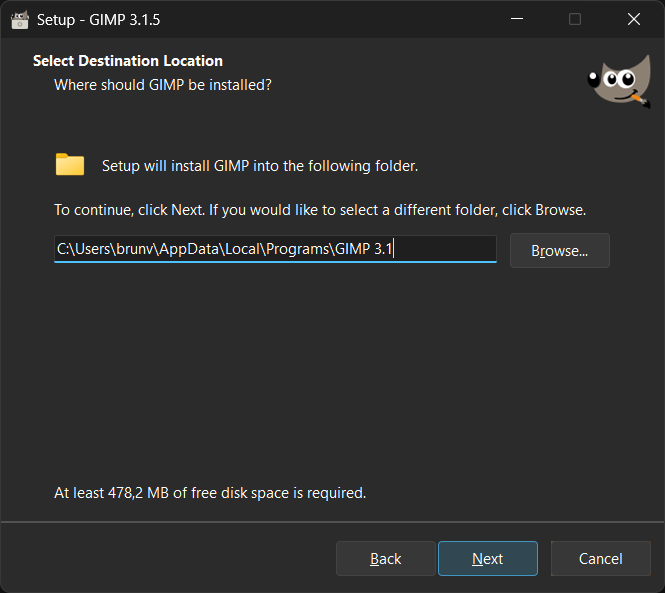
Dark mode on Windows installer
Our .exe installer is now gorgeous when you run it on Windows 10/11
with Dark Mode enabled.
This is not only due to the new splash screen, which is used on the
Installer too, but also thanks to the triaging work done by Jernej
Simončič and Bruno Lopes in tandem with Inno Setup developers on
the Inno Setup 6.6.0 development cycle.
That Inno Setup version we use on 3.2.0-RC1 and subsequent installers
supports automatic Dark Mode natively.
While very few changes were done to our GIMP packaging scripts, we can’t
stop praising the incredible work done by Martijn Laan, main
Inno Setup developer, on Google Groups after our small feedback.
Just run the .exe and give it a try.
Release stats
Since GIMP 3.1.4, in the main GIMP repository:
- 78 reports were closed as FIXED.
- 80 merge requests were merged.
- 645 commits were pushed.
- 17 translations were updated: Basque, Brazilian Portuguese, Chinese (China), Danish, Dutch, Georgian, Hungarian, Italian, Kabyle, Lithuanian, Norwegian Nynorsk, Romanian, Russian, Slovenian, Thai, Turkish, Ukrainian.
42 people contributed changes or fixes to GIMP 3.2.0 RC1 codebase (order is determined by number of commits; some people are in several groups):
- 18 developers to core code: Jehan, Alx Sa, Gabriele Barbero, Bruno Lopes, Jacob Boerema, Idriss Fekir, Sabri Ünal, luzpaz, Øyvind Kolås, Cheesequake, Estecka, Gabriele, James Addison, Lukas Oberhuber, Ondřej Míchal, aruius, cheesequake, megakite.
- 11 developers to plug-ins or modules: Alx Sa, Jehan, Ondřej Míchal, Sabri Ünal, Jacob Boerema, Anders Jonsson, Bruno Lopes, Dr. David Alan Gilbert, Gabriele Barbero, Lukas Oberhuber, lillolollo.
- 23 translators: Martin, luming zh, Kolbjørn Stuestøl, Marco Ciampa, Ekaterine Papava, Sabri Ünal, Yuri Chornoivan, Nathan Follens, Alan Mortensen, DiGro, Emin Tufan Çetin, Luming Zh, Aleksandr Prokudin, Asier Saratsua Garmendia, Aurimas Černius, Balázs Úr, Cristian Secară, Aefgh Threenine, Alevtina Karashokova, Anders Jonsson, Athmane MOKRAOUI, Balázs Meskó, Juliano de Souza Camargo.
- 3 theme designers: Alx Sa, Ondřej Míchal, luzpaz.
- 6 build, packaging or CI contributors: Bruno Lopes, Jehan, Alx Sa, Øyvind Kolås, Rico Tzschichholz, luzpaz.
- 6 contributors on other types of resources: Jehan, Bruno Lopes, Gabriele Barbero, Sabri Ünal, luzpaz, megakite.
- The gimp-data submodule had 6 commits by 1 contributor: Jehan.
- 2 image creators: Jehan, Bruno Lopes.
- The splash image for the 3.2 series was authored by Mark McCaughrean under license Creative Commons By-SA 2.0.
Contributions on other repositories in the GIMPverse (order is determined by number of commits):
- Our UX tracker had 13 reports closed as FIXED.
- ctx had 32 commits since 3.0.6 release by 1 contributors: Øyvind Kolås.
- The
gimp-macos-build(macOS packaging scripts) release had 16 commits by 1 contributors: Lukas Oberhuber. - The flatpak release had 21 commits by 1 contributor (and CI bots): Bruno Lopes.
- Our main website (what you are reading right now) had 159 commits by 7 contributors: Bruno Lopes, Jehan, Alx Sa, Guillaume Turri, Jacob Kauffmann, Petr Vorel, gturri.
- Our developer website had 190 commits by 3 contributors: Bruno Lopes, Jehan, Anders Jonsson.
- Our 3.0 documentation had 251 commits by 14 contributors: Sabri Ünal, Jacob Boerema, Marco Ciampa, Alevtina Karashokova, Matthew Leach, Nathan Follens, Anders Jonsson, Andre Klapper, Bruno Lopes, Richard Gitschlag, Dick Groskamp, Kristjan ESPERANTO, Kristjan SCHMIDT, jtux270.
Let’s not forget to thank all the people who help us triaging in Gitlab, report bugs and discuss possible improvements with us. Our community is deeply thankful as well to the internet warriors who manage our various discussion channels or social network accounts such as Ville Pätsi, Liam Quin, Michael Schumacher and Sevenix!
Note: considering the number of parts in GIMP and around, and how we
get statistics through git scripting, errors may slip inside these
stats. Feel free to tell us if we missed or mis-categorized some
contributors or contributions.
Around GIMP
GIMP developer website refreshed
As we noted on our previous news about GIMP Developer website, the GIMP Developer website has been completely rewritten to use modern web technologies so it is easier to maintain (and to look prettier). But due to the enormous amount of content to be migrated and the limited human resources we have, the process took longer than expected.
Now, finally, thanks to Bruno Lopes, who has been working on reviewing the dozens of pages of the Developer website to be kept up to date (and recently has been commiting changes to address its UI), we believe that you can navigate the site more easily.
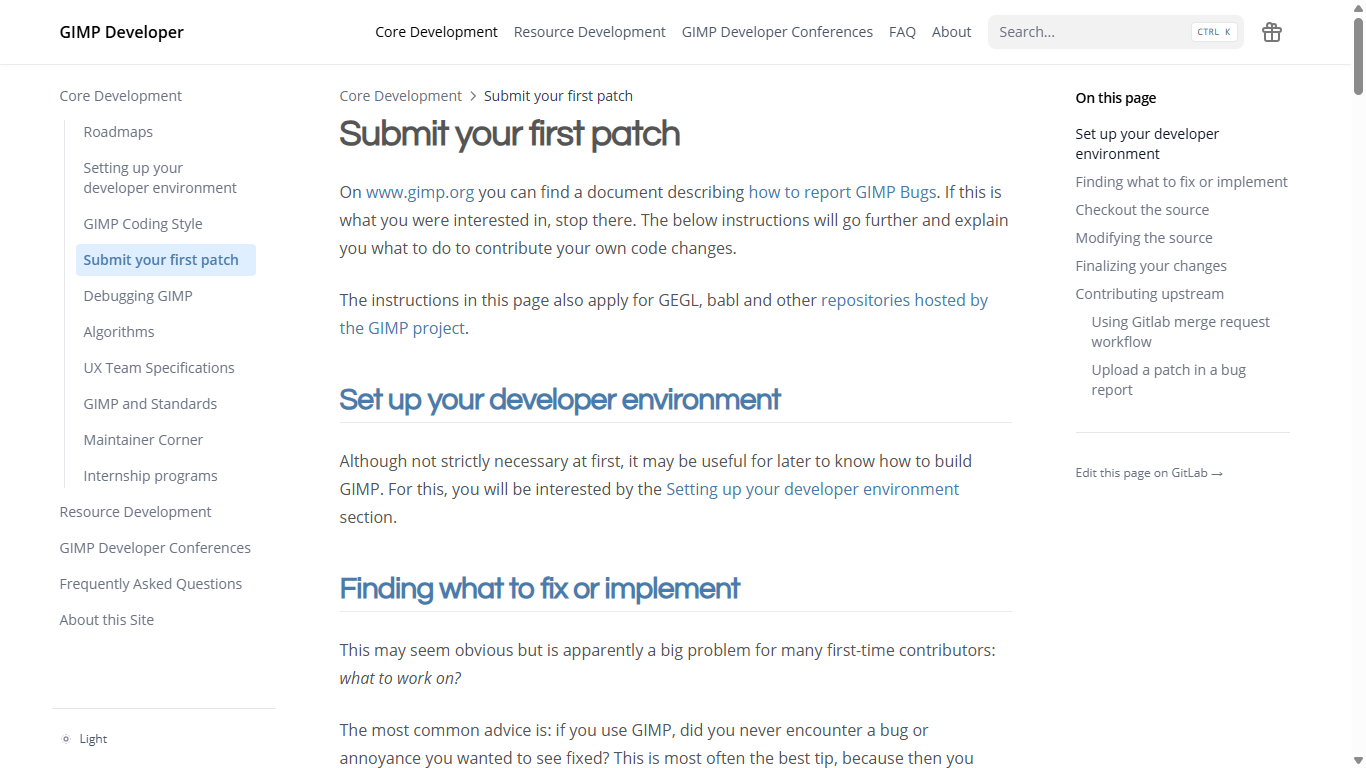
This new theme, called “Hextra”, allows us to have a search bar and the much requested navigation menu.
It also adds a link Edit this page on GitLab → to every page, so you can contribute fixes more directly.
You will notice that it looks a bit like the main GIMP website, and that’s because we modified it to follow the same visual identity designed by Pat David, making use of the same color palette and fonts.
Downloading GIMP 3.2 RC1
You will find all our official builds on GIMP official website (gimp.org):
- Linux AppImages for x86 and ARM (64-bit)
- Linux Flatpaks for x86 and ARM (64-bit)
- Linux Snaps for x86 and ARM (64-bit)
- Universal Windows installer for x86 (32 and 64-bit) and for ARM (64-bit)
- Microsoft Store for x86 and ARM (64-bit)
- macOS DMG packages for Intel/x86 and Apple/ARM hardware (64-bit)
Other packages made by third-parties are obviously expected to follow (Linux or *BSD distributions’ packages, etc).
There is no development release for the manual, but you can continue to use the existing GIMP 3.0 documentation.
Notes:
- The Microsoft Store release may be delayed as we wait for the certification process to finish.
- macOS packages should be uploaded shortly.
What’s next
We had mentioned our accelerated release policy when releasing GIMP 3.0.0. Well I’m not sure if many people actually thought we’d manage to stick to the schedule! Yet here we are, barely 8 months after GIMP 3.0.0 release, and already publishing our first 3.2.0 release candidate!
Now we still haven’t released actual GIMP 3.2.0 yet, of course. But this RC is our milestone for freezing features (and strings, hence giving time for translators to do their thing! Awesome work by all of them across the world, by the way! 🤗) so we are now focusing on fixing bugs and possibly some minor UX improvements (more on the side of papercuts rather than anything implying major UI changes).
That also means that we are really looking forward your issue reports! If there was any time for you to get your voice heard and tell us of any issues we may have missed before we publish the next stable minor version, that would be now!
Don’t forget you can donate and personally fund GIMP developers, as a way to give back and accelerate the development of GIMP. Community commitment helps the project to grow stronger!
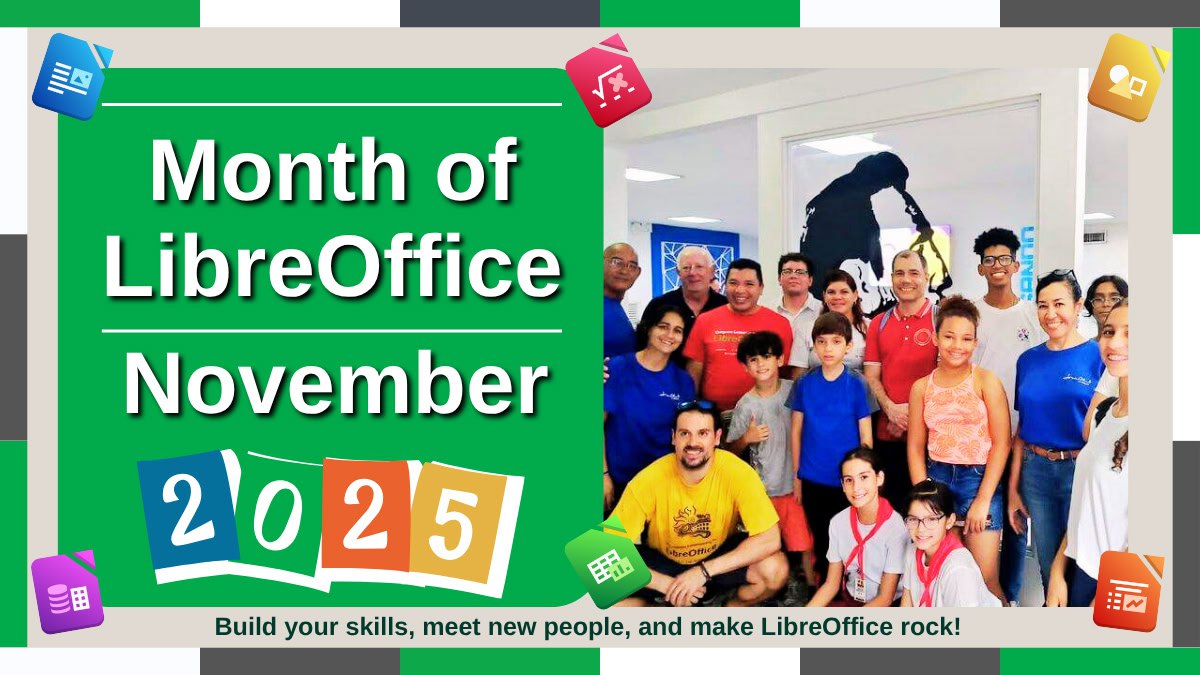
Month of LibreOffice, November 2025 – Half-way point!

We’re just over half-way through the Month of LibreOffice, November 2025. And already, 219 contributors have won cool LibreOffice sticker packs! Details on how to claim them will be provided at the end of the month, but if you don’t see your name (or username) on that page, it’s not too late to join…
How to take part
There are many ways you can help out – and you don’t need to be a developer. For instance, you can be a:
- Handy Helper, answering questions from users on Ask LibreOffice. We’re keeping an eye on that site so if you give someone useful advice, you can claim your shiny stickers.
- First Responder, helping to confirm new bug reports: Go to our Bugzilla page and look for new bugs. If you can recreate one, add a comment like “CONFIRMED on Windows 11 and LibreOffice 25.8.3”.
- Drum Beater, spreading the word: Tell everyone about LibreOffice on Mastodon, Bluesky or X (Twitter)! Just say why you love it or what you’re using it for, add the #libreoffice hashtag, and at the end of the month you can claim your stickers.
- Globetrotter, translating the user interface: LibreOffice is available in a wide range of languages, but its interface translations need to be kept up-to-date. Or maybe you want to translate the suite to a whole new language? Get involved here.
- Code Cruncher, contributing source code: The codebase is big, but there are lots of places to get involved with small jobs. See our Developers page on the website and this page on the wiki to get started.
- Docs Doctor, writing documentation: Whether you want to update the online help or add chapters to the handbooks, here’s where to start.
So, two more weeks to go! We’ll be posting more updates on this blog and our Mastodon, Bluesky and X (Twitter) accounts…
The role of ODF in digital sovereignty (digital freedom)
Digital sovereignty, or the ability of nations, organisations and individuals to control their own digital destiny, is a fundamental issue of the 21st century. At the heart of this challenge lies a seemingly trivial question: who controls the format of the documents that contain our intellectual property or personal information?
In this context, the standard and open Open Document Format (ODF) – the native format of LibreOffice documents, also supported by other suites – is the fundamental technology for those seeking true digital independence.
Digital sovereignty includes the ability to control access to one’s own information without depending on third parties, to make independent technological choices based on one’s own needs, to ensure independent access to strategic data without depending on the commercial interests of Big Tech, and to maintain this technological self-determination in the face of market consolidation.
When government agencies, businesses, or citizens store their documents in proprietary formats controlled by Big Tech, they surrender part of their sovereignty and depend on these external entities to access their own information.
Why document formats are important for sovereignty
Document formats are infrastructure, which—like roads, power grids, or telecommunications networks—are fundamental to the functioning of modern societies. Consider what happens when strategic documents exist only in formats controlled by a single vendor:
- Vendor Lock-In: Organisations find themselves trapped, unable to switch to alternative software without costly conversion processes and potential data loss.
- Loss of Control: formats can and do change without notice and beyond the control of users, increasing the effect of vendor lock-in.
- Fragility of Access: if the vendor controlling the format changes the format or discontinues support, as was the case with Windows 10, access to documents becomes problematic or impossible.
- Economic Dependency: The cost of the licence required to perform software updates creates a relationship of economic dependency in order to access one’s own data, and effectively transfers ownership of the data to the vendor that controls the format.
Why ODF is the only tool for digital sovereignty
ODF is governed by OASIS, an international standardisation organisation that protects its transparent development, and is published as ISO/IEC 26300-2015 (and soon ISO/IEC 26300-2025). Unlike proprietary formats, ODF specifications are public and can be freely implemented, are developed through a transparent, multi-stakeholder process, are not controlled by a single government or company, and are subject to international standardisation bodies.
This means that governments and companies can participate in defining the format specifications, rather than being forced to passively accept changes imposed by a single vendor based on its commercial strategies.
Thus, ODF specifications allow anyone to create an office suite that natively supports the format and promotes digital sovereignty, without any authorisation, licence fees or fear of legal action, while supporting the local software industry.
ODF enables true interoperability, not only between different software packages, but also between countries, languages and political systems. A document created in Brazil can be opened and edited in India, Germany or Japan using locally developed software. This breaks down digital barriers and enables the creation of diverse, independent technology ecosystems.
A stack for digital sovereignty
Digital sovereignty requires a multi-layered infrastructure, starting with the ODF open standard format to ensure format independence, moving on to an open source office suite such as LibreOffice to have control over the tool, an open source cloud infrastructure such as Nextcloud to have control over the location of the data, and ending with a legislative framework that defines the requirements for sovereignty.
ODF is at the base of the stack because without an open standard for document format, digital sovereignty is still limited, even with elements such as a law favouring open source software, an open source cloud infrastructure, and an open source office suite.
Challenges for adopting the ODF format
Adopting the open standard ODF format for digital sovereignty is not without its challenges, for several reasons:
- Migration from proprietary formats requires planning, training and, in many cases, managing interoperability issues due to unnecessary complexities artificially built into the proprietary format.
- When stakeholders in the organisation continue to use the proprietary format, exchanging documents in ODF format can create interoperability issues, as office suites that do not use ODF as their native format have problems handling ODF files appropriately.
- Implementing policies focused on digital sovereignty requires a clear commitment from management, which must prioritise long-term independence over short-term convenience.
However, all of these challenges can be managed and tend to diminish over time, while the constraints and costs of dependence on proprietary formats become increasingly severe.
Announcement of LibreOffice 25.8.3

Berlin, 13 November 2025 – LibreOffice 25.8.3, the third minor release of the free, volunteer-supported office suite for personal productivity in office environments, for Windows, MacOS and Linux, is now available at www.libreoffice.org/download. The new version fixes 70 issues compared to the previous release, which came out in October [1].
LibreOffice 25.8.3 is based on the LibreOffice Technology, which enables the development of desktop, mobile and cloud versions – either from TDF or from the ecosystem – that fully supports the two document format standards: the open ODF or Open Document Format (ODT, ODS and ODP), and the closed and proprietary Microsoft OOXML (DOCX, XLSX and PPTX). Products based on the LibreOffice Technology are available for all major desktop operating systems (Windows, macOS, Linux and ChromeOS), mobile platforms (Android and iOS) and the cloud.
For enterprise-class deployments, TDF recommends the LibreOffice Enterprise optimized versions from ecosystem companies, with dedicated value-added features and other benefits such as SLAs and security patch backports for three to five years (www.libreoffice.org/download/libreoffice-in-business/).
English manuals for the LibreOffice 25.8 family are available for download at https://books.libreoffice.org/en/. End users can get first-level technical support from volunteers on user mailing lists and Ask LibreOffice website: ask.libreoffice.org.
Downloading LibreOffice
All available versions of LibreOffice for the desktop can be downloaded from the same website: www.libreoffice.org/download/. To improve the interoperability with Microsoft 365, we suggest installing the Microsoft Aptos font from this web page: learn.microsoft.com/en-us/typography/font-list/aptos.
LibreOffice enterprise and individual users can support The Document Foundation and the LibreOffice project by making a donation: www.libreoffice.org/donate.
[1] Fixes in RC1: wiki.documentfoundation.org/Releases/25.8.3/RC1. Fixes in RC2: wiki.documentfoundation.org/Releases/25.8.3/RC2.
Update about Font Replacement
Last Saturday, November 8, I have managed a workshop at SFScon on Font management for document interoperability in LibreOffice. The workshop aimed to demonstrate how to configure and manage the LibreOffice font replacement feature, one of the key elements of document interoperability. Although font replacement on the fly is a long-standing LibreOffice feature, it is rather unknown and must be configured and managed properly in order to substitute proprietary fonts, which are standard on Windows and macOS and have been used as a lock-in tool for years, with metrically compatible free fonts.
In September 2020, I wrote the blog post LibreOffice Tips & Tricks: Replacing Microsoft Fonts, which explained how to create a Font Replacement Table (available in Tools > Options > LibreOffice > Fonts) to instantly replace Microsoft’s proprietary fonts with metrically equivalent free fonts, available from Google Fonts and other websites. However, I recommend using Google Fonts for legal compliance, as they provide the font, licence and all other documents from the font designer. This post prompted several responses and inspired Jean-François Nifenecker, a volunteer contributor, to develop the FontsSubstTableExporter extension, which creates an extension embedding the font’s replacement table for easy duplication or backup, as well as the resulting FontSubstTable, which sets the font’s substitution table values.
During the webinar, I used a short LibreOffice Impress presentation to help the audience follow my talk more easily:
SFScon Font Management 2025 Download the Slide Deck
I opened the webinar by showing the 2020 blog post and its associated font replacement table. I then presented the updated table, as Spartan — one of the free fonts — has evolved into League Spartan. I also explained how the situation has changed radically since 2020, as Microsoft has deprecated ClearType fonts (Calibri, Candida, Candara, Consolas, Constantia, Corbel and Segoe for Western languages) and now uses Aptos as the default font for Western languages. Although Aptos is Microsoft proprietary, it has a weaker licence which only prohibits redistribution. As such, it can be downloaded and installed by all users (including Linux users) provided the download is from the official Microsoft Aptos Page.
I also announced that, ideally before the release of LibreOffice 26.2 in February 2026, I will update the FontSubstTable extension to include all Microsoft proprietary fonts with restrictive licences. These are fonts that require replacement as they cannot be installed by Linux users or those without a Microsoft Windows or Microsoft 365 licence. I will also try to generate additional FontSubstTable extensions for the most commonly used fonts in DOCX, XLSX and PPTX files. Thanks to AI, I now have access to a list of these fonts in just a few seconds, which would have taken me weeks to compile manually. These extensions will be available for general use and for specific verticals, such as visual design.
Long-term archiving with ODF: a future-proof strategy
Digital documents in proprietary formats often become inaccessible within a few years due to undocumented changes to the XML schema that are intentionally employed for lock-in purposes. To avoid this problem, it is advisable to use the Open Document Format (ODF) not only for everyday tasks, but also for long-term storage. This ensures that documents remain accessible for years or even generations.
Without this approach, government documents, academic research, legal documents and corporate archives risk becoming true digital orphans — files that exist, but cannot be read. This is not so much because the software that created them is obsolete, but because the XML schema has been modified to make the files readable by a specific version of a single software program. However, the layering of changes makes them unreadable by any software in the long term.
Why is ODF suitable for archiving?
ODF (ISO/IEC 26300 and subsequent versions) is an open standard, managed transparently by OASIS. Its development process and specifications are documented and publicly accessible, unlike proprietary formats, where the process is undocumented and the ISO/IEC specifications do not reflect the reality of the format. This means that even if the current software disappeared, developers could create new programmes compatible with the standard to handle the files and access their content.
Furthermore, ODF files are compressed archives (ZIP) containing XML files based on a schema that can be easily read by non-technical users, enabling anyone to extract and interpret the content. This transparency of format is a fundamental element of its archival value. In contrast, the XML schema of proprietary files is intentionally designed to be unreadable. In this sense, it is a perfect example of how a language created for simplification, such as XML, can become a subtle lock-in tool if used contrary to its nature.
Finally, ODF maintains strong backwards compatibility between versions. This means that all files created with ODF 1.0 in 2005 — immediately after standardisation by OASIS — can be opened without issue by applications released in 2025. This stability is intentional; the format was designed with long-term preservation in mind.
Best practices for archiving in the ODF format
Although newer versions add functionality, the best option for long-term archiving is to use a version recognised by ISO/IEC, such as ODF 1.2 (ISO/IEC 26300-1:2015) or, in the near future, ODF 1.3 (ISO/IEC 26300:2025). This is because it is mature and well documented, and will remain compatible for decades, offering an excellent balance between functionality and breadth of support.
For documents where faithful visual reproduction is important, it is advisable to embed fonts in ODF files to avoid font substitution issues when files are opened years later in a different environment to the one used to create them.
Additionally, all resources related to the documents (images, graphics, etc.) should be embedded in the ODF file rather than linked externally because external links are at risk of breaking over time if the original file is moved, which could render the documents incomplete.
Finally, to enable recognition of the file years later, take advantage of rich metadata support by adding the creation date, author, subject, and any other contextual information that could help understand the document’s purpose and origin. In any case, even when using an open standard format such as ODF for long-term archiving, it is advisable to plan for the periodic migration of archives to the most recent version of the format, and to check the accessibility of files every few years.
ODF, though, cannot be used to archive documents which have to maintain their original format, without the risk of being inadvertently edited. For these documents, a different approach based on PDF/A should be considered. PDF/A is specifically designed for archiving and complements ODF perfectly in a comprehensive archiving strategy, so is ideal for final documents that are not expected to be modified over time.
Since no format can protect against media failure, it is best to keep multiple copies of each file on different storage media and in different locations, following the 3-2-1 backup rule: three copies on two types of media, with one copy off-site. In addition, the archiving processes should be documented and the documentation should be easily accessible, so that people taking on different roles within the company can reproduce and update the process in a manner consistent with the software tools used, as well as with decisions on strategy and formats.
Looking to the future
The digital preservation landscape continues to evolve, but ODF’s commitment to open standards, transparency and vendor independence positions it as the best long-term choice, thanks to its dedication to ensuring information accessibility extends beyond the lifespan of a single organisation.
In a world where planned obsolescence is an increasingly common strategy and is sometimes imposed, as with the end of support for Windows 10 forcing the abandonment of perfectly functioning hardware despite any talk of sustainability and reducing digital waste, this commitment is rare and valuable.
Monthly News – October 2025
Many thanks to our donors, sponsors and to all the people who support our project.
Cinnamon Menu
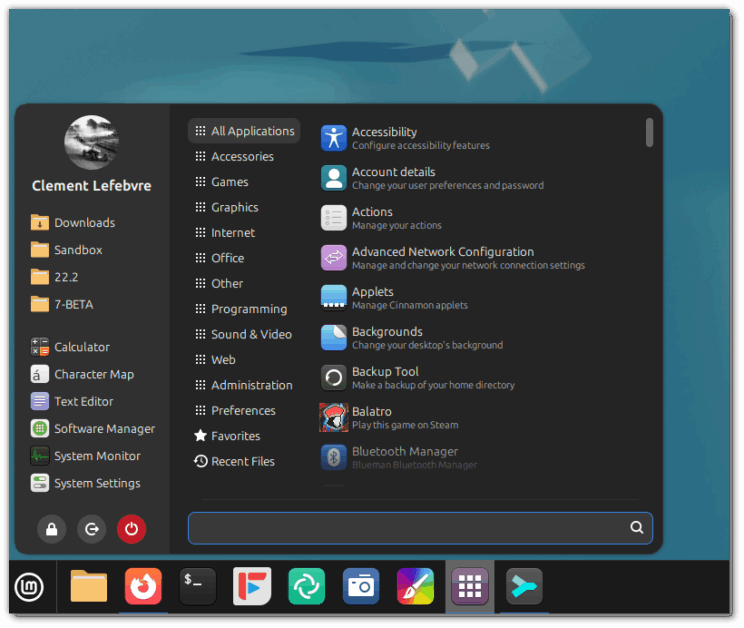
Work continued on the Cinnamon menu applet.
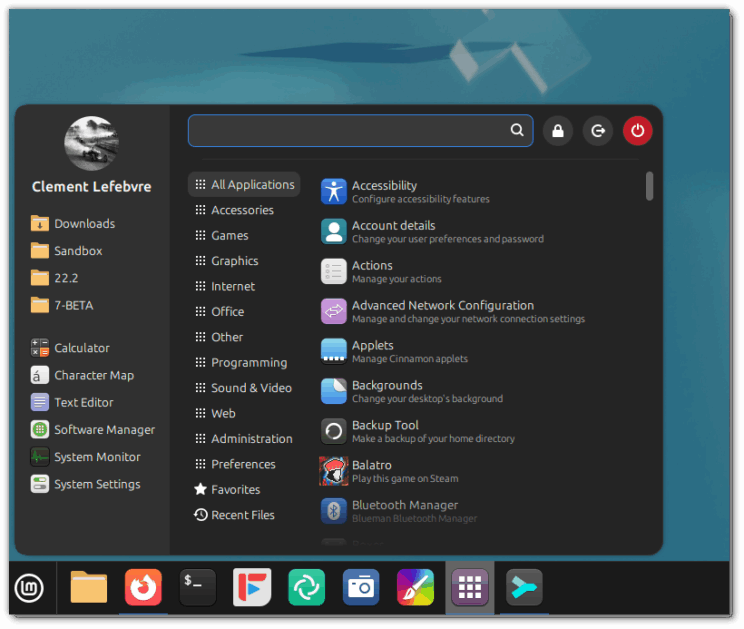
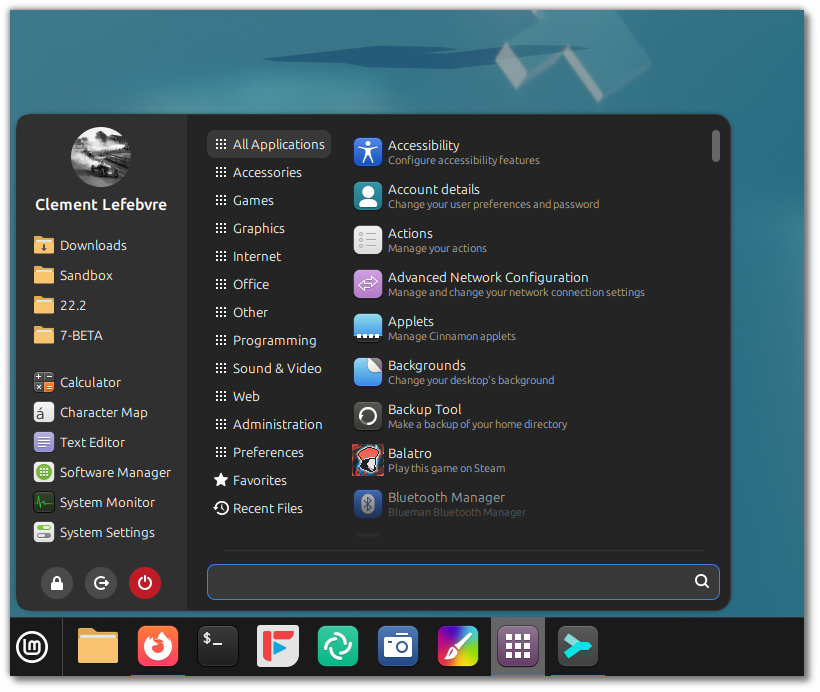
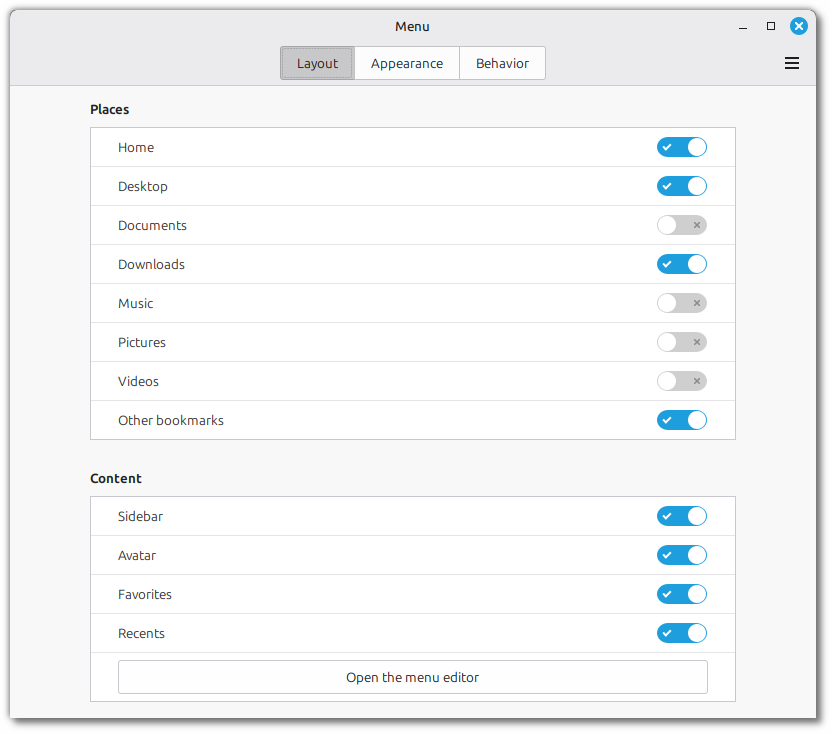
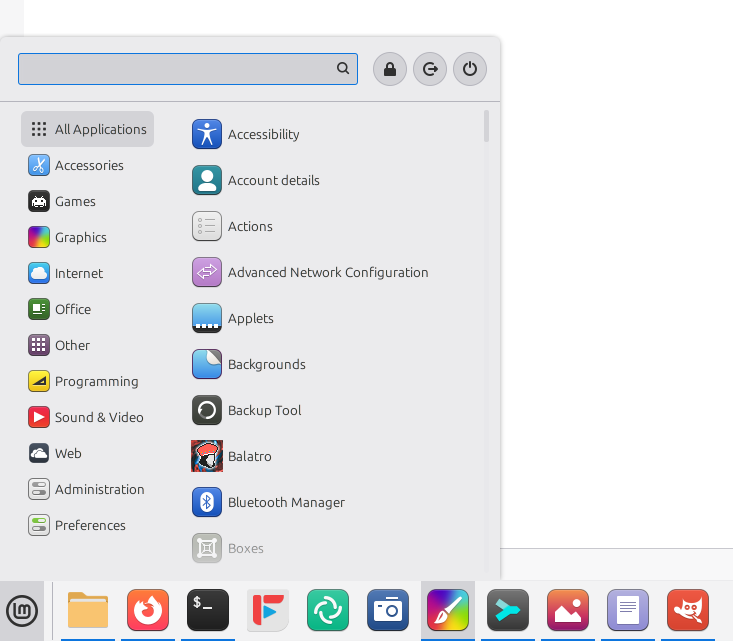
Configuration options were added to be able to move the search bar to the bottom:
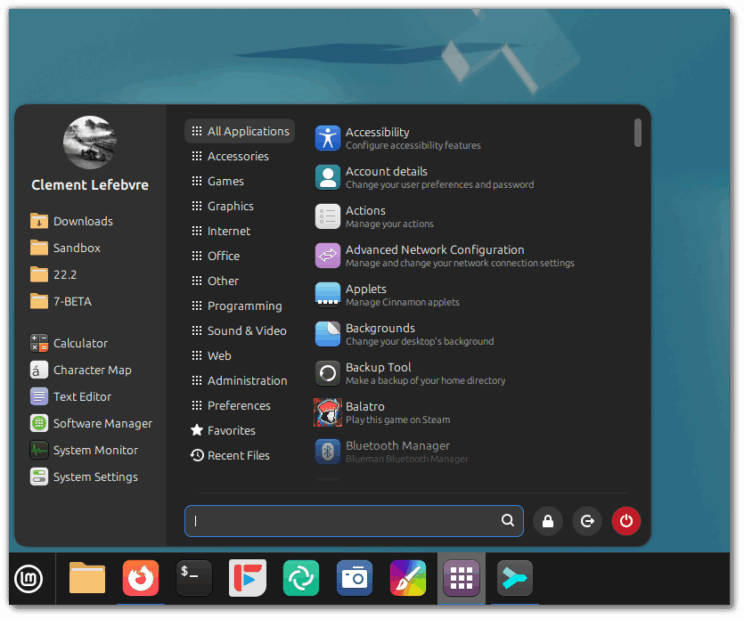
And to be able to position the system buttons in the sidebar:
Troubleshooting Tools
Despite our best efforts, things don’t always work out of the box, right? 
When troubleshooting issues and finding solutions you don’t only need to find people who are able to help you, you need to be able to give them the information they need to understand your problem and give you the right solution.
The steps involved in troubleshooting a hardware-related issue usually are:
- Finding the cause of the problem
- Precisely identifying the device, component or driver
- Finding out what to do
- Applying the recommended solution
The community (forums, chat, tutorials, etc..) helps with step 3, but you’re usually on your own with the command line for steps 1, 2 and 4.
We worked on making these steps a little bit easier.
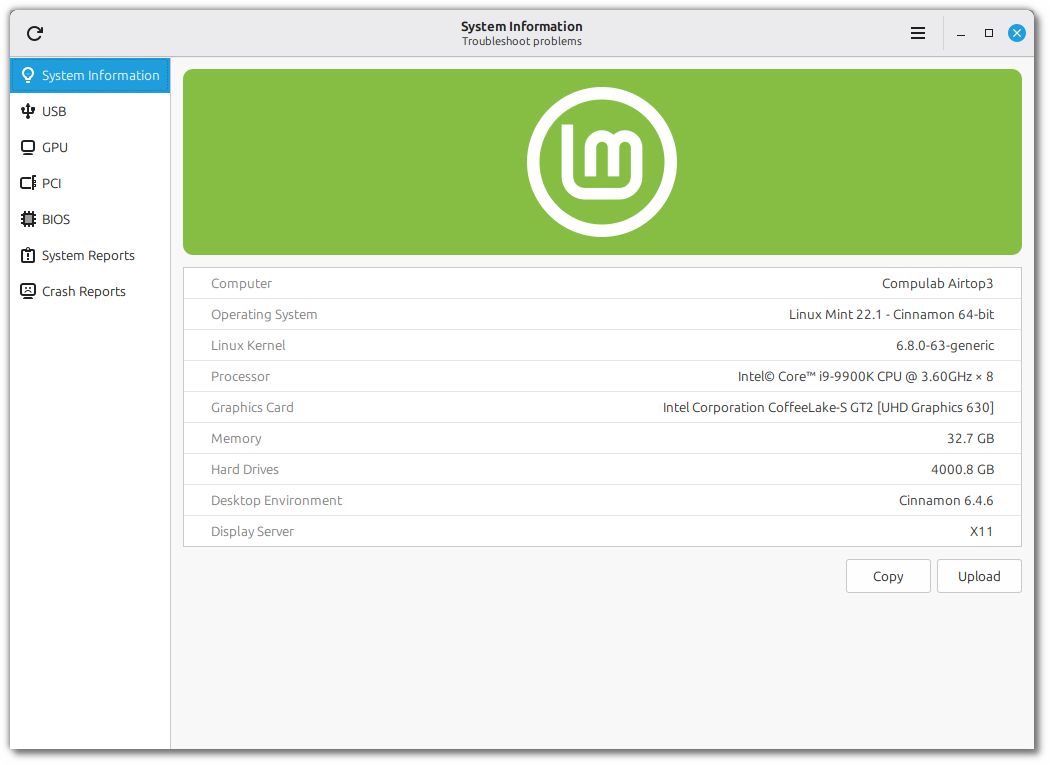
The “System Reports” tool was given a plethora of new features and it was rebranded as “System Information”.
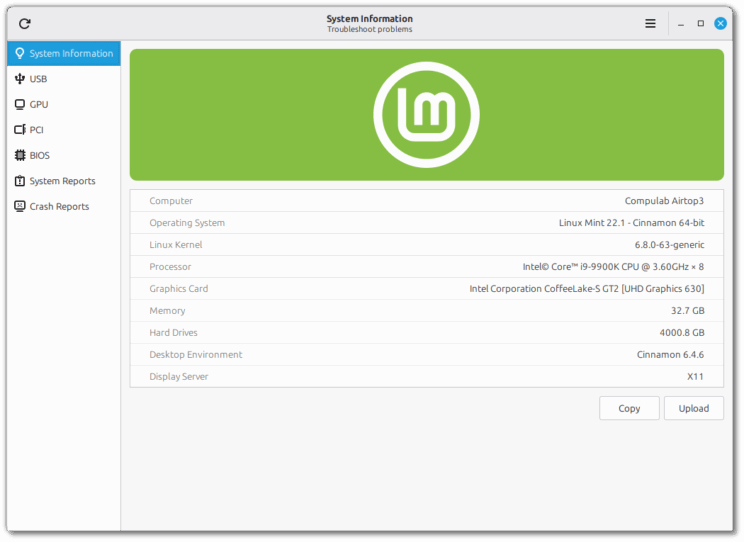
In addition to its “System Information”, “System Reports” and “Crash Reports” pages, the tool received 4 new pages to show you more information and help you troubleshoot common issues.
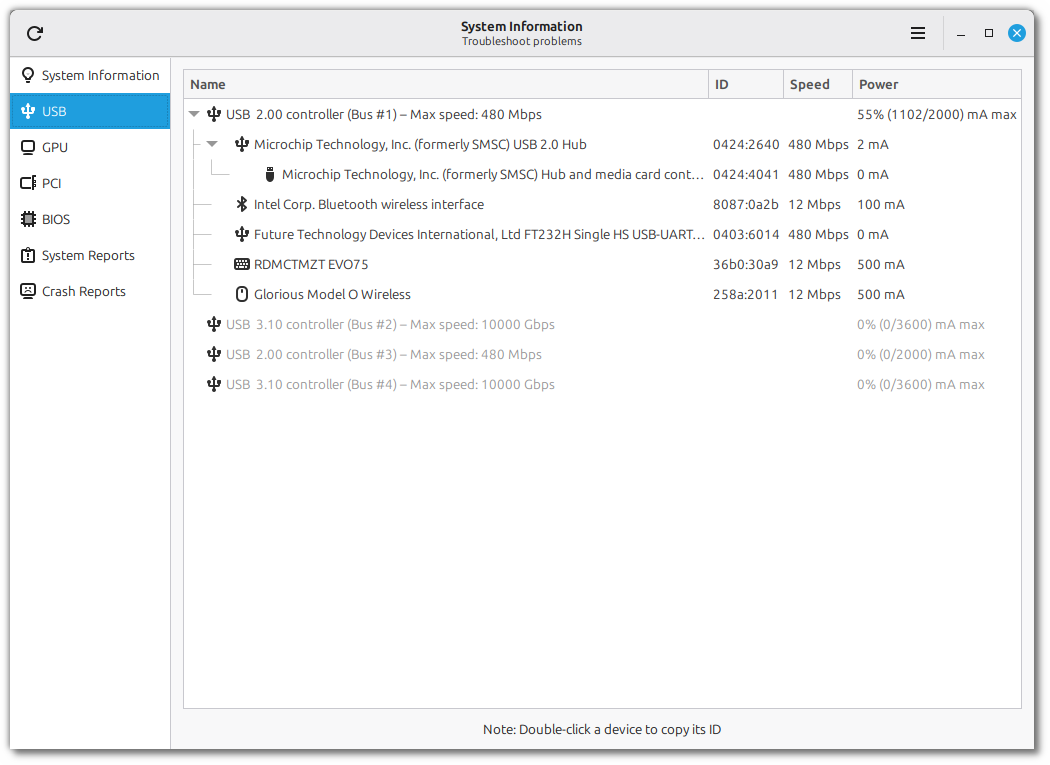
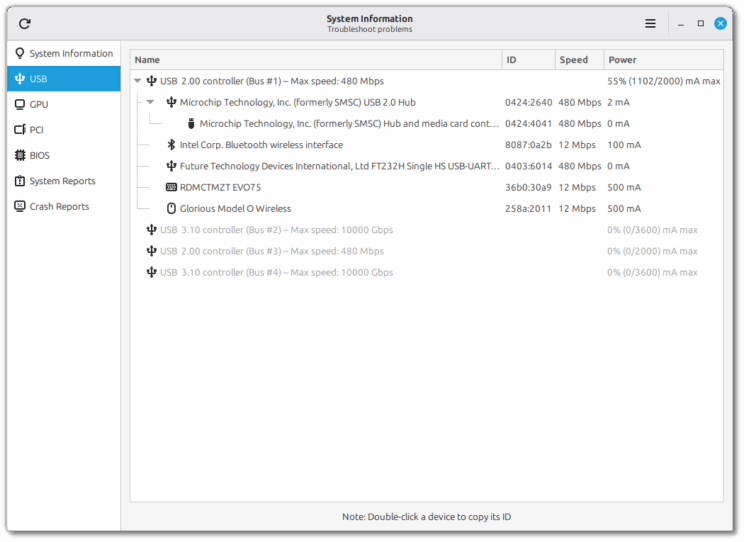
The “USB” page shows a detailed view of all your plugged-in devices. You can see their type, name and ID (which uniquely identifies the device and its manufacturer).
Devices are grouped by USB controller, so you can see where each device is plugged and compare its connection speed and power usage with the controller’s max connection speed and total power capacity. This makes it easy to troubleshoot common USB issues such as slow transfers or random disconnections.
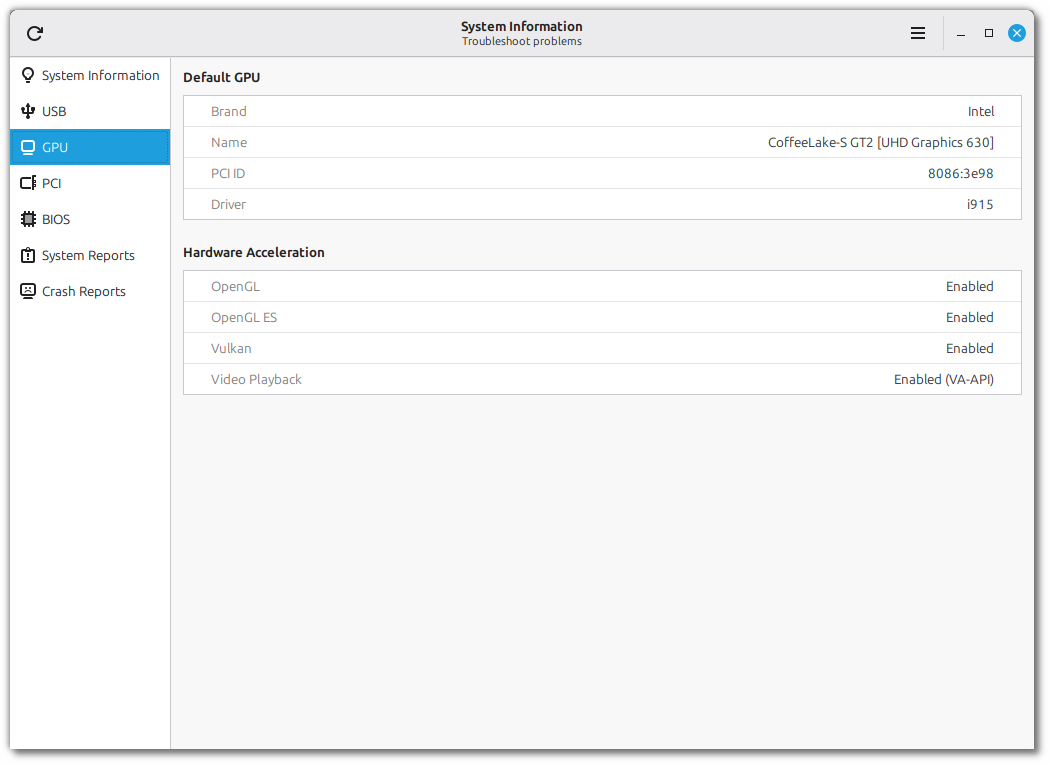
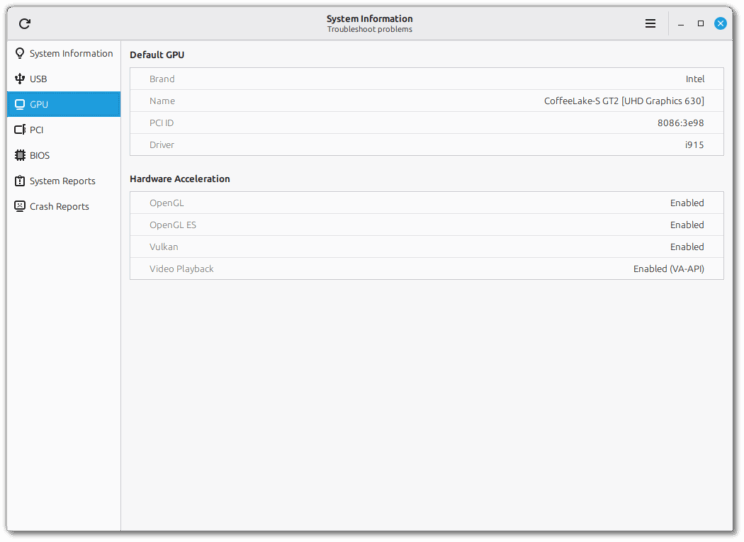
The “GPU” page shows information about your default graphics card and its support for hardware acceleration:
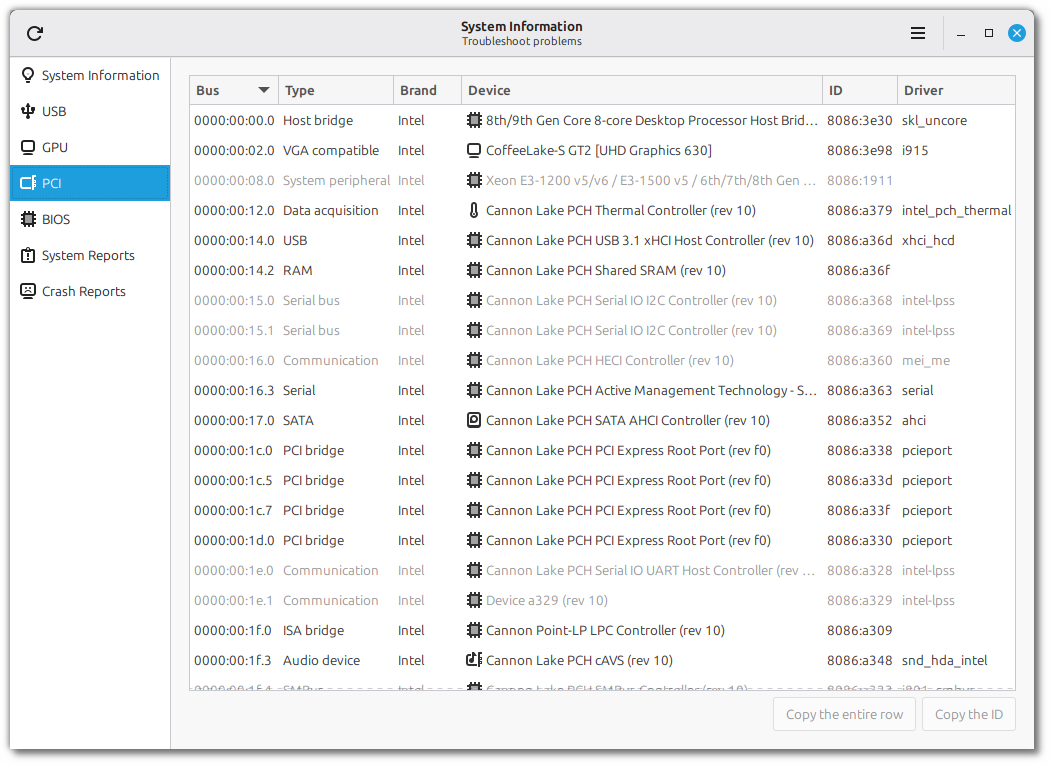
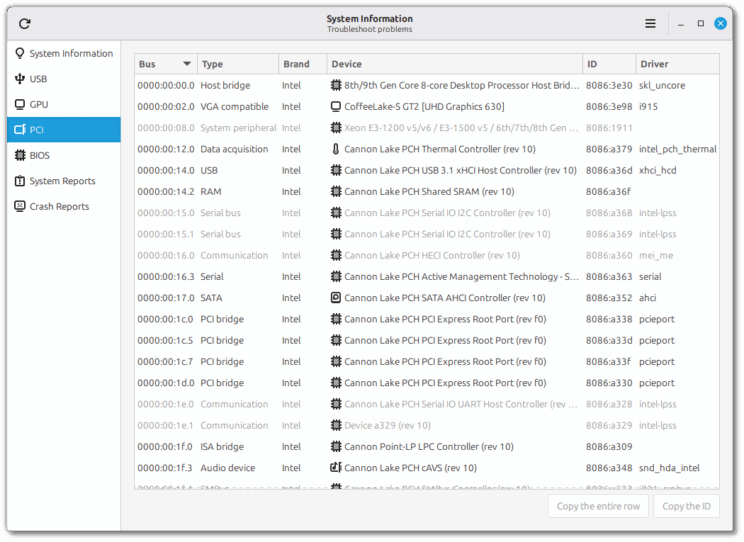
The “PCI” page gives you a detailed look at the internal components of the computer. The PCI ID and the driver in use are very useful when troubleshooting PCI devices.
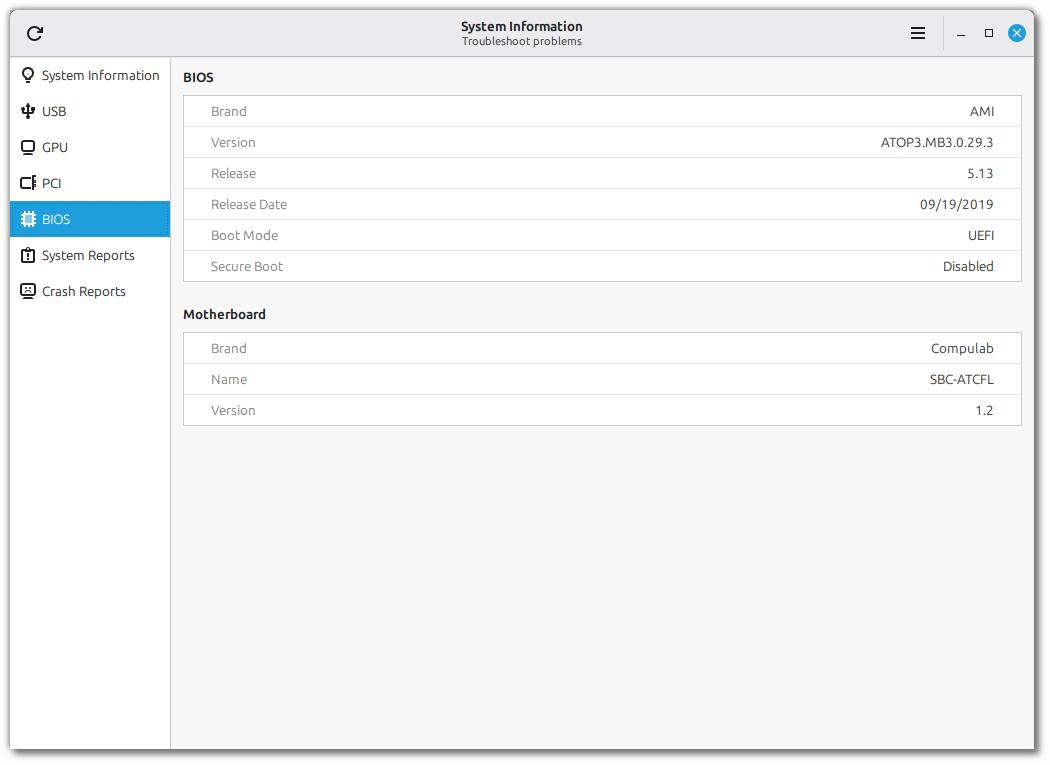
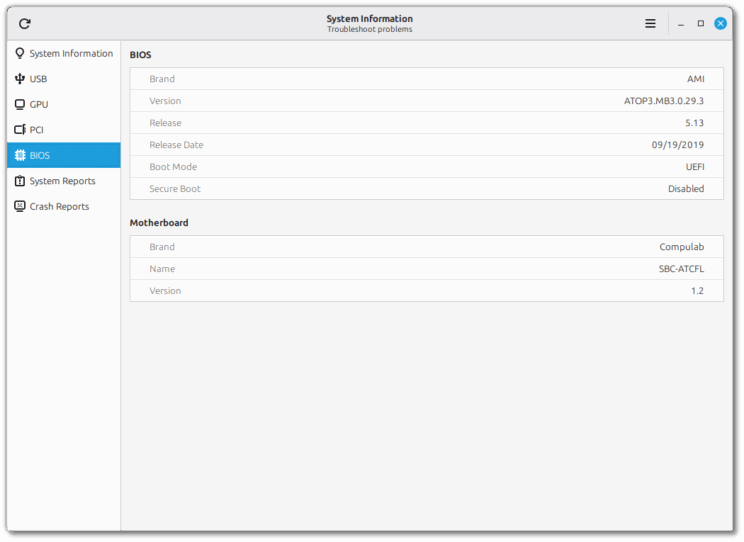
In the “BIOS” page you can find information about your motherboard, BIOS version, boot mode and secure-boot.
A new tool called “System Administration” was implemented. Although its UI looks similar to the “System Information” tool, its goal is slightly different. This tool runs with admin privileges and focuses on administration.
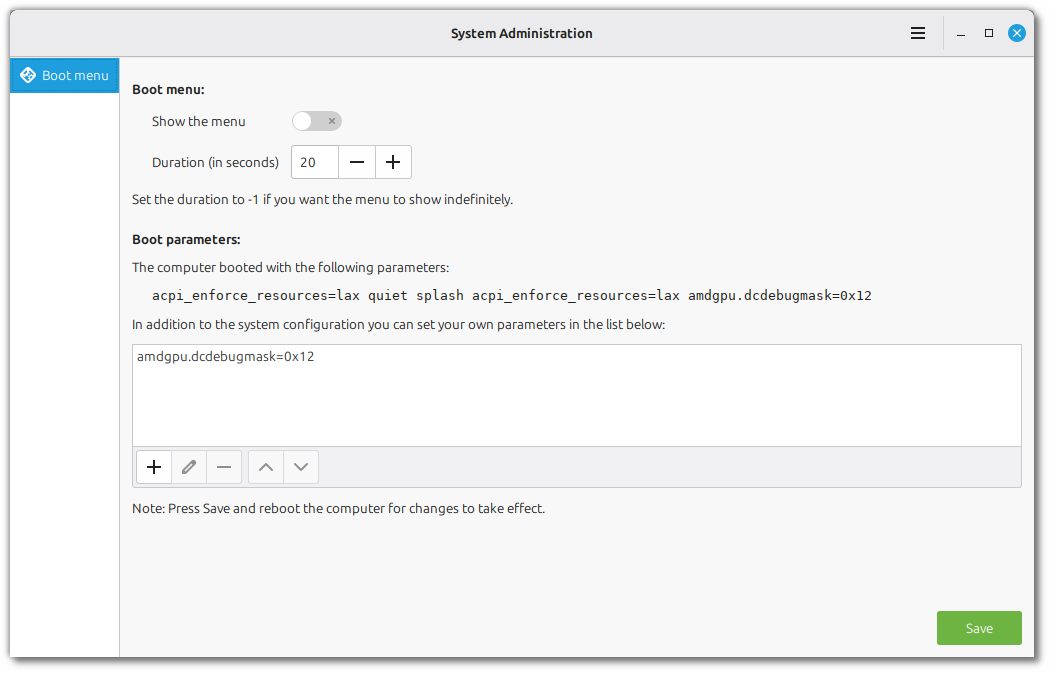
For the moment it only has one page called “Boot menu”:
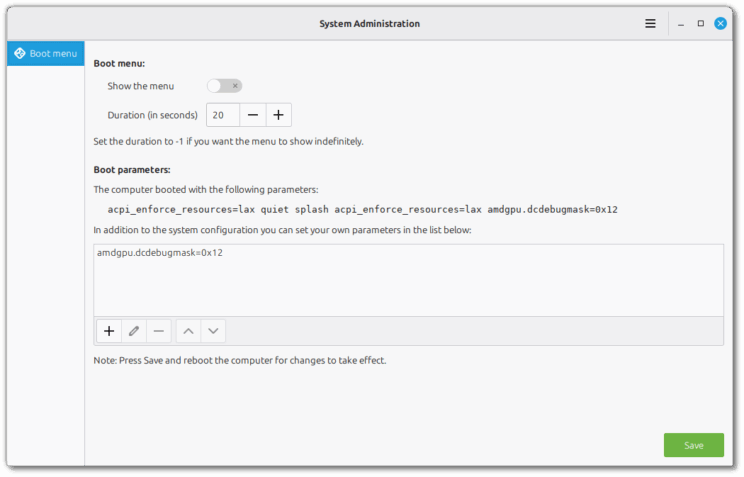
At the top you can show or hide the boot menu and set how long it stays visible before booting the default option. This is very useful if you’re dual-booting or if you’re using multiple kernel series.
In the second section you can add boot parameters. This is sometimes needed when dealing with hardware/driver issues.
LMDE 6 EOL
LMDE 6 will reach End of Life on January 1st 2026.
Past that date the repositories will continue to work but the release will no longer receive bug fixes or security updates.
To upgrade the 64-bit version of LMDE 6 to LMDE 7 visit https://blog.linuxmint.com/?p=4571.
The 32-bit version will unfortunately not be upgradable. Proper support for 32-bit was dropped by many upstream projects (Debian, Ubuntu, Mozilla, Chromium) so we cannot continue to support this architecture anymore.
XSI (XApp Symbolic Icons)
Although adwaita-icon-theme is still a dependency on libgtk, it no longer supports applications outside of GNOME. Some of the symbolic icons it provided were simply removed, leading to regressions in many projects who relied on them. For instance if you are running Cinnamon in LMDE 7 or Arch Linux right now, you can right-click your panel and see missing symbolic icons.
To replace the Adwaita symbolic icons a new XApp project was started called XSI (XApp Symbolic Icons): https://github.com/xapp-project/xapp-symbolic-icons.
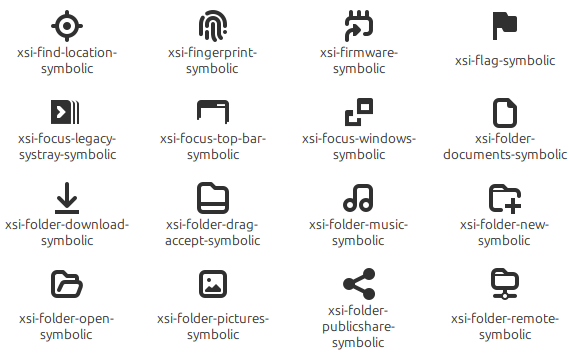
All the XApp, Cinnamon and Mint projects switched to XSI.
Sponsorships:
Linux Mint is proudly sponsored by:
| Gold Sponsors: Silver Sponsors: ![]() |
Bronze Sponsors:![]() ![]() ![]() ![]() |
Donations in September:
A total of $21,001 were raised thanks to the generous contributions of 718 donors:
$1062, David R.
$531, Hans-Peter V.
$500 (3rd donation), stevengarland
$500, John J.
$500, Kevin F.
$212 (11th donation), Jiří B.
$212 (2nd donation), Hans-peter S.
$200, Gary B.
$127 (10th donation), Richard H.
$125, Hans R. S.
$106 (13th donation), Christian G. aka “Chrissy”
$106 (4th donation), Marek Stapff
$106 (3rd donation), Tero J.
$106 (2nd donation), Ingo B.
$106, Adrian D.
$106, Carsten K.
$106, Jürgen G.
$106, Mark W.
$106, MR J. O.
$106, Tancrède D. R.
$100 (26th donation), John Mc aka “Land Research Project“
$100 (23rd donation), Philip W.
$100 (12th donation), James F.
$100 (8th donation), John B.
$100 (8th donation), Susan T
$100 (4th donation), Faisal Yousuf
$100 (4th donation), Jay V.
$100 (3rd donation), David D.
$100 (2nd donation), aka “The O.G.”
$100 (2nd donation), Garrett S.
$100 (2nd donation), Soeren
$100, Brenna M.
$100, David R.
$100, Derek B.
$100, John O.
$100, Kawashima
$100, Ken N.
$100, Kenneth W. N.
$100, LJ&M, LLC
$100, Mark H.
$100, Matthew J. P.
$100, Monica M.
$100, Paul P.
$80, Terry Ya!
$75 (11th donation), Kyle S.
$70 (11th donation), John B.
$63, Luc H.
$55, JAEHO C.
$53 (15th donation), Goran A.
$53 (15th donation), Roland H.
$53 (10th donation), Uwe P.
$53 (9th donation), Giovanni D. S. aka “ChibiOS“
$53 (8th donation), Daniel K.
$53 (8th donation), Pavel P.
$53 (6th donation), Marco van den Berg
$53 (5th donation), Boris I.
$53 (5th donation), Danilo Cesari aka “Dany”
$53 (5th donation), Ludwig K.
$53 (4th donation), António Salsinha – Graphic Designer
$53 (4th donation), Christian S.
$53 (4th donation), Leo P.
$53 (4th donation), Marion
$53 (4th donation), Rainer B.
$53 (2nd donation), Alexander E.
$53 (2nd donation), Arend Stemerding
$53 (2nd donation), Kurt Ballmer-Hofer
$53 (2nd donation), Terence P. aka “Terryphi”
$53 (2nd donation), Timothy E.
$53, Alain P.
$53, Benjamin R.
$53, Christian H.
$53, Christoph S.
$53, Daniel T.
$53, Daniele R.
$53, David B.
$53, Detlev S.
$53, Dr S. M. W.
$53, Dr. T. B.
$53, Francesco S.
$53, Gebhard S.
$53, Herbert E.
$53, Juergen W.
$53, Manuel R.
$53, Mustapha W.
$53, Nicholas G.
$53, romain B.
$53, Shane H.
$53, Thilo G.
$53, Thomas S.
$53, Toni F.
$53, Torsten W.
$53, TS
$53, Ulrich Schmiedel aka “Ueli-BSL”
$53, Urs F.
$50 (12th donation), Mothy
$50 (9th donation), Anthony C. aka “Ciak”
$50 (9th donation), Terrence P.
$50 (7th donation), Larry B.
$50 (6th donation), Tom D.
$50 (5th donation), Brian H.
$50 (5th donation), Lee Frakes
$50 (5th donation), Robert M.
$50 (4th donation), Edmund B.
$50 (4th donation), Mark H.
$50 (4th donation), Omar T.
$50 (3rd donation), Michael T.
$50 (2nd donation), John B.
$50 (2nd donation), John M.
$50 (2nd donation), Randy S.
$50 (2nd donation), Richard W.
$50 (2nd donation), Winston M.
$50, Andy K.
$50, arCandide consulting
$50, Arthur J.
$50, BHARATKUMAR N.
$50, Bruno Santiago
$50, Bryan N.
$50, Charlie P.
$50, Chris R.
$50, Christopher G.
$50, Dan D.
$50, Daniel D.
$50, David D.
$50, DAVID R.
$50, Douglas H.
$50, Eduardo A. V.
$50, Jason M.
$50, Joe F.
$50, Keith Toy
$50, KENNETH W. T.
$50, Louis G.
$50, Manot S.
$50, MARCEL R.
$50, Mark S.
$50, Matthew P.
$50, maykel F. S.
$50, Mike M.
$50, Noelle L.
$50, Paul P.
$50, Philip B.
$50, Pierce L.
$50, Ray R.
$50, Robert H.
$50, Rusty D.
$50, Scott O.
$50, Wallace O.
$48 (2nd donation), K V
$44 (2nd donation), Bernd W. aka “Weze“
$42, Paul G.
$40 (5th donation), Colin S.
$40, Clay C.
$40, Jake L.
$40, Ronald B.
$40, Todd M.
$38, Frank D.
$37 (3rd donation), Paul B.
$37, Stefan G.
$36, Lawrence W.
$35 (18th donation), B. H. .
$31 (15th donation), Luca D.
$31 (11th donation), Alexander M.
$31 (7th donation), John P.
$31 (7th donation), Jürgen H.
$31 (6th donation), Matthias S.
$31 (5th donation), Jean-claude M.
$31 (3rd donation), Antony L.
$31 (3rd donation), John C.
$31 (2nd donation), M. T.
$31 (2nd donation), Michael K.
$31 (2nd donation), Philippe J.
$31 (2nd donation), Reiner L.
$31 (2nd donation), Thomas P.
$31, Andreas O.
$31, Olivier G.
$31, Yury M.
$30 (6th donation), silver_whiskers
$30 (4th donation), mitch K.
$30 (2nd donation), Lewis E. D.
$30, Dennis M.
$30, Jeffrey B.
$30, John J.
$30, Kenneth K.
$30, KIKUJIROU M.
$30, Leon S.
$30, PATRICK H. S.
$29, Isabella N.
$26 (8th donation), Matteo aka “Mac7veN“
$26 (4th donation), Willem vdK aka “WvdK”
$26 (2nd donation), Gerbert B.
$26 (2nd donation), Richard W.
$26, Briseida L. G.
$26, John K.
$26, Peter J.
$25 (55th donation), Linux Mint Sverige
$25 (15th donation), Andrew Currie
$25 (14th donation), Mihnea Rădulescu
$25 (14th donation), Timothy C.
$25 (13th donation), Alexander M.
$25 (8th donation), John N.
$25 (7th donation), Gary D.
$25 (6th donation), Marion P.
$25 (4th donation), David P.
$25 (3rd donation), Frank F.
$25 (3rd donation), Philippe W.
$25 (3rd donation), Thomas E.
$25 (2nd donation), Kenneth S.
$25, Lawrence F. J.
$25, Magnus F.
$23 (3rd donation), Gerardus J. W. C.
$22, Francois P.
$21 (111st donation), Johann J.
$21 (63rd donation), Peter E.
$21 (30th donation), Denis D.
$21 (30th donation), Stefan W.
$21 (25th donation), Benjamin W. aka “UncleBens”
$21 (24th donation), Marek S.
$21 (16th donation), Frank J.
$21 (9th donation), Divoto
$21 (9th donation), Rolf-Jürgen G.
$21 (7th donation), Dirk B.
$21 (7th donation), Ezequiel O.
$21 (7th donation), Gareth L.
$21 (7th donation), Günther H.
$21 (7th donation), Thorsten H.
$21 (6th donation), Kai D.
$21 (6th donation), Martin O.
$21 (6th donation), Massimo R.
$21 (5th donation), David P.
$21 (5th donation), Erkki J.
$21 (5th donation), Frank W.
$21 (5th donation), Karl-heinz R.
$21 (4th donation), Arnis D.
$21 (4th donation), Curt S.
$21 (4th donation), Mateusz M.
$21 (4th donation), Mili D.
$21 (4th donation), Odie P.
$21 (4th donation), Rimas V.
$21 (3rd donation), Mack
$21 (3rd donation), Alexandros D.
$21 (3rd donation), Andreas G.
$21 (3rd donation), Claire P.
$21 (3rd donation), Hans-werner J.
$21 (3rd donation), Jochen M.
$21 (3rd donation), Matthias Versen aka “Matti”
$21 (3rd donation), Petur K.
$21 (3rd donation), Siva S. aka “S.S”
$21 (3rd donation), Zdzislaw P.
$21 (2nd donation), Denis F.
$21 (2nd donation), Dieter Schemmelmann aka “Die0691”
$21 (2nd donation), Frank B.
$21 (2nd donation), Frank H.
$21 (2nd donation), George M.
$21 (2nd donation), Graham D.
$21 (2nd donation), Jens R.
$21 (2nd donation), Joerg A.
$21 (2nd donation), Karl – Heinz P.
$21 (2nd donation), Rainer M.
$21 (2nd donation), Roland H.
$21 (2nd donation), Wim R.
$21, AHMET C. Ö.
$21, Albert G.
$21, Alexander E.
$21, Amir A. D.
$21, Andreas W.
$21, Bart E.
$21, Bernard F.
$21, Bernd K.
$21, Chris H.
$21, christophe O.
$21, Christopher D.
$21, Claus H.
$21, Curd R.
$21, Demetrio M.
$21, Engelbert E.
$21, Eric B.
$21, Federico S.
$21, Felix C.
$21, Florian G.
$21, GMB V.
$21, Guy I.
$21, Helga W.
$21, Henrik S.
$21, Jacek B.
$21, JACKY T.
$21, JEAN-LUC F.
$21, Jeanette B.
$21, Joachim J.
$21, Jorge S. J. T.
$21, Karel V. R.
$21, Kevin S.
$21, Klaus G.
$21, Livio G.
$21, Manuel L. G.
$21, Marcel S.
$21, Markus L.
$21, Martin R.
$21, Massimo P.
$21, Matthias B.
$21, Michael Meisner aka “Michael“
$21, Michaela S.
$21, Mr Cee
$21, paul M.
$21, Pedro A.
$21, Peter B.
$21, Peter N.
$21, Peter P.
$21, Peter V. R.
$21, Piet V. D. E.
$21, Raees M.
$21, Ralph D.
$21, Reiner P.
$21, Rolf N.
$21, Roman A.
$21, Scott M.
$21, Stéven P.
$21, Stephane T. aka “Soixante4”
$21, Thomas F.
$21, Thorsten M.
$21, Timo aka “TfromG”
$21, Tobias D.
$21, Weihel M.
$21, Werner L.
$20 (71st donation), Bryan F.
$20 (34th donation), vagrantcow
$20 (33rd donation), Hemant Patel
$20 (29th donation), Aimee W.
$20 (15th donation), Terry B.
$20 (13th donation), Eric W.
$20 (10th donation), Tom S.
$20 (9th donation), Jeffery G.
$20 (8th donation), Mario M.
$20 (8th donation), Waldemar P. aka “valldek”
$20 (7th donation), Paul K.
$20 (6th donation), Dimitrios G.
$20 (6th donation), Eric H.
$20 (5th donation), Alonzo J.
$20 (5th donation), Christian O.
$20 (5th donation), Gregory M.
$20 (5th donation), Luc C.
$20 (5th donation), Martin F.
$20 (4th donation), Daniel M. L.
$20 (4th donation), Robert H.
$20 (3rd donation), Donald S.
$20 (3rd donation), Edward M K.
$20 (3rd donation), Kevin D.
$20 (3rd donation), KONSTANTINOS I. B.
$20 (2nd donation), Craig K.
$20 (2nd donation), Joel B.
$20 (2nd donation), José Juan M.
$20 (2nd donation), Steven L.
$20, Albert C.
$20, Alex V. P.
$20, Art By Justin
$20, AUSTIN H.
$20, Daniel D.
$20, Daniel M.
$20, Darrell S.
$20, Daryl A.
$20, David A.
$20, Donald S.
$20, Dylan G.
$20, Gerald G.
$20, herbert B.
$20, James M.
$20, Jeffrey J.
$20, Joe C.
$20, John W.
$20, Joseph M.
$20, Keith S.
$20, Ken M.
$20, Kyle D.
$20, Louis G. J.
$20, Martin B.
$20, Mike T.
$20, MILAN U.
$20, Pablo A. %.
$20, Radek D.
$20, Randall W.
$20, Robert C.
$20, Robert P.
$20, Roger H.
$20, S P.
$20, Uwe M.
$20, WillIam S.
$19, Anonymous
$16 (7th donation), Harold H.
$15 (6th donation), Rimon K.
$15 (4th donation), Alessandro P.
$15 (3rd donation),
$15 (3rd donation), Laura S.
$15 (3rd donation), Tonny K.
$15 (2nd donation), apistos
$15 (2nd donation), Emmanouil K.
$15 (2nd donation), Hamish M.
$15, Admir K.
$15, B.A. L.
$15, Heather W.
$15, Klaus-Dieter K.
$15, Maurice E.
$15, Paul R.
$15, Ruth M.
$15, ZHE A.
$12 (3rd donation), Yavor N.
$12, Leong J. S.
$12, William Z.
$11 (16th donation), Bengt Falke aka “BIOMOIB“
$11 (10th donation), Alessandro S.
$11, Claas S.
$10 (114th donation), Thomas C.
$10 (58th donation), Philip Woodward
$10 (41st donation), Tugaleres.com
$10 (38th donation), Denys G. aka “GD Next“
$10 (22nd donation), Piotr L
$10 (21st donation), Abdulkadir H. aka “Askari”
$10 (19th donation), Michael P. aka “www.perron.de“
$10 (17th donation), Adian K.
$10 (17th donation), TONY aka “STRUZZIN ELECTRONICS“
$10 (15th donation), Alan B.
$10 (15th donation), Philip E.
$10 (15th donation), Tomi P.
$10 (14th donation), Antonio aka “pengu73”
$10 (13th donation), Rupert B.
$10 (10th donation), Gene E.
$10 (10th donation), Joerg B.
$10 (10th donation), Patrick C.
$10 (9th donation), Abe Z.
$10 (8th donation), Artem Ignatyev aka “ZaZooBred”
$10 (8th donation), Tomasz K.
$10 (7th donation), K. T. .
$10 (7th donation), A. R.
$10 (7th donation), Craig D.
$10 (7th donation), H.V. L.
$10 (7th donation), Marcos P. G.
$10 (7th donation), Thomas G. aka “thg14”
$10 (6th donation), Nabil aka “Billy”
$10 (6th donation), Pietro Giaccoli aka “Prof.pg”
$10 (5th donation), Arvidas S.
$10 (5th donation), Björn H.
$10 (5th donation), Cedric B.
$10 (5th donation), Erich G.
$10 (5th donation), Ferruccio R.
$10 (5th donation), Gerard B.
$10 (5th donation), Günter S.
$10 (5th donation), jfoxwoosh
$10 (5th donation), Mariusz B.
$10 (5th donation), Stefan V. B. aka “stefanvb”
$10 (5th donation), Želimir S.
$10 (4th donation), Jeffrey S.
$10 (4th donation), John T.
$10 (4th donation), Marco D.
$10 (4th donation), Martin G.
$10 (4th donation), Matthias H.
$10 (4th donation), Sascha S.
$10 (4th donation), Sebastian S.
$10 (4th donation), Serge S.
$10 (4th donation), Sergei Petrov
$10 (3rd donation), Andre Toussaint aka “AndreT”
$10 (3rd donation), Hans A.
$10 (3rd donation), Leonardo M.
$10 (3rd donation), Matheus E.
$10 (3rd donation), Rainer R.
$10 (3rd donation), Roger S.
$10 (3rd donation), Vesa A.
$10 (3rd donation), Walter W.
$10 (3rd donation), Z
$10 (2nd donation), António M.
$10 (2nd donation), Bryce S.
$10 (2nd donation), Charles R.
$10 (2nd donation), Christian S.
$10 (2nd donation), Dominique M.
$10 (2nd donation), Dušan B.
$10 (2nd donation), Geoffrey N.
$10 (2nd donation), Giuseppe Francesco Aldo R.
$10 (2nd donation), James P.
$10 (2nd donation), James T.
$10 (2nd donation), Jaroslaw R.
$10 (2nd donation), Joe K.
$10 (2nd donation), John M.
$10 (2nd donation), Michael Casanova
$10 (2nd donation), Michael W. aka “MichaTux”
$10 (2nd donation), Natanael Cruz
$10 (2nd donation), Oleg L.
$10 (2nd donation), Rainer B.
$10 (2nd donation), Ravindu W.
$10 (2nd donation), Raymond B.
$10 (2nd donation), Saro E.
$10 (2nd donation), Steffen K.
$10 (2nd donation), Sydney C.
$10 (2nd donation), T.H.
$10 (2nd donation), TAKAO Y.
$10 (2nd donation), Ted H.
$10 (2nd donation), Thomas Schramm aka “TomTom “
$10 (2nd donation), Víctor G. M.
$10 (2nd donation), Wolfgang V.
$10,
$10, AHA R.
$10, Alexander T.
$10, Andres G.
$10, Andrey G.
$10, Anthony G.
$10, antonino C.
$10, Arno E.
$10, Ashley S.
$10, Bernd D.
$10, Bojan M.
$10, Brian C.
$10, Brian M.
$10, Charandeep M.
$10, Chris G. aka “JustGoey”
$10, Christian F.
$10, CLAIRVEAUX B.
$10, Corrado T. (Palermo)
$10, Daniel B.
$10, Danilo M.
$10, DENIS D.
$10, Engelbert N.
$10, Eric S.
$10, Erik H.
$10, Estefanía I. F.
$10, Evan D. B.
$10, Félicien L.
$10, Francesco P.
$10, Francois L.
$10, Franz G.
$10, Freediving Coron
$10, Gianfranco G.
$10, Giel V. L.
$10, Giovanni A.
$10, Giraldo D.
$10, Glenn H.
$10, Grant S. M.
$10, Hans-Dieter K.
$10, Hans-Jürgen S.
$10, Helmut R.
$10, Holden M.
$10, Horst G.
$10, Jürgen L.
$10, Jaime O. S.
$10, Jan V.
$10, Jannik H.
$10, Jean-Claude V.
$10, Jean-Pierre L.
$10, Jochen P.
$10, John G.
$10, John Q.
$10, Jose A. A. B.
$10, Joshua J.
$10, Jukka T.
$10, Just Jason
$10, Karolis K.
$10, Klaus I.
$10, Korora Solutions
$10, Kyle P.
$10, Lane L.
$10, Manfred S.
$10, Manuel %. Z. B.
$10, Marcin S.
$10, Mario D. P.
$10, Maroš Ď.
$10, Martin G.
$10, Martin J.
$10, Martinez L.
$10, Maxiu
$10, Michael C. L.
$10, Michael L.
$10, Michael M.
$10, Michael T.
$10, Michel A.
$10, Ministério Vida Sobrenatural – Nova Aliança Igreja Cristã
$10, Mr M. M.
$10, N G. H.
$10, Nektarios T.
$10, Nico
$10, Oleg S.
$10, Oleksandr N.
$10, Ollie Norman-Ramm
$10, Otto K.
$10, Patricio L.
$10, Philippe C.
$10, R.G.M. R.
$10, Rafael R.
$10, Raymond S.
$10, Rene K.
$10, Robert B.
$10, Roger E.
$10, Royce G.
$10, Rudolf S.
$10, saman K.
$10, Samuel T. T.
$10, Sandra N.
$10, Sebastian H.
$10, Sergio R.
$10, Sharon A Bunting
$10, Simon V. H.
$10, Sven K.
$10, Thomas P.
$10, Thomas S.
$10, TIW
$10, Uis Z.
$10, valerio S.
$10, Victoria A. J.
$10, Vlad M.
$10, Volker F.
$10, W G.
$10, Walburga K.
$10, Werner B.
$10, Winfried K.
$10, Wolfgang S.
$10, Yax
$10, YourGameTV
$9, Chris Paul
$7 (31st donation), Blazej P. aka “bleyzer”
$7 (8th donation), Lorne F.
$7 (2nd donation),
$7, Joaquin C. C.
$6 (97th donation), Eugene T.
$6 (6th donation), Darin K. aka “D.e132”
$6 (3rd donation), A user and fan
$6, Geoffrey O.
$6, nicholas J.
$6, Timothy H.
$349 from 91 smaller donations
If you want to help Linux Mint with a donation, please visit https://www.linuxmint.com/donors.php
Patrons:
Linux Mint is proudly supported by 1,798 patrons, for a sum of $4,446 per month.
To become a Linux Mint patron, please visit https://www.patreon.com/linux_mint
Interview with Simon Budig, GIMP developer
GIMP is Free and Libre Open Source Software, but none of it is possible without the people who create with and contribute to it. Our project maintainer Jehan was interested in interviewing the volunteers who make GIMP what it is, and sharing their stories so you can learn more about the awesome people behind GIMP!
Early interviews with co-maintainer Michael Natterer and Michael Schumacher were published shortly after the first Wilber Week. Unfortunately, the rest of the interviews from that event have never seen the light of day - until now!
The interview in this article is about Simon Budig, a core GIMP code contributor and advocate. It is especially fitting to share his interview now, as Simon was behind the rewrite of the Path Tool infrastructure that powers the new Vector Layer feature in the upcoming GIMP 3.2.
This interview took place on February 4th, 2017. In addition to Jehan and Simon, Michael Schumacher and Thomas Manni were also involved and asked questions. Thanks also to Alx Sa for transcribing the audio recording after all these years, an ungrateful task but without which we could not publish these!
Jehan: Hello Simon. Can you introduce yourself, in general and in relation to GIMP?
Simon: Hello, I’m Simon Budig, and I’ve been involved in GIMP since 1998 or something like that. A little bit earlier maybe if you count the non-official contributions.
Jehan: What are “non-official” contributions?
Simon: Ah, giving talks about GIMP without being affiliated with the project. But my first patch, I looked it up yesterday, was in April ‘98.
Jehan: What was it?
Simon: It was a fix for the layers dialog regarding the spacing of the widgets. So, you have this box and the spacing between the widgets was basically inconsistent.
Jehan: Okay! I know you’ve worked on a lot of important features in GIMP. Can you share a little about them, like the vector tool?
Simon: Yes, I think the vector tool is probably the most important one. It was basically a complete rewrite of the vector tool, getting new infrastructure for vector data, which by the way, is more flexible than we actually use. It’s probably a little bit over-complicated from looking back at the code, and there’s stuff I would do different today – but it works.
Jehan: Could you explain a little more?
Simon: The vector infrastructure was designed to allow different stroke types. A stroke is putting down the pen, following the path, and releasing the pen. So it was designed to be able to handle different stroke types, but the only stroke type we have now is the Bezier, so you have points connected by Bezier curves and their handles. There’s been a lot of thinking going on about if, for example, you’d like to have rectangle strokes - how would it work to have a rectangle on the canvas? The tool must query where to put the control nodes and the anchor nodes and stuff like this. Ideally, it should be possible to have different kinds [of strokes], but it failed due to UI considerations – how would the user choose what kind of stroke to create? The obvious implementation for a lot of this kind of thing would lead to very unconventional user interactions for manipulating the content – it would be a little bit weird.
[Editors note: Simon clarifies, that he was trying to implement a path tool working within the constraints of the tool infrastructure at that time (2002-2004). He was trying to abstract away from the specific shape to be manipulated. This would have had weird consequences for the user interactions, see for example the screenshot of a prototypical rectangle stroke type above. He at some point scrapped this idea.]
Jehan: It’s quite different from Inkscape‘s SVG vectors. So I guess it’s a different concept from most other software? For instance, if I’m in Inkscape and I make a vector shape I have a concept of a stroke, a fill, and everything. In GIMP you just have a vector that you can stroke separately but it’s not attached to the vector. You can not move the vector for instance and have the fill or stroke follow it.
Simon: Yeah, this basically has to do with what I had to start with. The old vector tool was the same, so it didn’t have fill properties or stroke properties. So, at that point I didn’t see the need to, or I wasn’t confident enough to just throw all of this away and introduce a completely new concept of having objects within the layer stack. This was something that was just over my head. We had a Google Summer of Code project regarding vector layers that was supposed to implement this, but this is something that hasn’t been finished.
[Editor’s note: This work is finally done and you can experiment with a first pre-stable version in development release GIMP 3.1.4. This will be part of the stable release GIMP 3.2.]
And the other thing is that the use of the path tool is quite different than for example in Inkscape. Because Inkscape has a path manipulation tool, which has tons of different buttons and possibilities to do a rectangular select on the nodes and stuff like this, which we don’t have in GIMP. So this would be quite a lot of work to get this aligned to a traditional tool. But on the other hand, what one of the main purposes of the rewrite was to get it more close in this direction because the old path tool was quite different and quite strange.
Jehan: The old tool, that was not by you.
Simon: Right, the old one I threw it away basically.
Jehan: Okay, so what are you working on now? Or do you want to work on something?
Simon: I don’t find the time or energy to work on GIMP as much as I would like, so I’m hesitant with starting bigger projects in GIMP because I’m not sure I can finish them properly. So what I’m mainly doing is lurking around and try to help people there. Yeah. But other than that, my contributions to GIMP are limited and I prefer small-scale things to work on. For example, I’ve been working on the Warp operation in GEGL to make it more similar to what I-Warp has been doing.
Jehan: To what?
Simon: I-Warp [plug-in]. There was a difference in the math which was quite noticeable in some parts and it still has issues. I am not sure if I can resolve this. So I like small, isolated problems.
Jehan: Do you use GIMP?
Simon: I do! But mostly for small scale things like doing diagrams of something. Regarding the use of graphics tools I also like Inkscape a lot. Somehow this whole vector thing triggers the right point in my mind so I like dealing with vectors. But what’s happening right now in GIMP with this GEGL integration and further expansion of the layer nodes is quite interesting as well. So yeah, I like GIMP. Again, I use it for not very artistic stuff but I do use it sometimes. But I’m not the GIMP expert.
Jehan: Your company also does some stuff sometimes, like taking care of stickers.
Simon: Maybe I should explain a little bit. The main work we do in our company is embedded Linux work. We specialize in embedded Linux and we do custom software development for a wide range of embedded devices. Sometimes there’s really crazy things we’re working on. And sometimes in the process of this there’s a use for GIMP. For example, if you create a boot splash and you want to put some basic stuff, some text, some logos together and it needs to be in 320 by 240 and it needs to be 16 bit RGB565 and stuff like this so that the boot loader can handle it – it’s easy [in GIMP].
But a minor part of the company is that we have a history of doing merchandising for a variety of free and open source projects. It’s kind of connected to big events in Germany like the LinuxTag or the – I forgot the name – FrOSCon is one of the conference. So sometimes a colleague of mine has a booth there and sells all kinds of interesting merchandising stuff for different projects. And this is where I help her by preparing designs for the items. For example, if you have some random bitmap and you want to do T-Shirts, the T-Shirts maybe should be silk-screen printed. Then the bitmap is not very suitable because silk-screen printing is done with a low number of very specific colors and you need to create vector shapes. This is something I do with Inkscape for example.
Other things can be done with GIMP, if you do some stuff that is printed digitally you can hand in a bitmap. I’m very much a fan of using the right tool for the job, and this sometimes also means that I invent the right tool for a specific job.
Jehan: As free software?
Simon: They usually get developed to a point where they solve the problem. So, I know how to use them, but nobody else can! For example, I made a tool for one of the LinuxTag T-Shirts. We wanted to have a nebula effect in the background, and silk-screen printing and shades of gray don’t mix well. So I wanted to emulate this by having a very specific dot pattern that kind of relates to the nebula pattern but also is discrete dots printed on the shirts. Not being happy with the bog standard newsprint style patterns, I wrote a Python script to have wavy patterns. So I write a pattern script that generated Postscript output and this Postscript output then got further processed with a mix of various things – it’s been a while since I did this.
[Editor’s note: Simon found one of his old scripts which provided PostScript and Skencil outputs, and shared it with us: dotgenerator.py.]
Jehan: You’ve also shown us various creative stuff you do. So maybe you don’t have a professional artist background, but you do a lot of artistic stuff.
Simon: Yeah this is something I need to get use to, to be confident in calling the stuff I do art. My professional background is actually in mathematics. So I have a diploma in mathematics. Then I kind of got back onto the slippery slope of computer science. And I worked in the CS department of the university, in the algorithm program, so I helped teaching students about algorithms and solving them. But also algorithms with graphics side-effects. For example, one thing I was working on was a tool to visualize an algorithm for creating the Voronoi diagram. I guess I won’t expand on that right now, but the thing is, there is really beautiful stuff that comes out of that. Discovering this is a lot of fun.
Schumaml: Getting back to your involvement with the vector tool, how sophisticated do you think vector editing in GIMP should be? Like should it rival Inkscape?
Simon: Personally I think there are certainly a lot of things that can be improved. One thing that is obvious is vector shapes. Vector shapes would be a big improvement. [Especially] if you have them in a mask, like an oval shape that’s defined as an oval shape and used as a mask. I also think that it would be useful if the vector tool would get revamped a little bit to be more discoverable, because a lot of people are struggling with discovering all the functionality that is there. When I designed this in 2003 or something, I wanted it to be usable for someone who has learned to deal with it. I still think it does this – it’s a little bit doubtful if I fully succeeded with this. It’s a lot better than the tool was before, but other than that – there’s so much functionality in the tool which is hard to present in the user interface. So we have this weird [situation], where there’s lots of key combinations and modifiers that you have to use to get certain functionality and stuff like this. Inkscape solves this by having a tool specific toolbar. But this also means you constantly go back and forth between different tools.
Jehan: So you can have both. It’s discoverable for new people but experts can use the modifiers.
Simon: Maybe that’s kind of the problem. Because I always saw the buttons so I didn’t know about the existence of having modifiers for changing tool functions.
Jehan: I don’t know if Inkscape has this, but in GIMP that could be the solution.
Simon: If Inkscape has that I don’t know, but the toolbar might prevent me from discovering this. So actually in Inkscape it’s quite annoying – when I do vector editing I do it in a very analytic manner because that’s how my mind is wired. So I want to have the nodes and specific shapes and sometimes I do stuff like – for example, you have the elongated oval thing and you want to make it two half circles. So I would have to click here, remove segments, reconnect the points in a different way, so it’s quite a lot of work to do this. I would have to show it.
But yeah, it’s a little bit weird because you need a lot of clicks for seemingly a simple operation. Maybe when you have shapes composed of multiple strokes and you want to change the structure of this, you have to frequently remove the segments between two nodes and then create a new segment between two other nodes, this is quite a lot of mouse work in Inkscape.
Schumaml: Because of the UI?
Simon: Yeah, because the buttons are on the top and I need to decipher the icons again and again because they’re quite similar actually. And I realize it’s a hard problem because it’s not easy to make it clear what is there. But on the other hand they’ve done some improvements recently so more stuff is working as you’d expect it to work.
But yeah, you originally asked where GIMP should go with its vector functionality. I don’t think that it’s necessary to compete with Inkscape regarding this feature. In my personal opinion, we don’t need a spiral tool, we don’t need a star tool, and stuff like this is something where I say “No that’s not necessary”.
It’s useful for Inkscape, artists can do a lot of great stuff with this kind of thing. But then what we should focus on is basically having good integration with Inkscape. So that artwork from Inkscape can be imported into GIMP, maybe not lose all of the information, keeping as much as possible. But then if you look at, for example, the SVG specification that Inkscape is built around, there is a ton of stuff in there! And I don’t think we want all of that.
Jehan: What would be interesting as another feature would be not to build them, but being able to import them and keep them as vector. Like, you implement enough to be able to import them as vectors, even though you could not build them as vectors in GIMP itself.
Simon: Maybe, I don’t know.
Thomas: We have a patch for the vector tool, because there is some bad rendering when you switch on/off the visibility of the active vector.
Simon: Yeah, I haven’t touched the code actually for quite a few years now. In fact the code has changed, it used to be XOR based when I implemented it.
Thomas: X what?
Simon: XOR – like inverting and inverting back. But this is very nice now with Cairo. Regarding the stroke and filling there are some interesting side things, because right now we use Cairo to render strokes and render fillings, and Cairo is 8 bit only which sucks for GEGL.
[Editor’s note: Cairo now has float channel support since version 1.17.2 in 2019, but not yet at time of interview.]
I’m not even sure if they have a specific gamma or if they assume linear.
[Editor’s note: There are also discussions that we replace Cairo for vector rendering with ctx eventually.]
Jehan: Why did you start contributing?
Simon: Why did I start contributing? Because the spacing between the widgets and the layout was inconsistent! (Laughing)
Jehan: Why do you stick around? Will you continue to be a contributor?
Simon: Well, maybe in 20 years, no!
I don’t know, I’m stubborn. And I’m still interested in all of this. I still like what GIMP is doing. I still think my input can help. Well, in the mean time, I did acquire a few additional hobbies, so GIMP has to share my attention with other hobbies.
But I still feel attached to the project, I made a lot of friends there, I like the people. It’s more about the people I guess.
Jehan: Questions, anyone? Maybe we’re finished.
Simon: Well, the food is not there right? It is? Okay, so let’s stop there and if any other questions pop-up we can talk later.
[Editors note: Food arrived at the event. Everybody is distracted by food. 😋]
A few links to know more about this core developer:
Do something awesome! Join the Month of LibreOffice, November 2025

Love LibreOffice? Join the project and help to make it even better – get involved in the Month of LibreOffice, November 2025! Over the next four weeks, hundreds of people around the world will collaborate to improve the software – and you can help them. There are many ways to get involved, as you’ll see in a second.
And best of all: everyone who contributes to LibreOffice in November can claim a cool sticker pack, and has the chance to win extra LibreOffice merchandise such as mugs, hoodies, T-shirts, rucksacks and more (we’ll choose 10 participants at random at the end):

How to take part
There are many ways you can help out – and you don’t need to be a developer. For instance, you can be a…
- Handy Helper, answering questions from users on Ask LibreOffice. We’re keeping an eye on that site so if you give someone useful advice, you can claim your shiny stickers. We also monitor the users@ mailing list.
- First Responder, helping to confirm new bug reports: Go to our Bugzilla page and look for new bugs. If you can recreate one, add a comment like “CONFIRMED on Windows 11 and LibreOffice 25.8.2”.
- Drum Beater, spreading the word: Tell everyone about LibreOffice on Mastodon, Bluesky or X (Twitter)! Just say why you love it or what you’re using it for, add the #libreoffice hashtag, and at the end of the month you can claim your stickers.
- Globetrotter, translating the user interface: LibreOffice is available in a wide range of languages, but its interface translations need to be kept up-to-date. Or maybe you want to translate the suite to a whole new language? Get involved here.
- Code Cruncher, contributing source code: The codebase is big, but there are lots of places to get involved with small jobs. See our Developers page on the website and this page on the wiki to get started.
- Docs Doctor, writing documentation: Whether you want to update the online help or add chapters to the handbooks, here’s where to start.
We’ll be updating this page every few days with usernames across our various services, as people contribute. So dive in, get involved and help make LibreOffice better for millions of people around the world – and enjoy your sticker pack at the end as thanks from us! And who knows, maybe you’ll be lucky enough to win bonus merch as well…
So let’s get going! We’ll be posting regular updates on this blog and our Mastodon, Bluesky and X (Twitter) accounts over the next four weeks – stay tuned…
ODF format security: encryption, signatures and metadata management
Open Document Format (ODF) is an open standard for office documents – texts, spreadsheets, presentations and more – that is flexible and interoperable. As with any other digital format, its security is a key concern, as ODF files often contain sensitive information that, without adequate protection measures, can be exposed, tampered with or tracked.
This post analyses how ODF handles security, focusing on encryption, digital signatures and metadata management: three features that protect documents from prying eyes and tampering.
Encryption: content locking
ODF supports file-level encryption using standard algorithms. When you save an ODF document with a password, the content is compressed and then encrypted using AES (Advanced Encryption Standard), typically with a 256-bit key.
Here’s what happens behind the scenes:
- The document content (the XML file) is compressed.
- A random salt (a sequence of bits used together with a password as input to a one-way function) and an initialisation vector (IV), which is a block of bits of a predefined length, are generated.
- A key is derived from the password using PBKDF2 (Password-Based Key Derivation Function 2). The key is a string of data used with an algorithm to encode (encrypt) and decode (decrypt) the text, transforming it from plain text to unreadable text.
- AES encrypts the content using this key.
This is encryption based on open and verified algorithms, sufficiently strong when implemented correctly, whose security depends largely on the strength of the password. Users should therefore always use long, unique passwords, preferably created by a password generator.
Unfortunately, not all applications that support the ODF format implement encryption in the same way, with possible repercussions on interoperability.
Digital signatures: who modified the document?
Digital signatures guarantee authenticity and integrity, and show who created or modified the ODF file, and whether it has been modified by another user since its creation.
How it works:
- ODF uses XML digital signatures.
- A cryptographic hash of the document’s content is created (a fixed-size digital fingerprint of data, created by a one-way algorithm that is almost impossible to reverse).
- This hash is signed with the signer’s private key (a secret code, similar to a password, used to encrypt and decrypt data and digitally sign transactions).
- The signature is stored in “META-INF/documentsignatures.xml”.
This makes it possible to verify the origin of the document, but verifying signatures requires access to the signer’s public key or certificate. If the workflow involves multiple people, multiple signatures are supported. Any changes to the file after signing invalidate the signature.
Unfortunately, not all office suites that support ODF consistently display or validate signatures.
Metadata management: a potential information leak
Metadata can unintentionally disclose various information, including sensitive information such as usernames, file paths, software versions, timestamps (creation and save dates), and even content revision history.
What does metadata contain?
- Author name, change history, and save times.
- Custom properties, such as project codes or internal comments.
- Application-specific data embedded in namespaces.
Malicious actors can extract metadata for social engineering, document tracking, or profiling purposes. To prevent this, use metadata cleaning tools—such as those in LibreOffice—or document sanitisation tools, such as manually inspecting the “meta.xml” file within the ODF archive. Of course, it is always best to avoid including unnecessary comments or tracked changes before sharing.
Final considerations
ODF is a robust format, and its security features are solid when used correctly. Encrypt sensitive files with strong passwords. Sign important documents to assert ownership and integrity. And don’t forget to clean up metadata before hitting “send”.
Security is not just about features, but also about habits. Make these protections an integral part of your standard workflow, and your ODF files will be able to withstand most threats.
LibreOffice project and community recap: October 2025

Here’s our summary of updates, events and activities in the LibreOffice project in the last four weeks – click the links to learn more…
- We started the month by posting the LibreOffice Podcast, Episode #5 –Accessibility in Free and Open Source Software, with Michael Weghorn and Mike Saunders. Watch it below – or on PeerTube.
Please confirm that you want to play a YouTube video. By accepting, you will be accessing content from YouTube, a service provided by an external third party.
If you accept this notice, your choice will be saved and the page will refresh.
- Markdown support is coming to LibreOffice! This is just one of the projects from the Google Summer of Code 2025, and should be included in our next major release, LibreOffice 26.2, due in February next year.
- In October, we had two updates to the software: LibreOffice 25.8.2, and LibreOffice 25.2.7. The latter is the final update to the 25.2 branch, so after this, all users are recommended to upgrade to the 25.8 branch.

- It’s the End of 10! Yes, in October, Microsoft ended official support for Windows 10. This leaves users who want to continue using the operating system with few alternatives — especially if they have an old PC that is not compatible with Windows 11’s demanding hardware requirements — other than buying a new PC. But we a posted about 10 reasons to switch to Linux – and, of course, many desktop Linux distributions ship with LibreOffice.

- Lots of people ask us about LibreOffice’s compatibility with Microsoft Office/365 documents. We think our compatibility is very good (and always improving, as more people send us documents to test), but the format is extremely difficult to work with, as our posts about the DOCX and PPTX formats explain. (Of course, ideally we’d all be using the Open Document Format, regardless of the software we prefer! And here’s how to make your ODF documents more accessible.)

- The Document Foundation is the small (15-person) non-profit organisation that coordinates the LibreOffice project and community. And we’re expanding! In October, we posted two new positions: Paid Developer working on Base (application deadline already over) and Paid Developer focusing on scripting support (application deadline November 17).


- Our Nepalese community is organising an event called the LibreDots Unconference 2025 in Kathmandu. More details to follow – stay tuned to this blog!

- Meanwhile, the Libreitalia Conference 2025 was organized by Marco Marega – a LibreItalia and TDF Member – in Gradisca d’Isonzo, near the border with Slovenia.

- Then we posted the outcome and conclusions of the VI Latin American LibreOffice Congress, which was held in Habana, Cuba, from October 6 to 9.

- And our final event report was from LinuxDays 2025 in Prague, where we had a stand with stickers, flyers and a quiz about LibreOffice.

Keep in touch – follow us on Mastodon, X (formerly Twitter), Bluesky, Reddit and Facebook. Like what we do? Support our community with a donation – or join our community and help to make LibreOffice even better!
The Document Foundation announces LibreOffice 25.2.7

Berlin, 30 October 2025 – The Document Foundation announces the release of LibreOffice 25.2.7, the final maintenance release of the LibreOffice 25.2 family, available for download at www.libreoffice.org/download [1]. Users of LibreOffice 25.2.x should update to LibreOffice 25.8.x, as LibreOffice 25.2.x is approaching the end of its support period.
LibreOffice 25.2.7 is based on the LibreOffice Technology, which enables the development of desktop, mobile and cloud versions – either from TDF or from the ecosystem – that fully supports the two document format standards: the open ODF or Open Document Format (ODT, ODS and ODP), and the closed and proprietary Microsoft OOXML (DOCX, XLSX and PPTX).
Products based on the LibreOffice Technology are available for all major desktop operating systems (Windows, macOS, Linux and ChromeOS), mobile platforms (Android and iOS) and the cloud.
For enterprise-class deployments, TDF recommends a LibreOffice Enterprise optimized version from one of the ecosystem companies, with dedicated value-added features and other benefits such as SLAs and security patch backports for three to five years (www.libreoffice.org/download/libreoffice-in-business/).
English manuals for the LibreOffice 25.2 family are available for download at books.libreoffice.org/en/. End users can get first-level technical support from volunteers on the user mailing lists and the Ask LibreOffice website: ask.libreoffice.org.
Downloading LibreOffice
All available versions of LibreOffice for the desktop can be downloaded from the same website: www.libreoffice.org/download/.
LibreOffice users, free software advocates and community members can support The Document Foundation and the LibreOffice project by making a donation: www.libreoffice.org/donate.
[1] Fixes in RC1: wiki.documentfoundation.org/Releases/25.2.7/RC1. Fixes in RC2: wiki.documentfoundation.org/Releases/25.2.7/RC2.
LibreOffice at LinuxDays 2025 in Prague

On October 4 and 5, the LinuxDays 2025 event took place at the Faculty of Information Technology (Czech Technical University). It combined stands for free and open source software projects with workshops and talks, and the LibreOffice community was there, represented by Zdeněk Crhonek, Petr Valach, Stanislav Horáček and Mike Saunders.
At the stand, we had flyers explaining what LibreOffice is and how it can be used in various contexts (homes, businesses etc.) along with stickers, beer/coffee mats, and printed versions of the handbooks, to show how extensive the documentation for LibreOffice really is. We also had a fun quiz for participants to try.

During the two days, many visitors came to our stand, gave feedback and asked questions. Of course, at an event focused on Linux, most visitors already knew what LibreOffice is (and many used it regularly). But they gave us some useful feedback and asked about new features, including:
- Where is the online version of LibreOffice?
- Better clipboard management (normally handled by the operating system)
- More development of Base (TDF has a new paid developer role for this)
- Better options for copying and pasting in Calc
- Real-time collaboration would be good
- Clearer warnings about formatting problems when opening Microsoft Office documents
- Simplify the user interface, using OBS as an example
- Integrate text translator directly into Writer and Calc
- It would be nice to have an optional automatic cloud saving feature
- Make the tabbed user interface default
- Functions in Calc for interpolating and extrapolating values in 2D and 3D tables
Anyone who wants these features or improvements in LibreOffice is welcome to join our project and help to make it happen, or fund a developer. And we plan to be at more events in the coming months – stay tuned to this blog and our Mastodon account for news!

Join the LibreOffice Team as a Paid Developer focusing on scripting support, preferably full-time, remote (m/f/d)

Love LibreOffice development? Want to turn your passion into a paid job? We are The Document Foundation (TDF), the non-profit entity behind LibreOffice. We’re passionate about free software, the open source culture and about bringing new companies and people with fresh ideas into our community.
To improve the scripting support of LibreOffice, the office productivity suite for over 200 million users around the globe, we’re searching for a developer (m/f/d) to start work (from home) as soon as possible. This is what you’ll do:
- Work on the LibreOffice codebase (mostly C++)
- Focus on scripting and the use of UNO API, including script developer experience with internal and external IDEs
- Fix bugs, implement new features, and improve the quality of scripting-related code in LibreOffice
- Document what you do, actively share knowledge in public with volunteers and contributors via blog posts, workshops and conference talks, so other developers and users have an easier time learning about your work
Examples of tasks:
- Add support for Interactive Python
- Make macro recording production-ready
- Reimplement JavaScript support in order to drop Rhino dependency
- Improve VBA compatibility
- Improve auto-completion support
What we want from you:
- Very good C++ development skills
- Proven experience working with some of the scripting languages supported by LibreOffice
- Good team-playing skills
- Speaking and writing English
Previous contributions to FOSS projects (show us your repos!) are a plus. A previously established relationship within the developer community, as well as with other teams such as QA is a plus, but it is not mandatory at the start and can be achieved during the work itself.
As always, TDF will give some preference to individuals who have previously shown a commitment to TDF, including but not limited to members of TDF. Not being a member does not exclude any applicants from consideration.
Join us!
All jobs at The Document Foundation are remote jobs, where you can work from your home office or a co-working space. The work time during the day is flexible, apart from a few fixed meetings. The role is offered as full-time (ideally 40 hours per week). While we prefer full-time for the role, part-time applications, or proposals to grow the hours over time, will be considered. Candidates that are resident in (or willing to relocate to) Germany will be employed directly by TDF. Otherwise, external payroll services will be used if available in the candidate’s country of residence.
Are you interested? Get in touch!
TDF welcomes applications from all suitably qualified persons regardless of their race, sex, gender, disability, religion/belief, sexual orientation or age. Don’t be afraid to be different, and stay true to yourself. We like you that way! 
We’re looking forward to receiving your application, including information about you (your resume), when you are available for the job, and of course your financial expectations. We expect you to provide details about your C++ experience. Pointing to public repositories with your code is very helpful. Please send us an e-mail to developers@documentfoundation.org no later than November 17, 2025. If you haven’t received feedback by December 15, 2025, your application could not be considered.
Also note: we only accept applications from the applicant, and not from any intermediary. We do not accept agency resumes. Please do not forward resumes to any recruiting alias or employee.
LibreItalia Conference 2025 in Gradisca d’Isonzo
Libreitalia Conference 2025 was organized by Marco Marega – a LibreItalia and TDF Member – in Gradisca d’Isonzo, near the border with Slovenia, in Gorizia’s province. Gradisca is a very nice fortified city surrounded be beautiful parks. The conference venue was the historical Monte di Pietà palace, that the municipality administration kindly allowed to use.
Gorizia, the administrative center, is a city divided in two parts, half in Italy (Gorizia itself), and half in Slovenia (Nova Gorica). Together, they are the 2025 European’s Capital of Culture.
The conference was very interesting, with members coming from many different cities. Furio Honsell – a councilman of Friuli Venezia Giulia region and also a former mayor of the city of Udine and rector of Udine University – was the special guest, introducing his regional law proposal to promote free software adoption in local administrations.
Italo Vignoli had two talks, one about the end of Windows 10 support and the other about the 20th anniversary of the ODF format. Marco Gaiarin had a brief talk about good practices for free software adoption. Giulia Bimbi spoke about Italian laws regulating free software adoption in public administrations.
Blerta Mecani and Moreno Cervesato of PNLUG, Pordenone Linux Users’ group, talked about their activities, with a special focus on their project leveraging Italian rules which permit to legally recover used PCs, install Linux on them and then donate them to schools.
Sonia Zorba and Andrej Sossi presented Trieste Linux Users group activities, and their game to learn command line.
Marco Marega opened the day introducing free software and LibreOffice to newbies.
In the afternoon, he explained – together with Gabriele Ponzo – how to contribute to the LibreOffice project, focusing on the tools used to localize the software’s UI and the documentation.
Marco did a very good job in organizing the event, and was very happy to see many community members meeting in his hometown. The conference was a great occasion to strengthen our community.
On November 22/23, some of the conference attendees will meet again in Pordenone, another administrative center of Friuli Venezia Giulia, at the Linux Arena within the Radioamatore2 fair.
Make your ODF files accessible: a simple guide for everyone
People without disabilities have no problem viewing documents on a computer screen, but there are people with visual impairments or who are blind who use screen readers and keyboard navigation. ODF files have everything they need to be accessible to these people too, and this is a short guide to creating documents that they can use without any problems.
In the context of digital document management, accessible means that a document can be consulted without any constraints related to the ability to see or move one’s hands with dexterity. This means that people can quickly find what they are looking for (headings, lists, indexes), understand the meaning of graphs and images thanks to descriptions, tables are simple and clear, and they can read the text because the contrast is good and the links make sense even out of context.
To achieve this result, which does not discriminate against people based on their physical characteristics, it is necessary to follow a few simple rules when creating a document. Obviously, we are talking about LibreOffice, although the rules also apply to other office suites (although in this case the document format will be proprietary and not standard).
1. Use styles for headings (not just bold text)
- Screen readers use headings to move around the page.
- To do this, select the heading and choose Heading 1 from the styles drop-down menu, Heading 2 for sections, and Heading 3 for subsections.
- Avoid skipping numbers, but always follow the order 1, 2, 3.
2. Create lists using the appropriate buttons
- This way, screen readers count the items correctly.
- To do this, highlight the items and click on the Bulleted List or Numbered List button. Avoid typing dots or numbers manually.
3. Add alternative text to every image, graph or icon
- This way, people who cannot see the image will still receive the message.
- To do this, right-click on the image, select Properties, select Options, and fill in the Alternative (text only) field.
- For example: in the case of an image, ‘team photo: from left to right, Mr. X, Mr. Y, and Mr. Z’; in the case of a graph, ‘sales increased every month, and the fourth quarter was the highest with £X million’.
4. Create simple tables
- Complex tables are difficult for screen readers to read.
- To do this, use the first row for headers (for example: Name and Date), and avoid merging or splitting cells.
- Avoid using tables solely to order elements within the page.
5. Create self-explanatory links
- A link such as “click here” tells a screen reader nothing.
- To do this, write the action related to the link as if it were the link itself.
- For example: “Download the budget report (in ODF format)”.
6. Set the language
- This allows screen readers to pronounce words correctly.
- To do this for the entire document, select the language in the status bar at the bottom of the screen.
- To do this for a portion of the document, highlight the text and select the language in the status bar at the bottom of the screen.
7. Use light colours and strong contrast
- Screen readers have trouble reading low-contrast text.
- To do this, use dark text on a light background, and never use colour alone to emphasise the meaning of a word.
- For example: “Expired items are written in red and labelled as EXPIRED”.
8. Label all fields on any forms
- This way, even visually impaired or blind people know what to type and where.
- To do this, add a label immediately before the field (e.g., Email Address), and maintain a logical tab order (top to bottom, and left to right for Western languages).
9. Add a table of contents to longer documents
- This makes navigation easier and faster.
- To do this, place the cursor where you want it, select Insert, select Table of Contents, and accept the default settings.
- For the table of contents, level 1/2/3 headings are used, so step 1 is extremely important.
Outcome and conclusions of the VI Latin American LibreOffice Congress

Gustavo Pacheco send us this report on the activities of the sixth edition of the Latin American LibreOffice Congress, held in Habana, Cuba, from October 6 to 9, 2025:

Official photo Cibersociedad 2025 + Latin American LibreOffice Congress
With a completely different organizational model than in previous years, our conference was held as a prominent section within another broader event: the Cibersociedad 2025 congress.
Held every two years by the Union of Computer Scientists of Cuba, Cibersociedad aims to be a space for innovation and proposals for the construction of a more sustainable and equitable digital future.
For the events in 2019 in Asunción, 2022 in Brasília and 2023 in Mexico City, we had the support of universities, and in 2024 in Montevide, support local communities. But 2025 marked a new moment for the Latin American organizing committee. On this occasion, our relationship was established with an organization of professionals, the UIC, which contributed all its knowledge and structure to the planning of a joint event.
The idea arose from the proposal of the president of the UIC in 2023, Ailyn Febles, who, in contact with Gustavo Pacheco, presented the invitation to hold the conference in Cuba, motivated by the legacy left by Carlos Parra (1961-2022), an active member of both the UIC and theTDF.
As in 2023 we already had our congress confirmed for Mexico City, we would talk again during that year to align the possibilities.
In addition to the excellent event in Mexico City, at that time we also had the Montevideo congress. That one was an atypical event, as it was carried out as a contingency to the originally planned place, the state of Rio Grande do Sul, in Brazil, affected by the largest flood of the century in May 2024. The event was only saved from being canceled thanks to the support of the Uruguayan community. Thus, for the first time, the congress was held in a public space outside a university: a challenge also for local volunteers.
We did not reach the expected face-to-face audience, but we had a meeting with exceptionally high-quality participations. With the participation of Gastón Hannay in the graphic design activities, we achieved the objective of the congress to always bring, as a minimum, a new permanent volunteer for the project, in addition to interesting results from the participation among the members, such as the development of new formulas for Calc, by Xisco Fauli, based on the presentation of the practical experience of Ismael Fanlo with spreadsheet users.
With the results of 2024, we began planning for 2025 based on the premise of taking advantage of our participation in the event to visit universities, public institutions, third sector entities, local communities, etc., in their own organizational spaces. This idea was very well received by the then new president of the UIC, Omar Correa.
The initiative would also fit the way the event would be carried out. By incorporating our event into a larger one, we obtained the benefit of reducing the workload, however, we no longer had total autonomy in defining the programming. This year, we had a smaller number of speakers, none of them from Asia, which, as far as possible, we intend to improve in future editions.
In fact, since Cibersociedad is a broad event, the LibreOffice project programming was concentrated on the opening day, October 6, and in the special session “LibreOffice Congress and Technological Sovereignty”, on the 8th. With the remaining days available, we articulated a parallel agenda of activities, with visits and strategic meetings with managers and professionals from governmental and community areas.
Opening Session
We started Cibersociedad 2025 with Gustavo Pacheco representing the LibreOffice project in the Opening Session, together with the Minister of Communications of Cuba, Mayra Arevich, the president of the UIC, Omar Correa, the representative of the Central Committee of the PCC, Omar Pérez Salomón, and the president of the Scientific Committee, Tatiana Delgado.

Opening Session Cibersociedad 2025
Immediately after the opening session, we had our first strategic meetings.
In addition to welcoming, the Minister of Communications of Cuba, Mayra Arevich, showed interest in the implementation process of LibreOffice by the Government of Mexico, presented by Adlair Cerecedo. Subsequently, the importance of the participation of the LibreOffice project in Cuba became even more evident with the publication of the minister in her profile after the conference of Olivier Hallot on LibreOffice and the most important aspects of the migration process. Through the minister, we were also received by the general director of the Joven Club project, Maidelys Pupo, on October 9.
It was also the moment to personally meet Professor Joaquín Pina, from the UIC of Havana. Professor Pina will be the focal point of contact for the Cuban community. On the initiative of Pina, Hanoi Calvo and Liber Luis González, an online group was formed with students and professionals linked to the UIC. This working group will aim to study and develop extensions for LibreOffice, with possible results for the next FLISOL, the most important decentralized Free Software event in Latin America, in April 2026.
We also had long conversations with the LPI representative in Latin America, Juan Ibarra. Ibarra is Paraguayan and already participated in a LibreOffice Conference in 2021. Through Juan, we were able to learn about LPI’s strategy for the Cuban market, which involves both the UIC and the universities.
Finally, the rector of the University of Computer Sciences (UCI), Raydel Montesino, informed us about the itinerary prepared for the visit to the UCI the following day.
Visit to the UCI
On October 7, our agenda was completely focused on the visit to the University of Computer Sciences (UCI).
To make the meeting possible, our request was:
- to know the University, its courses, the profile of its faculty and students, and its relationship with Free Software projects;
- hold a meeting with the members of the University’s board of directors, to assess the possibility of a joint long-term collaboration;
- present LibreOffice to the students, preferably to those who had some relationship with free software projects.
After a 30 km journey from Havana, we arrived at the UCI, where we were received by the director of International Relations, Delly Lien González. The university has an infrastructure of more than 150 buildings, distributed in 268 hectares. Over 21 years, it has trained more than 16,800 engineers and technicians. The UCI is also the headquarters of Nova Linux, the reference Linux distribution in Cuba.
After the detailed presentation, we were invited to a meeting with the administration professors and the Nova Linux developers. In our presentation, we highlighted our interest in spreading LibreOffice in universities through the exchange of our knowledge and, in the case of the UCI, stimulating the formation of a study group focused on LibreOffice that can meet the needs of local users, based on the Nova Linux team. For its part, the UCI highlighted the technical training of the university and that yes, there is interest in this type of collaborative action, which we should detail in the coming weeks.

Meeting LibreOffice Latin America, UCI Board of Directors and Nova Linux.
Our next activity was a technical presentation for the UCI students. Xisco, Olivier, Mauricio and Adlair gave a presentation and then Gustavo spoke about the main topics of the Latin American LibreOffice Congress held in Cuba and the reasons for the visit to the UCI.

Gustavo Pacheco in the presentation for UCI students.

Xisco Fauli and Olivier Hallot present Show me the Code! for UCI students
Next, Olivier and Xisco presented the talk Show me the Code!, a technical introduction to LibreOffice with the main aspects of the development process.

Photo of the meeting of the LibreOffice project with the UCI students in front of the panel in tribute to José Martí.
At the end of the visit, after the photo with the group, professors Ailyn Estrada and Serguey González presented us with copies of the book Good Practices for Migration to Open Source, a UCI publication that very well illustrates the history and importance of open technologies in the institution.
Special Session – LibreOffice Congress and Technological Sovereignty
The third day of the event was dedicated to our programming with additional panels related to Free Software and Technological Sovereignty.
Within our space in the programming, we organized the presentations differently than in other years. On this occasion, apart from the initial introductory conference by Olivier, the topics were divided into panels with two speakers each. In this way, despite the breadth of the content, the dynamics of the activities were attractive to the participants:
Conference LibreOffice and the liberation of digital imperialism, Olivier Hallot

Olivier Hallot opens the special session of the LibreOffice project in Cibersociedad 2025
The first conference, proposed and presented by Olivier, was very important to update the knowledge of the public present. Through a clear presentation, Olivier mentioned the main characteristics of the product and the project, highlighting important topics related to the event, such as technological sovereignty and access to knowledge.
Panel Migration of the LibreOffice suite and the project of the Government of Mexico, Olivier Hallot and Adlair Cerecedo-Méndez

Gustavo Pacheco, Mauricio Baeza, Omar Correa, Adlair Cerecedo and Olivier Hallot.
Next, Olivier led the transition of the topic to the migration process to LibreOffice, where Adlair presented the details that, today, qualify the Mexican project as one of the most important projects in progress, not only in Latin America, but throughout the world.
Panel “Opportunities and Connections for the rebirth of the Cuban LibreOffice community”, Gustavo Pacheco and Mauricio Baeza
This panel originally had a propositional structure in which ideas for the reorganization of the Cuban community would be presented. However, the first days of activities in Havana were so intense that Gustavo and Mauricio decided to modify the focus of the panel and mention the results already achieved, among which are:
- the work agenda proposed by Joaquín Pina focused on Flisol 2026;
- the visit to the UCI and the possibility of collaborative projects with LibreOffice and Nova Linux;
- the common interest between the technological projects of Cuba and Mexico with the support of the community;
- the surprises related to the interactions of the event, such as the interest in the LibreOffice Training Certification, motivated by the presentation of Professor Yusniel Valdés, from Pinar del Río, on the use of LibreOffice for the teaching of computer science in primary and secondary schools in Cuba.
The example of the Brazilian community was also mentioned, through the four basic aspects to stimulate volunteer work: regular online meetings, friendly environment, clear and objective tasks and tutoring of the most experienced. Mauricio contributed the Mexican experience, detailing the importance of the 2023 conference and the LibreOffice project in the Social Service: the period in which young Mexicans carry out volunteer work with mentoring for a few months for the benefit of society in general.
Panel “Technical visions of the LibreOffice project: Quality Control and Extensions”, Xisco Fauli and Mauricio Baeza
Xisco Fauli began his presentation with an introduction to quality control, highlighting the collaborative tasks that provide the new volunteer with a quick technical understanding of the project.

Xisco Fauli and Mauricio Baeza.
Mauricio Baeza presented the development of extensions in LibreOffice with Python. This was a strategically important presentation for our event due to the interest shown in the group that Professor Joaquín Pina will coordinate.
Practical workshop: Show me code!, Olivier Hallot and Xisco Fauli
Olivier and Xisco finished the day repeating the technical presentation they had made the day before at the UCI. A technical introduction to LibreOffice with the main aspects of the development process, talking about the knowledge requirements, the infrastructure and the support resources of the project.

Explanation of Xisco Fauli about the Easy Hacks of LibreOffice.

Xisco Fauli, Mauricio Baeza, Adlair Cerecedo, Gustavo Pacheco, Mayra Arevich, Minister of Communications of Cuba, Olivier Hallot and Omar Correa, President of the UIC.
Joven Club
Taking advantage of the proximity, we visited the central headquarters of the Joven Club, in the central area of Havana. The general director of the project, Maidelys Pupo, explained to us that the Joven Club is a public organization with its own financing, created by Fidel Castro with the aim of implementing teaching centers in the areas of robotics, electronics and computer science for young people. In total, the Joven Club has more than 600 facilities in hundreds of Cuban cities. The biggest challenge today, according to Maidelys, is the infrastructure. There are difficulties in updating the equipment park. Even the simplest maintenance tasks take longer than expected.

Central Headquarters of the Joven Club project in Havana.
Under the local coordination of Niurbelis Maturell, the students of the Adalberto Gómez Núñez School presented scientific initiation projects in the areas of robotics and augmented reality.

Meeting with teachers and students of the Joven Club project

Meeting with teachers and students of the Joven Club project
Later, the director of national computerization, Lexy Gaspar, joined us, who detailed the projects in progress, despite all the difficulties derived from the current economic situation in Cuba. Due to its capillarity throughout the country and for being a technical training center, the structure of the Joven Club is used by companies and government agencies for teaching and support in the area of technology.
Final outcome
The day after the closing of the congress was dedicated to evaluating the results, before the participants began the return trip. In general terms, the experience was very positive. After months of organization and planning work, we can affirm that the Latin American LibreOffice Congress has fulfilled its objectives. We spread the knowledge of the project, consolidated institutional relations and recovered the legacy of our member Carlos. We have excellent possibilities to continue with the growth of the local community of the LibreOffice project in Cuba, either by individual or institutional initiatives.
As a secondary result, the importance of the Mexico migration project became evident. This was one of the motivations why we received the invitation from Manuel Haro, from the Gnome Latam project, to participate in the CCOSS + Gnome LATAM Conference, on November 21 and 22 in Aguascalientes, Mexico.
As for the future, for the next editions, the same formula for success this year can be repeated.
Leaving the event space and presenting LibreOffice where users and potential collaborators are was fundamental to our success. We are not yet sure where the next edition will take place, but Bolivia, Chile and Colombia, in that order, emerge as possibilities. Whatever the place and the model, our event will continue with the objective of bringing, in the best possible way, the LibreOffice project to the local communities of Latin America.
LibreOffice and Google Summer of Code 2025: The results

This year, LibreOffice was once again a mentoring organization in the Google Summer of Code (GSoC), a global program focused on bringing more developers into free and open source software development. Seven projects were finished successfully. Contributors and mentors enjoyed the time, and here we present some of the achievements, which should make their way into LibreOffice 26.2 in early February 2026!
You can experiment with the new features by using daily builds and report any problems in our bug tracker.
Import Markdown files into LibreOffice Writer by Ujjawal Kumar Chouhan
Mentors: Thorsten Behrens (Collabora), Ilmari Lauhakangas (TDF)
Requests to add support for the simple text formatting language known as Markdown to LibreOffice have been more and more frequent. These days Markdown is often encountered in forum posts, chat messages and readme files. In fact, the content of the website of The Document Foundation is written in Markdown.
Thanks to this project, LibreOffice now supports importing Markdown files and pasting Markdown content into Writer as well as pasting Markdown tables into Calc. The supported dialect is CommonMark with GitHub-style table syntax and the library used is MD4C.
Additionally, Collabora developers added support for exporting to Markdown from Writer.
Learn more about Markdown import in the final report.
New Dialog To Edit Table Styles by Karthik Godha
Mentors: Heiko Tietze (TDF), Rafael Lima
LibreOffice does not yet support proper styles for tables, but has a system for applying direct formatting to them. Before Karthik’s work, it was only possible to add new formatting templates, while now existing ones can be edited as well. At the time of writing this, the feature has not yet been merged into the code base, but hopefully it will appear in the next weeks.
Learn more about the table styles project in the final report.
Python code auto-completion by Manish Bera
Mentors: Xisco Faulí, Hossein Nourikhah (TDF)
Power users are sure to love the improvements brought to Python support by this project. Now Python IDEs are able to provide auto-completion for LibreOffice UNO API methods and properties, flag type errors and display information about parameters and types.
Learn more about the Python auto-completion project in the final report.
BASIC IDE code auto-completion by Devansh Varshney
Mentors: Jonathan Clark, Hossein Nourikhah (TDF), Rafael Lima
BASIC macro developers are not forgotten: this project implemented an object browser, allowing the macro author to see all the available and used methods and properties, including the whole UNO API. A helpful view for details is shown, reducing the need to dig through the API documentation. After this foundational achievement, the next goal is to add context-aware auto-completion to the BASIC IDE editor.
Learn more about the BASIC auto-completion project in the final report.
Rust UNO Language Binding by Mohamed Ali Mohamed
Mentor: Stephan Bergmann (Collabora)
Rust is a popular type safe programming language, which can now be used to write LibreOffice extensions or do any kind of scripting and processing via the UNO API.
Learn more about the Rust binding in the final report.
Implement report builder in C++ by Adam Seskunas
Mentors: Michael Weghorn, Hossein Nourikhah (TDF)
The Report Builder produces Writer documents from Base files. While it might not be the most popular feature in LibreOffice, there have been increasing concerns about the maintainability of the current Java-based tool. The first group of people to celebrate Adam’s reimplementation will surely be Linux package maintainers, who had even started omitting the feature entirely. At the time of writing this, the feature has not yet been merged into the code base.
Learn more about the C++ Report Builder in the final report.
Rework Impress slideshow to use DrawingLayer primitives by Shardul Vikram Singh
Mentors: Thorsten Behrens, Sarper Akdemir (Collabora)
This is important modernising work happening under the hood of Impress. The project mostly completed the rework on Linux, laying a foundation for rendering modernisation on other platforms. The code itself lives in a separate feature branch for now and will not be merged for LibreOffice 26.2.
Learn more about the slideshow rework in the final report.
Wrapping up
Many thanks to all contributors who spent their summer time improving LibreOffice. You are awesome! And special thanks also to the mentors who always put so much love and energy into these tasks. That’s what makes LibreOffice rock.
Now we are looking forward to next year’s GSoC. If you are interested, why not prepare early? Learn more at out wiki page where some ideas are listed.
Participating in GSoC is a great way to build your skills, and show future employers what you’re capable of!
New Official Snap package
We announce a new packaging format for Linux being deployed directly from
our CI (Continuous Integration) system: .snap. This is a result of
Bruno‘s effort on expanding GIMP availability through multiple
de facto standard and distro-agnostic packaging formats.
Overcoming technical peculiarities
Snap packages are created using “snapcraft”, a tool that largely relies on
a container technology developed by Canonical called “lxd”. However,
all Linux runners on GNOME GitLab instance already run Docker for
containerization. So, we needed to adjust our scripts to make use of,
--destructive-mode option so we can use snapcraft-rocks Docker image to
build GIMP then create the snap package reliably and fast on our CI.
These scripts are available under our Git repository and work locally as well, so anyone can build GIMP snap package.
Collaboration with Snapcrafters
Before the package being now available directly and officially, it used to be maintained unofficially by the downstream project called “Snapcrafters”.
As announced in GIMP 3.1.4 news, they kindly agreed to transfer the ownership of the snap package. This delicate process took fruitful months and we are very grateful for their help and for dedication on all these years, specially Jon Seager who handled most of the administrative stuff.
gimp-plugins plug interface for developers
The snap used to have some third-party plugins bundled on it. And, as
outlined in our current packaging principles,
official GIMP packages are “vanilla” (without additional code which is not from
babl, gegl or GIMP source). Instead, we asked and Will French developed a
plug interface called gimp-plugins. It works similary to our existing
“org.gimp.GIMP.Plugin” Flatpak extension point and to MSIX modification packages,
allowing to install plugins without breaking the Snap strict confinement.
So, the two existing plugins can be installed following the steps provided in their respective repositories:
We have written a how-to about Snap plugins on GIMP developer website. We hope that this will encourage more developers to package their plugins properly for Snap.
Download the Snap
GIMP 3.0.6 was co-produced by us and Snapcrafters and it is the first
version available as an official snap package on the latest/stable channel.
Future versions will be deployed automatically on the release day.
You can install it today on the download page: https://gimp.org/downloads.
Like the Flatpak, and MSIX (MS Store), we also provide a development
counterpart, for the users who want to test the latest features and
help us making GIMP better. It is available on preview/stable channel.
NOTE: Due to a bug on App Center, you may need to use manual commands to install the preview snap.
Don’t forget you can donate and personally fund GIMP developers, as a way to give back and accelerate the development of GIMP code and packages.
IndiaFOSS 2025
The Inkscape project sent four contributors (Anunay, Ishaan, Manpreet, and Vaibhav) to attend IndiaFOSS 2025 which took place on September 20 and 21, 2025, in Bengaluru. The event provided a platform for Indian FOSS contributors to discuss their projects, future collaborations, and more. Students and other FOSS enthusiasts were also in attendance, making it a diverse and engaging gathering. The Inkscape project hosted a booth where people could talk to the contributors, and try Inkscape live! Stickers (some of which are shown below) were also available for the visitors. Our stickers were frequently praised for their designs and uniqueness.
Before the main conference, all 4 contributors attended the Maintainers Summit organized by the FOSSUnited folks on 19th September. The summit was an unconference style event, a small gathering of maintainers/contributors of various FOSS projects. Among other things we discussed the possibility of funding Inkscape through FLOSS/Fund. The originators of the fund talked about the challenges of funding critical FOSS projects from India. One of the current challenges is the significant red tape involved, but they're actively working with the regulatory authorities to reduce that.
After attending a few sessions, we co-opted the venue to have our own mini-summit, and managed to work on a few things. Ishaan investigated enabling LTO builds for Inkscape which could result in more optimized binaries. Ishaan and Vaibhav together looked at a font reloading issue on Linux when fonts are deleted while being used in a document. Manpreet created a bugfix to get the correct font properties from the font definitions in the target AI file, because a version of the font was not parsed correctly. Anunay started work on calculating sRGB fallbacks in inkex (Inkscape's extension library), needed for accurate colors in inkai, Inkscape's AI file importer extension. Anunay and Manpreet also discussed approaches to refactor some global states in inkai. 
Booth experience
Most visitors who came at the booth were unaware about Inkscape and vector graphics in general. The conversations usually started with explaining the difference between vector and raster graphics, then giving examples of other vector graphics programs. We then continued by informing them that Inkscape could be used to design logos, posters, and shapes that could then be sewn, CNC-machined, laser-cut, and more... Some people even got excited about the prospect that they could draw something and scale it indefinitely without any loss of quality. We would then usually ask if they wanted to try out Inkscape, and gave a short tutorial of all the tools.
Some people were interested in knowing if Inkscape supported collaborative designing and editing like some paid online offerings. They also asked if Inkscape could be run on browsers, Android tablets, or iPads. Although there is no direct support for browsers and iPads, we were happy to report that Inkscape now has an Android CI that produces experimental Android builds.
Several visitors told us that they were using a different vector graphics program, and said that they'd try out Inkscape. We got to know about a place in Kerala where one can go and get their designs laser cut. They currently use a very old designing tool, and were excited to learn about Inkscape.
We were introduced to Mind Empowered, which is a Kerala based non-profit teaching Inkscape to deaf children. The founder of the non-profit also asked for availability of someone who could teach Inkscape in the city of Kochi, and we were able to connect them with someone from that region. Another teacher associated with the organization asked about the current accessibility features for specially-abled users. They also asked if we had any plans to work on this in the near future.
One very enthusiastic Inkscape user complained about the lack of a good reference for all the keyboard shortcuts. They were using Inkscape with an LLM to generate SVG code for desktop mats with designs of Linux commands’ cheatsheets. None of us were aware that Inkscape actually had a shortcut guide under Help menu > Learn more > Keys and Mouse Reference, we learned about this after the event.
The KDE project’s booth was just beside ours, and we noticed that they were drawing Konqi (the mascot of KDE). So, we had a friendly competition with them on who could draw Konqi better.
A hardware enthusiast who designed some PCBs in Inkscape, and then imported those in KiCAD also visited the booth. They showed us their workflow as well. One of the PCBs they designed is shown above.
Some visitors asked about the steps to start contributing to Inkscape. We showed them our repositories, and pointed them to Inkscape's chat system at https://chat.inkscape.org if they needed specific help.
We also met a developer working on a proprietary vector graphics program, and we discussed about various extensions the project was working on for importing files made in that and other proprietary programs. Before leaving, they wrote "Good Product" on the user artwork SVG of Day 2.
There were a few people who wanted to contact contributors from the Inkscape team for FOSS events. We were happy to share our contact details with them.
Many visitors reported that Inkscape was a part of their school curriculum. Since the version of Inkscape that was usually taught was quite old, we showed them some of the newer features like multiple pages, Shape Builder tool, etc.
We had a great talk with contributors from the Wikimedians of Kerala User Group, who also had a booth at the conference. They were very enthusiastic about the LPEs offered by Inkscape.

At the end of day one, we went for dinner with a bunch of folks from various Indian FOSS communities like OpenStreetMap India, Debian India, ILUG-D (India Linux Users’ Group Delhi), ILUG-B, (India Linux Users’ Group Bengaluru), etc. A group picture taken just before the dinner is shown on the right.
At the end of the second day, we all were both excited and exhausted, so we wrapped up the event by having a nice group dinner (shown on the left).
User Artworks!
At the start of each day, we had an empty document open inside Inkscape for visitors to draw on, and for many people it was their first time drawing vector shapes, especially using a graphics tablet. Inkscape has an Automatic Save feature which can periodically save an open file. This is supposed to be useful in cases of a crash and/or file corruption. However, we repurposed this feature, and set the autosave interval to 1 minute (which can be adjusted in Preferences > Input/Output > Autosave). As a result, we now had individual SVGs for each minute. Using the Inkscape CLI, the awesome ImageMagick and GNU Parallel programs, and our incremental SVGs, here is a timelapse of what visitors drew over the two days.
The Calligraphy and the Pencil tool turned out to be the favorite tools!
The final SVG sources for the drawings: Day 1 Artwork (1 of 2), Day 1 Artwork (2 of 2), Day 2 Artwork
Reflections
Meeting with the wider Indian FOSS community filled us with enthusiasm and pride. We realised that we are part of such a rich and diverse ecosystem of tools and users. We also felt very lucky to have had the chance to represent the Inkscape project and meet with its current, and hopefully, future users. We hope to return next year with even more enthusiasm. See you!
Coming up: LibreOffice event in Nepal
Look! Our Nepalese community is preparing a very cool LibreOffice event for early December. More details to come – stay tuned to this blog 

LMDE 7 “Gigi” released!
The team is proud to announce the release of LMDE 7 “Gigi”.
LMDE 7 Gigi
LMDE is a Linux Mint project which stands for “Linux Mint Debian Edition”. Its goal is to ensure Linux Mint would be able to continue to deliver the same user experience, and how much work would be involved, if Ubuntu was ever to disappear. LMDE is also one of our development targets, to guarantee the software we develop is compatible outside of Ubuntu.
LMDE aims to be as similar as possible to Linux Mint, but without using Ubuntu. The package base is provided by Debian instead.
Important info:
The release notes provide important information about known issues, as well as explanations, workarounds and solutions.
To read the release notes, please visit:
System requirements:
- 2GB RAM (4GB recommended for a comfortable usage).
- 20GB of disk space (100GB recommended).
- 1024×768 resolution (on lower resolutions, press ALT to drag windows with the mouse if they don’t fit in the screen).
Upgrade instructions:
Upgrade instructions for LMDE 6 users are available at: https://blog.linuxmint.com/?p=4923
If you are using LMDE 7 BETA, you don’t need to upgrade. Just apply any available updates.
Download links:
- Torrent https://www.linuxmint.com/torrents/lmde-7-cinnamon-64bit.iso.torrent
- World Cicku
- World Linux Mint
- World Rackers
- Canada Manitoba Unix User Group
- Canada University of Calgary
- Canada University of Waterloo Computer Science Club
- USA Clarkson University
- USA Fremont Cabal Internet Exchange
- USA GigeNET
- USA Harvard School of Engineering
- USA Hoobly
- USA James Madison University
- USA kernel.org
- USA Lancaster-Lebanon Intermediate Unit 13
- USA Linux Freedom
- USA MIRhosting
- USA Open Computing Facility at UC Berkeley
- USA Purdue Linux Users Group
- USA Sonic
- USA Team Cymru
- USA TeraSwitch
- USA US Internet
- USA XMission Internet
- Belarus ByFly
- Belgium Unix-Solutions
- Bulgaria IPACCT
- Bulgaria Telepoint
- Bulgaria University of Ruse
- Czech Republic CZ.NIC
- Czech Republic IT4Innovations National Supercomputing Center
- Czech Republic UPC Ceska republika
- Czech Republic Webglobe
- Denmark c0urier.net
- Denmark Dotsrc.org
- Denmark KLID
- France CNRS IBCP
- France Crifo.org
- France Johnnybegood
- France Université de Reims
- Germany c48.uk
- Germany dogado GmbH
- Germany Friedrich-Alexander-University of Erlangen-Nuremberg
- Germany Funkfreunde Landshut e.V.
- Germany GWDG
- Germany Hochschule Esslingen University of Applied Sciences
- Germany IPB Internet Provider in Berlin GmbH
- Germany NetCologne GmbH
- Germany Netzwerge GmbH
- Germany PyrateLAN.party
- Germany University of Frankfurt
- Germany wilhelm.tel GmbH
- Greece GreekLUG
- Greece University of Crete
- Hungary Quantum Mirror
- Ireland Webworld
- Italy GARR
- Latvia koyanet.lv
- Latvia University of Latvia
- Moldova iHost
- Netherlands Evoluso.com
- Netherlands LiteServer
- Netherlands MIRhosting
- Netherlands NLUUG
- Netherlands Triple IT
- Poland ICM – University of Warsaw
- Poland Poznan Supercomputing and Networking Center
- Portugal PTISP
- Portugal RNL – Técnico Lisboa
- Portugal Universidade do Porto
- Romania Hosterion
- Romania Hostico
- Romania Orange Romania
- Russia HyperDedic
- Russia Powernet ISP
- Russia Yandex Team
- Serbia SOX
- Serbia University of Kragujevac
- Slovakia Energotel
- Spain Aire Networks
- Spain Oficina de Software Libre do Cixug
- Spain Raiola Networks
- Spain University of Zaragoza
- Sweden Academic Computer Club
- Sweden Bahnhof
- Sweden Brain Drain Lan
- Switzerland GoFOSS
- Switzerland Init7
- Switzerland Metanet.ch
- Turkey ekiphost
- Turkey Guzel Hosting
- Turkey Linux Kullanicilari Dernegi
- Turkey Verinomi
- Ukraine Distrohub
- Ukraine Hostiko
- Ukraine IP-Connect LLC
- United Kingdom c48.uk
- United Kingdom Server.net
- United Kingdom UK Dedicated Servers
- United Kingdom UKFast
- United Kingdom University of Kent UK Mirror Service
- United Kingdom VineHost
- Azerbaijan OUR.Technology
- Bangladesh XeonBD
- China Alibaba Cloud
- China Beijing Foreign Studies University
- China Nanjing University
- China Shanghai Jiao Tong University Linux User Group (SJTUG)
- China TUNA
- China University of Science and Technology of China Linux User Group
- Hong Kong KoDDoS
- India Albony Network
- India NxtGen DataCenter
- India PicoNets-WebWerks
- Indonesia DatautamaNET
- Japan ICSCoE
- Japan Yamagata University
- Kazakhstan Hoster.kz
- Kazakhstan PS Internet Company LLC
- Saudi Arabia Maeen Network
- Singapore Freedif
- Singapore jingk.ai
- South Korea Archive of Siwoo
- South Korea Jeonnam High School
- South Korea KAIST
- Taiwan Taiwan Digital Streaming Co.
- Thailand Khon Kaen University
- Vietnam Clearsky
- Vietnam MeowSMP.net
- Australia AARNet
- New Zealand University of Canterbury
- Argentina Zero.com.ar
- Brazil C3SL
- Brazil Universidade Federal de Mato Grosso
- Chile Universidad de La Frontera
- Ecuador CEDIA
- Botswana Retention Range
- Kenya Liquid Telecom
- Mauritius cloud.mu
- South Africa Dimension Data
- South Africa University of Free State
Integrity and authenticity checks:
Once you have downloaded an image, please verify its integrity and authenticity.
Anyone can produce fake ISO images, it is your responsibility to check you are downloading the official ones.
- Please read and follow the steps at https://linuxmint.com/verify.php
- Link to the sums: sha256sum.txt
- Link to the signed sums:sha256sum.txt.gpg
Enjoy!
We look forward to receiving your feedback. Thank you for using Linux Mint and have a lot of fun with this new release!
How to upgrade to LMDE 7
It is now possible to upgrade LMDE 6 to version 7.
First, refresh your cache and install the Upgrade Tool by typing the following commands in a terminal:
apt update
apt install mintupgrade
Then type the following command to launch the Upgrade Tool:
sudo mintupgrade
Follow the instructions on the screen.
When the tool is done and the upgrade is successful uninstall it and reboot your computer.
apt remove mintupgrade
sudo reboot
This is a major upgrade. It can take several hours.
You will be asked to be up to date and to prepare system snapshots. Do not rush, do not take shortcuts.
Don’t hesitate to seek help if you have questions or if you face problems with the upgrade.
Notes:
- If you have other ways of rolling back the upgrade and restoring your system to the way it was before, you can skip the system snapshots requirement by disabling it in the preferences.
- Temporary files are left behind during the upgrade. Please read section 5.1.6 of the Debian 13 release notes for information on this issue and how to remove these files.
- Debian discontinued support for i386 so LMDE 7 is only available in 64-bit. It is not possible to upgrade from LMDE 6 32-bit.
End of 10. Ten reasons to switch from Windows to Linux on your desktop
Today, Microsoft is ending official support for Windows 10. This leaves users who want to continue using the operating system with few alternatives — especially if they have an old PC that is not compatible with Windows 11’s demanding hardware requirements — other than buying a new PC.
If you’re tired of struggling with your operating system instead of getting work done, it might be time to reconsider your setup. Linux isn’t just for servers and developers; it’s also a viable alternative to Windows for desktop use. Whether you’re looking for better performance, greater privacy, or a more intuitive user experience, Linux is the answer.
Here are 10 reasons why switching to Linux is a good idea:
- No Forced Updates. Windows often interrupts your work with updates and sometimes restarts your system without permission. With Linux, you have full control over when and how you update. No surprises. No more restarts during a Zoom call!
- It’s Really Free. Linux costs zero in any currency. Most distributions are open source, meaning you can download, install and use them for free forever, with no licence fees or activation keys. There are also no “Pro” versions that hide features which are only available for a fee.
- Speed and Performance. Linux is generally faster than Windows, particularly on older PCs. It starts up faster, uses less RAM, and does not slow down due to background processes. Your old PC will be given a new lease of life and will continue to function well for years to come.
- Privacy Built In. Unlike Windows, Linux does not track users, collect data about your connection or send your data to the cloud for “diagnostics”. What you do on your PC stays on your PC — as it should be with all operating systems.
- No Useless Software. Windows comes with pre-installed software that you never asked for, such as games, shopping apps and trial versions. Microsoft also suggests Edge as if it were the only browser available. In contrast, Linux distributions allow you to choose exactly what to install, based on your needs.
- Security Without Issues. Linux is less targeted by malware because it has more robust user authorisation systems, meaning that an antivirus is not always required. It is more secure from the outset, especially for experienced users.
- You Own Your System. Linux enables you to customise every aspect of your desktop, from the user interface to the kernel. Windows locks you into its ecosystem, whereas Linux puts you in control.
- Easy Application Management. Linux uses package managers that enable you to install and update apps from trusted sources with a single command. This makes it much cleaner, safer and faster than Windows.
- Freedom of Choice. The fact that not all Linux systems are the same is a good thing, as it allows you to choose the distribution that best suits your needs. While Windows offers a single version, Linux offers dozens.
- Community Matters and Helps. Linux boasts a global community of passionate users who love to help others. Stuck on something? Chances are someone has already solved your problem. The support is genuine and is often superior to that offered by Microsoft’s official channels.
In conclusion, Linux isn’t perfect. No operating system is perfect, but Linux is an interesting choice for users who want speed, privacy, control, and freedom from Big Tech’s impositions. It has come a long way since its days as a system for geeks, and is now more intuitive than ever.
If you’re ready to step outside your Windows comfort zone, Linux is certainly worth considering.
2.15.1 released
🐛 Bug Fixes & Minor Changes
- Don’t provide haptic feedback when swipe position snaps back (#937) by @Coopra in #937
- Now able to swipe open the nav drawer again (#940) by @Coopra in #940
🌐 Translations
- Updated Slovak translation using Weblate in #938
- Updated Latvian translation using Weblate by @Coool in #950
The artificial complexity of OOXML files (the PPTX case)
This is the third and final post on the topic of the artificial complexity of the OOXML format. This complexity is the result of careful design aimed at preventing interoperability. Developers have to deal with a veritable “maze” of tags, even for the simplest content. This binds users to the Microsoft ecosystem, providing the first example of standard-based lock-in.
The PPTX case
To demonstrate the difference in complexity between Impress and PowerPoint XML schemas in ODF and OOXML formats, I created a simple eight-slide presentation summarising the most common types: title and subtitle, centred text, bulleted list, table, vector image, photo, colour graphics and video. I created the same file using both software programmes, starting from a basic template without a background to prevent interference with the slide format and, consequently, the XML schema.
This is the PDF file of the presentation (the first seven slides are identical, while the video on the last slide is replaced by a static image):
slideloTo perform the analysis, I duplicated and renamed the two files, replacing the original extension with ‘ZIP’, and then unzipped them to create two folders containing all the files from their respective XML schemas.
The LibreOffice folder is very similar to the one created by Calc and Writer, containing five subfolders – three of which are identical to those of the ODS and ODT files – and five files. manifest.rdf is missing, but all the others are present and have the same characteristics. The Media and Pictures folders were added to contain multimedia content and images. Once again, all the content is located in the content.xml file, while the other files contain instructions for displaying the slides correctly and for displaying elements other than text.
Therefore, despite the diversity of the three applications (Calc, Writer and Impress), we are faced with an extremely consistent internal file structure, as one would expect from a standard that aims to simplify life for users and developers. This consistency is a key benefit and simplifies the reproducibility of the standard format.
The Microsoft 365 folder contains three subfolders and the [Content_Types].xml file, as with the XLSX and DOCX files examined in the last two weeks. One of the folders has a different name, but this relates to the application and does not increase complexity. Opening the ‘[Content_Types].xml’ file provides information about the other files, including those in the subfolders.
In this case, the content is located in eight slide*.xml files (where the asterisk is a sequential number) inside the slide folder within the ppt folder. These folders and files are completely different to those in the XLSX and DOCX files, but information relevant to displaying slides on screen is scattered throughout them. Again, there are no technical reasons for the differences in the XML schemas of the three files other than to make their internal structures more complex. This unnecessary complexity is also reflected in the XML files describing the contents of the presentation.
The ODP file
As with ODS and ODT files, the content.xml file is divided into two parts: the description of styles, which varies depending on the number and characteristics of the styles used in the document; and the description of the content itself, which varies depending on its length. In the case of a presentation, the style description can be extremely detailed and quite long if the slides contain different elements, as in the document I created for this comparison.
To avoid repetition, I extracted the first part of the content.xml file and simplified the style descriptions where they were repetitive (e.g. slide 7, where each coloured box corresponds to a style). In all these cases, I removed the less significant descriptions, leaving only the most detailed one.
The sequence is as follows: slide style; graphic element style (specifically, the red box on slide 7); title style; table, column, row and cell style; paragraph style; text style; and bullet point style.
CONTENT.XML (style description).
<office:automatic-styles>
<style:style style:name=”dp1″ style:family=”drawing-page”>
<style:drawing-page-properties presentation:background-visible=”true” presentation:background-objects-visible=”true” presentation:display-footer=”true” presentation:display-page-number=”false” presentation:display-date-time=”true”/>
</style:style>
<style:style style:name=”gr4″ style:family=”graphic” style:parent-style-name=”standard”>
<style:graphic-properties svg:stroke-color=”#000000″ draw:fill-color=”#ff0000″ draw:textarea-horizontal-align=”justify” draw:textarea-vertical-align=”middle” draw:auto-grow-height=”false” fo:min-height=”2.854cm” fo:min-width=”3.509cm” loext:decorative=”false”/>
</style:style>
<style:style style:name=”pr1″ style:family=”presentation” style:parent-style-name=”Default-title”>
<style:graphic-properties fo:min-height=”2.63cm” loext:decorative=”false”/>
<style:paragraph-properties style:writing-mode=”lr-tb”/>
</style:style>
<style:style style:name=”co1″ style:family=”table-column”>
<style:table-column-properties style:column-width=”11.988cm” style:use-optimal-column-width=”false”/>
</style:style>
<style:style style:name=”ro1″ style:family=”table-row”>
<style:table-row-properties style:row-height=”1.683cm” style:use-optimal-row-height=”false”/>
</style:style>
<style:style style:name=”ce1″ style:family=”table-cell”>
<style:text-properties style:font-name=”Aptos” fo:font-size=”24pt” style:font-size-asian=”24pt” style:font-size-complex=”24pt”/>
</style:style>
<style:style style:name=”P1″ style:family=”paragraph”>
<style:text-properties style:font-name=”Aptos” fo:font-size=”36pt” fo:font-weight=”bold” style:font-size-asian=”36pt” style:font-weight-asian=”bold” style:font-size-complex=”36pt” style:font-weight-complex=”bold”/>
<style:style style:name=”T1″ style:family=”text”>
<style:text-properties style:font-name=”Aptos” fo:font-size=”36pt” fo:font-weight=”bold” style:font-size-asian=”36pt” style:font-weight-asian=”bold” style:font-size-complex=”36pt” style:font-weight-complex=”bold”/>
</style:style>
<text:list-style style:name=”L1″>
<text:list-level-style-bullet text:level=”1″ text:bullet-char=”●”>
<style:list-level-properties text:min-label-width=”0.6cm”/>
<style:text-properties fo:font-family=”StarSymbol” style:use-window-font-color=”true” fo:font-size=”45%”/>
</text:list-level-style-bullet>
</text:list-style>
</office:automatic-styles>
CONTENT.XML (content description)
<office:body>
<office:presentation>
<draw:page draw:name=”page1″ draw:style-name=”dp1″ draw:master-page-name=”Default” presentation:presentation-page-layout-name=”AL1T0″>
<draw:frame presentation:style-name=”pr1″ draw:text-style-name=”P1″ draw:layer=”layout” svg:width=”25.199cm” svg:height=”2.63cm” svg:x=”1.4cm” svg:y=”0.627cm” presentation:class=”title” presentation:user-transformed=”true”>
<draw:text-box>
<text:p text:style-name=”P1″>
<text:span text:style-name=”T1″>Lorem Ipsum</text:span>
</text:p>
</draw:text-box>
</draw:frame>
<draw:frame presentation:style-name=”pr2″ draw:text-style-name=”P3″ draw:layer=”layout” svg:width=”23.952cm” svg:height=”8.03cm” svg:x=”2.019cm” svg:y=”3.992cm” presentation:class=”subtitle” presentation:user-transformed=”true”>
<draw:text-box>
<text:p text:style-name=”P2″>
<text:span text:style-name=”T2″>Neque porro quisquam est qui dolorem ipsum quia dolor sit amet, consectetur, adipisci velit…</text:span>
</text:p>
</draw:text-box>
</draw:frame>
<presentation:notes draw:style-name=”dp2″>
<draw:page-thumbnail draw:style-name=”gr1″ draw:layer=”layout” svg:width=”14.848cm” svg:height=”11.136cm” svg:x=”3.075cm” svg:y=”2.257cm” draw:page-number=”1″ presentation:class=”page”/>
<draw:frame presentation:style-name=”pr3″ draw:text-style-name=”P4″ draw:layer=”layout” svg:width=”16.799cm” svg:height=”13.364cm” svg:x=”2.1cm” svg:y=”14.107cm” presentation:class=”notes” presentation:placeholder=”true”>
<draw:text-box/>
</draw:frame>
</presentation:notes>
</draw:page>
<draw:page draw:name=”page2″ draw:style-name=”dp1″ draw:master-page-name=”Default” presentation:presentation-page-layout-name=”AL2T32″>
<draw:frame presentation:style-name=”pr4″ draw:text-style-name=”P5″ draw:layer=”layout” svg:width=”23.975cm” svg:height=”11.976cm” svg:x=”2.019cm” svg:y=”2.019cm” presentation:class=”subtitle” presentation:user-transformed=”true”>
<draw:text-box>
<text:p text:style-name=”P2″>
<text:span text:style-name=”T3″>Lorem ipsum dolor sit amet, consectetur adipiscing elit. In at sodales arcu, sollicitudin eleifend justo. Integer in ornare leo. Pellentesque ultrices sapien pharetra lectus finibus cursus. Vestibulum pulvinar, ex sed interdum pharetra, est risus efficitur arcu, ac aliquet ante diam ac eros. Sed vitae dui nec odio rutrum ornare. Cras in neque et neque cursus vehicula. Mauris posuere sed lorem at faucibus.</text:span>
</text:p>
</draw:text-box>
</draw:frame>
<presentation:notes draw:style-name=”dp2″>
<draw:page-thumbnail draw:style-name=”gr1″ draw:layer=”layout” svg:width=”14.848cm” svg:height=”11.136cm” svg:x=”3.075cm” svg:y=”2.257cm” draw:page-number=”2″ presentation:class=”page”/>
<draw:frame presentation:style-name=”pr3″ draw:text-style-name=”P4″ draw:layer=”layout” svg:width=”16.799cm” svg:height=”13.364cm” svg:x=”2.1cm” svg:y=”14.107cm” presentation:class=”notes” presentation:placeholder=”true”>
<draw:text-box/>
</draw:frame>
</presentation:notes>
</draw:page>
<draw:page draw:name=”page3″ draw:style-name=”dp1″ draw:master-page-name=”Default” presentation:presentation-page-layout-name=”AL3T1″>
<draw:frame presentation:style-name=”pr5″ draw:text-style-name=”P1″ draw:layer=”layout” svg:width=”25.199cm” svg:height=”2.63cm” svg:x=”1.4cm” svg:y=”0.627cm” presentation:class=”title”>
<draw:text-box>
<text:p text:style-name=”P1″>
<text:span text:style-name=”T1″>Mauris efficitur volutpat dictum</text:span>
</text:p>
</draw:text-box>
</draw:frame>
<draw:frame presentation:style-name=”pr6″ draw:text-style-name=”P6″ draw:layer=”layout” svg:width=”25.199cm” svg:height=”10.049cm” svg:x=”1.4cm” svg:y=”3.992cm” presentation:class=”outline” presentation:user-transformed=”true”>
<draw:text-box>
<text:list text:style-name=”L2″>
<text:list-item>
<text:p text:style-name=”P6″>
<text:span text:style-name=”T3″>Praesent tempus sodales lacus at accumsan.</text:span>
</text:p>
</text:list-item>
<text:list-item>
<text:p text:style-name=”P6″>
<text:span text:style-name=”T2″>Pellentesque vel neque rutrum, posuere sapien eget, eleifend leo.</text:span>
</text:p>
</text:list-item>
<text:list-item>
<text:p text:style-name=”P6″>
<text:span text:style-name=”T2″>Proin ut ultricies magna.</text:span>
</text:p>
</text:list-item>
<text:list-item>
<text:p text:style-name=”P6″>
<text:span text:style-name=”T2″>Nulla facilisi.</text:span>
</text:p>
</text:list-item>
<text:list-item>
<text:p text:style-name=”P6″>
<text:span text:style-name=”T2″>Donec sed risus quis tellus facilisis elementum.</text:span>
</text:p>
</text:list-item>
<text:list-item>
<text:p text:style-name=”P6″>
<text:span text:style-name=”T2″>Vivamus sit amet semper nisl, vel tristique mi.</text:span>
</text:p>
</text:list-item>
<text:list-item>
<text:p text:style-name=”P6″>
<text:span text:style-name=”T2″>Aenean lobortis neque in malesuada ornare.</text:span>
</text:p>
</text:list-item>
</text:list>
</draw:text-box>
</draw:frame>
<presentation:notes draw:style-name=”dp2″>
<draw:page-thumbnail draw:style-name=”gr1″ draw:layer=”layout” svg:width=”14.848cm” svg:height=”11.136cm” svg:x=”3.075cm” svg:y=”2.257cm” draw:page-number=”3″ presentation:class=”page”/>
<draw:frame presentation:style-name=”pr3″ draw:text-style-name=”P4″ draw:layer=”layout” svg:width=”16.799cm” svg:height=”13.364cm” svg:x=”2.1cm” svg:y=”14.107cm” presentation:class=”notes” presentation:placeholder=”true”>
<draw:text-box/>
</draw:frame>
</presentation:notes>
</draw:page>
<draw:page draw:name=”page4″ draw:style-name=”dp1″ draw:master-page-name=”Default” presentation:presentation-page-layout-name=”AL3T1″>
<draw:frame presentation:style-name=”pr5″ draw:text-style-name=”P1″ draw:layer=”layout” svg:width=”25.199cm” svg:height=”2.63cm” svg:x=”1.4cm” svg:y=”0.627cm” presentation:class=”title”>
<draw:text-box>
<text:p text:style-name=”P1″>
<text:span text:style-name=”T1″>Proin sed mattis elit</text:span>
</text:p>
</draw:text-box>
</draw:frame>
<draw:frame draw:style-name=”gr2″ draw:layer=”layout” svg:width=”23.974cm” svg:height=”8.274cm” svg:x=”2.042cm” svg:y=”3.964cm” presentation:class=”table” presentation:user-transformed=”true”>
<table:table table:template-name=”default” table:use-first-row-styles=”true” table:use-banding-rows-styles=”true”>
<table:table-column table:style-name=”co1″/>
<table:table-column table:style-name=”co2″/>
<table:table-row table:style-name=”ro1″ table:default-cell-style-name=”ce1″>
<table:table-cell>
<text:p text:style-name=”P7″>Aenean ultricies turpis eu erat euismod porta.</text:p>
</table:table-cell>
<table:table-cell>
<text:p text:style-name=”P7″>Maecenas nec ullamcorper odio, ac tincidunt metus.</text:p>
</table:table-cell>
</table:table-row>
<table:table-row table:style-name=”ro1″ table:default-cell-style-name=”ce1″>
<table:table-cell>
<text:p text:style-name=”P7″>Duis volutpat sapien at interdum consequat.</text:p>
</table:table-cell>
<table:table-cell>
<text:p text:style-name=”P7″>Donec vel semper nisl.</text:p>
</table:table-cell>
</table:table-row>
<table:table-row table:style-name=”ro1″ table:default-cell-style-name=”ce1″>
<table:table-cell>
<text:p text:style-name=”P7″>Sed scelerisque odio non justo suscipit congue.</text:p>
</table:table-cell>
<table:table-cell>
<text:p text:style-name=”P7″>Maecenas convallis quis neque at elementum.</text:p>
</table:table-cell>
</table:table-row>
<table:table-row table:style-name=”ro2″ table:default-cell-style-name=”ce1″>
<table:table-cell table:number-columns-spanned=”2″>
<text:p text:style-name=”P7″>In fringilla tortor id orci porttitor, a euismod velit molestie.</text:p>
</table:table-cell>
<table:covered-table-cell/>
</table:table-row>
</table:table>
<draw:image xlink:href=”Pictures/TablePreview1.svm” xlink:type=”simple” xlink:show=”embed” xlink:actuate=”onLoad”/>
</draw:frame>
<presentation:notes draw:style-name=”dp2″>
<draw:page-thumbnail draw:style-name=”gr1″ draw:layer=”layout” svg:width=”14.848cm” svg:height=”11.136cm” svg:x=”3.075cm” svg:y=”2.257cm” draw:page-number=”4″ presentation:class=”page”/>
<draw:frame presentation:style-name=”pr3″ draw:text-style-name=”P4″ draw:layer=”layout” svg:width=”16.799cm” svg:height=”13.364cm” svg:x=”2.1cm” svg:y=”14.107cm” presentation:class=”notes” presentation:placeholder=”true”>
<draw:text-box/>
</draw:frame>
</presentation:notes>
</draw:page>
<draw:page draw:name=”page5″ draw:style-name=”dp1″ draw:master-page-name=”Default” presentation:presentation-page-layout-name=”AL4T19″>
<draw:frame presentation:style-name=”pr5″ draw:text-style-name=”P1″ draw:layer=”layout” svg:width=”25.199cm” svg:height=”2.63cm” svg:x=”1.4cm” svg:y=”0.627cm” presentation:class=”title”>
<draw:text-box>
<text:p text:style-name=”P1″>
<text:span text:style-name=”T1″>Aliquam lobortis rutrum massa</text:span>
</text:p>
</draw:text-box>
</draw:frame>
<draw:frame draw:style-name=”gr3″ draw:text-style-name=”P8″ draw:layer=”layout” svg:width=”19.983cm” svg:height=”10.119cm” svg:x=”4.015cm” svg:y=”3.945cm”>
<draw:image xlink:href=”Pictures/10004DCD0000333B00001B9032A76A02.svg” xlink:type=”simple” xlink:show=”embed” xlink:actuate=”onLoad” draw:mime-type=”image/svg+xml”>
<text:p/>
</draw:image>
<draw:image xlink:href=”Pictures/10000001000001F00000010B2D77AC6F.png” xlink:type=”simple” xlink:show=”embed” xlink:actuate=”onLoad” draw:mime-type=”image/png”/>
</draw:frame>
<presentation:notes draw:style-name=”dp2″>
<draw:page-thumbnail draw:style-name=”gr1″ draw:layer=”layout” svg:width=”14.848cm” svg:height=”11.136cm” svg:x=”3.075cm” svg:y=”2.257cm” draw:page-number=”5″ presentation:class=”page”/>
<draw:frame presentation:style-name=”pr3″ draw:text-style-name=”P4″ draw:layer=”layout” svg:width=”16.799cm” svg:height=”13.364cm” svg:x=”2.1cm” svg:y=”14.107cm” presentation:class=”notes” presentation:placeholder=”true”>
<draw:text-box/>
</draw:frame>
</presentation:notes>
</draw:page>
<draw:page draw:name=”page6″ draw:style-name=”dp1″ draw:master-page-name=”Default”>
<draw:frame draw:style-name=”gr3″ draw:text-style-name=”P8″ draw:layer=”layout” svg:width=”23.956cm” svg:height=”11.952cm” svg:x=”2.049cm” svg:y=”2.019cm”>
<draw:image xlink:href=”Pictures/100000000000140800000C3850FDFB6D.jpg” xlink:type=”simple” xlink:show=”embed” xlink:actuate=”onLoad” draw:mime-type=”image/jpeg”>
<text:p/>
</draw:image>
</draw:frame>
<presentation:notes draw:style-name=”dp2″>
<draw:page-thumbnail draw:style-name=”gr1″ draw:layer=”layout” svg:width=”14.848cm” svg:height=”11.136cm” svg:x=”3.075cm” svg:y=”2.257cm” draw:page-number=”6″ presentation:class=”page”/>
<draw:frame presentation:style-name=”pr3″ draw:text-style-name=”P4″ draw:layer=”layout” svg:width=”16.799cm” svg:height=”13.364cm” svg:x=”2.1cm” svg:y=”14.107cm” presentation:class=”notes” presentation:placeholder=”true”>
<draw:text-box/>
</draw:frame>
</presentation:notes>
</draw:page>
<draw:page draw:name=”page7″ draw:style-name=”dp1″ draw:master-page-name=”Default” presentation:presentation-page-layout-name=”AL4T19″>
<draw:frame presentation:style-name=”pr1″ draw:text-style-name=”P1″ draw:layer=”layout” svg:width=”25.199cm” svg:height=”2.63cm” svg:x=”1.4cm” svg:y=”0.627cm” presentation:class=”title” presentation:user-transformed=”true”>
<draw:text-box>
<text:p text:style-name=”P1″>
<text:span text:style-name=”T1″>Nullam ac laoreet orci</text:span>
</text:p>
</draw:text-box>
</draw:frame>
<draw:custom-shape draw:style-name=”gr4″ draw:text-style-name=”P9″ draw:layer=”layout” svg:width=”4.009cm” svg:height=”3.104cm” svg:x=”2.004cm” svg:y=”11.396cm”>
<text:p/>
<draw:enhanced-geometry svg:viewBox=”0 0 21600 21600″ draw:mirror-horizontal=”false” draw:mirror-vertical=”false” draw:type=”rectangle” draw:enhanced-path=”M 0 0 L 21600 0 21600 21600 0 21600 0 0 Z N”/>
</draw:custom-shape>
<draw:custom-shape draw:style-name=”gr5″ draw:text-style-name=”P10″ draw:layer=”layout” svg:width=”4.008cm” svg:height=”3.104cm” svg:x=”8.668cm” svg:y=”11.396cm”>
<text:p/>
<draw:enhanced-geometry svg:viewBox=”0 0 21600 21600″ draw:mirror-horizontal=”false” draw:mirror-vertical=”false” draw:type=”rectangle” draw:enhanced-path=”M 0 0 L 21600 0 21600 21600 0 21600 0 0 Z N”/>
</draw:custom-shape>
<draw:custom-shape draw:style-name=”gr6″ draw:text-style-name=”P11″ draw:layer=”layout” svg:width=”4.008cm” svg:height=”3.104cm” svg:x=”15.332cm” svg:y=”11.353cm”>
<text:p/>
<draw:enhanced-geometry svg:viewBox=”0 0 21600 21600″ draw:mirror-horizontal=”false” draw:mirror-vertical=”false” draw:type=”rectangle” draw:enhanced-path=”M 0 0 L 21600 0 21600 21600 0 21600 0 0 Z N”/>
</draw:custom-shape>
<draw:custom-shape draw:style-name=”gr7″ draw:text-style-name=”P12″ draw:layer=”layout” svg:width=”4.009cm” svg:height=”3.104cm” svg:x=”21.993cm” svg:y=”11.396cm”>
<text:p/>
<draw:enhanced-geometry svg:viewBox=”0 0 21600 21600″ draw:mirror-horizontal=”false” draw:mirror-vertical=”false” draw:type=”rectangle” draw:enhanced-path=”M 0 0 L 21600 0 21600 21600 0 21600 0 0 Z N”/>
</draw:custom-shape>
<draw:custom-shape draw:style-name=”gr8″ draw:text-style-name=”P9″ draw:layer=”layout” svg:width=”4.009cm” svg:height=”3.103cm” svg:x=”2.003cm” svg:y=”7.47cm”>
<text:p/>
<draw:enhanced-geometry svg:viewBox=”0 0 21600 21600″ draw:mirror-horizontal=”false” draw:mirror-vertical=”false” draw:type=”rectangle” draw:enhanced-path=”M 0 0 L 21600 0 21600 21600 0 21600 0 0 Z N”/>
</draw:custom-shape>
<draw:custom-shape draw:style-name=”gr9″ draw:text-style-name=”P10″ draw:layer=”layout” svg:width=”4.008cm” svg:height=”3.103cm” svg:x=”8.667cm” svg:y=”7.47cm”>
<text:p/>
<draw:enhanced-geometry svg:viewBox=”0 0 21600 21600″ draw:mirror-horizontal=”false” draw:mirror-vertical=”false” draw:type=”rectangle” draw:enhanced-path=”M 0 0 L 21600 0 21600 21600 0 21600 0 0 Z N”/>
</draw:custom-shape>
<draw:custom-shape draw:style-name=”gr10″ draw:text-style-name=”P11″ draw:layer=”layout” svg:width=”4.008cm” svg:height=”3.103cm” svg:x=”15.331cm” svg:y=”7.427cm”>
<text:p/>
<draw:enhanced-geometry svg:viewBox=”0 0 21600 21600″ draw:mirror-horizontal=”false” draw:mirror-vertical=”false” draw:type=”rectangle” draw:enhanced-path=”M 0 0 L 21600 0 21600 21600 0 21600 0 0 Z N”/>
</draw:custom-shape>
<draw:custom-shape draw:style-name=”gr11″ draw:text-style-name=”P12″ draw:layer=”layout” svg:width=”4.009cm” svg:height=”3.103cm” svg:x=”21.992cm” svg:y=”7.47cm”>
<text:p/>
<draw:enhanced-geometry svg:viewBox=”0 0 21600 21600″ draw:mirror-horizontal=”false” draw:mirror-vertical=”false” draw:type=”rectangle” draw:enhanced-path=”M 0 0 L 21600 0 21600 21600 0 21600 0 0 Z N”/>
</draw:custom-shape>
<draw:custom-shape draw:style-name=”gr4″ draw:text-style-name=”P9″ draw:layer=”layout” svg:width=”4.009cm” svg:height=”3.104cm” svg:x=”2.002cm” svg:y=”3.543cm”>
<text:p/>
<draw:enhanced-geometry svg:viewBox=”0 0 21600 21600″ draw:mirror-horizontal=”false” draw:mirror-vertical=”false” draw:type=”rectangle” draw:enhanced-path=”M 0 0 L 21600 0 21600 21600 0 21600 0 0 Z N”/>
</draw:custom-shape>
<draw:custom-shape draw:style-name=”gr5″ draw:text-style-name=”P10″ draw:layer=”layout” svg:width=”4.008cm” svg:height=”3.104cm” svg:x=”8.666cm” svg:y=”3.543cm”>
<text:p/>
<draw:enhanced-geometry svg:viewBox=”0 0 21600 21600″ draw:mirror-horizontal=”false” draw:mirror-vertical=”false” draw:type=”rectangle” draw:enhanced-path=”M 0 0 L 21600 0 21600 21600 0 21600 0 0 Z N”/>
</draw:custom-shape>
<draw:custom-shape draw:style-name=”gr6″ draw:text-style-name=”P11″ draw:layer=”layout” svg:width=”4.008cm” svg:height=”3.104cm” svg:x=”15.33cm” svg:y=”3.5cm”>
<text:p/>
<draw:enhanced-geometry svg:viewBox=”0 0 21600 21600″ draw:mirror-horizontal=”false” draw:mirror-vertical=”false” draw:type=”rectangle” draw:enhanced-path=”M 0 0 L 21600 0 21600 21600 0 21600 0 0 Z N”/>
</draw:custom-shape>
<draw:custom-shape draw:style-name=”gr7″ draw:text-style-name=”P12″ draw:layer=”layout” svg:width=”4.009cm” svg:height=”3.104cm” svg:x=”21.991cm” svg:y=”3.543cm”>
<text:p/>
<draw:enhanced-geometry svg:viewBox=”0 0 21600 21600″ draw:mirror-horizontal=”false” draw:mirror-vertical=”false” draw:type=”rectangle” draw:enhanced-path=”M 0 0 L 21600 0 21600 21600 0 21600 0 0 Z N”/>
</draw:custom-shape>
<presentation:notes draw:style-name=”dp2″>
<draw:page-thumbnail draw:style-name=”gr1″ draw:layer=”layout” svg:width=”14.848cm” svg:height=”11.136cm” svg:x=”3.075cm” svg:y=”2.257cm” draw:page-number=”7″ presentation:class=”page”/>
<draw:frame presentation:style-name=”pr3″ draw:text-style-name=”P4″ draw:layer=”layout” svg:width=”16.799cm” svg:height=”13.364cm” svg:x=”2.1cm” svg:y=”14.107cm” presentation:class=”notes” presentation:placeholder=”true”>
<draw:text-box/>
</draw:frame>
</presentation:notes>
</draw:page>
<draw:page draw:name=”page8″ draw:style-name=”dp1″ draw:master-page-name=”Default” presentation:presentation-page-layout-name=”AL3T1″>
<draw:frame presentation:style-name=”pr5″ draw:text-style-name=”P1″ draw:layer=”layout” svg:width=”25.199cm” svg:height=”2.63cm” svg:x=”1.4cm” svg:y=”0.627cm” presentation:class=”title”>
<draw:text-box>
<text:p text:style-name=”P1″>
<text:span text:style-name=”T1″>It could work</text:span>
</text:p>
</draw:text-box>
</draw:frame>
<draw:frame draw:style-name=”gr2″ draw:layer=”layout” svg:width=”16.608cm” svg:height=”9.134cm” svg:x=”5.695cm” svg:y=”3.684cm” presentation:class=”object”>
<draw:plugin xlink:href=”Media/It Could Work – Young Frankenstein.mp4″ xlink:type=”simple” xlink:show=”embed” xlink:actuate=”onLoad” draw:mime-type=”video/mp4″>
<draw:param draw:name=”Loop” draw:value=”false”/>
<draw:param draw:name=”Mute” draw:value=”false”/>
<draw:param draw:name=”VolumeDB” draw:value=”0″/>
</draw:plugin>
</draw:frame>
<presentation:notes draw:style-name=”dp2″>
<draw:page-thumbnail draw:style-name=”gr1″ draw:layer=”layout” svg:width=”14.848cm” svg:height=”11.136cm” svg:x=”3.075cm” svg:y=”2.257cm” draw:page-number=”8″ presentation:class=”page”/>
<draw:frame presentation:style-name=”pr3″ draw:text-style-name=”P4″ draw:layer=”layout” svg:width=”16.799cm” svg:height=”13.364cm” svg:x=”2.1cm” svg:y=”14.107cm” presentation:class=”notes” presentation:placeholder=”true”>
<draw:text-box/>
</draw:frame>
</presentation:notes>
</draw:page>
<presentation:settings presentation:mouse-visible=”false”/>
</office:presentation>
</office:body>
Overall, ODP’s XML file is slightly more complex than ODS’ and ODT’s XML files due to the greater complexity of the styles section. However, this is offset by the lower complexity of the content section. Once you understand the logic — the slide number sequence, style descriptions, descriptions of elements that do not fall within the styles and content descriptions — it is fairly easy to read, even for a basic user (and certainly for a developer).
One detail to note is that the names of the images (renamed with a numerical code) and videos (with the same name as the MP4 file) are consistent across the Pictures and Media folders and content.xml to facilitate identification.
The PPTX file
As the seven slide.xml files contain most of the information, I will focus on them. To avoid repetition, I am only publishing slides 5, 3, 4, 6, 7 and 8.
SLIDE3.XML
<p:cSld>
<p:spTree>
<p:nvGrpSpPr>
<p:cNvPr id=”1″ name=””/>
<p:cNvGrpSpPr/>
<p:nvPr/>
</p:nvGrpSpPr>
<p:grpSpPr>
<a:xfrm>
<a:off x=”0″ y=”0″/>
<a:ext cx=”0″ cy=”0″/>
<a:chOff x=”0″ y=”0″/>
<a:chExt cx=”0″ cy=”0″/>
</a:xfrm>
</p:grpSpPr>
<p:sp>
<p:nvSpPr>
<p:cNvPr id=”15″ name=”PlaceHolder 1″/>
<p:cNvSpPr>
<a:spLocks noGrp=”1″/>
</p:cNvSpPr>
<p:nvPr>
<p:ph type=”title”/>
</p:nvPr>
</p:nvSpPr>
<p:spPr>
<a:xfrm>
<a:off x=”504000″ y=”225720″/>
<a:ext cx=”9071640″ cy=”946800″/>
</a:xfrm>
<a:prstGeom prst=”rect”>
<a:avLst/>
</a:prstGeom>
<a:noFill/>
<a:ln w=”0″>
<a:noFill/>
</a:ln>
</p:spPr>
<p:txBody>
<a:bodyPr lIns=”0″ tIns=”0″ rIns=”0″ bIns=”0″ anchor=”ctr”>
<a:spAutoFit/>
</a:bodyPr>
<a:lstStyle/>
<a:p>
<a:pPr indent=”0″ algn=”ctr”>
<a:buNone/>
</a:pPr>
<a:r>
<a:rPr lang=”en-GB” sz=”3600″ b=”1″ u=”none” strike=”noStrike”>
<a:solidFill>
<a:srgbClr val=”000000″/>
</a:solidFill>
<a:effectLst/>
<a:uFillTx/>
<a:latin typeface=”Aptos”/>
</a:rPr>
<a:t>Mauris efficitur volutpat dictum</a:t>
</a:r>
</a:p>
</p:txBody>
</p:sp>
<p:sp>
<p:nvSpPr>
<p:cNvPr id=”16″ name=”PlaceHolder 2″/>
<p:cNvSpPr>
<a:spLocks noGrp=”1″/>
</p:cNvSpPr>
<p:nvPr>
<p:ph/>
</p:nvPr>
</p:nvSpPr>
<p:spPr>
<a:xfrm>
<a:off x=”504000″ y=”1437120″/>
<a:ext cx=”9071640″ cy=”3617640″/>
</a:xfrm>
<a:prstGeom prst=”rect”>
<a:avLst/>
</a:prstGeom>
<a:noFill/>
<a:ln w=”0″>
<a:noFill/>
</a:ln>
</p:spPr>
<p:txBody>
<a:bodyPr lIns=”0″ tIns=”0″ rIns=”0″ bIns=”0″ anchor=”t”>
<a:normAutofit/>
</a:bodyPr>
<a:lstStyle/>
<a:p>
<a:pPr marL=”432000″ indent=”-324000″>
<a:spcBef>
<a:spcPts val=”1057″/>
</a:spcBef>
<a:buClr>
<a:srgbClr val=”000000″/>
</a:buClr>
<a:buSzPct val=”45000″/>
<a:buFont typeface=”Wingdings” charset=”2″/>
<a:buChar char=””/>
</a:pPr>
<a:r>
<a:rPr lang=”en-GB” sz=”2400″ b=”0″ u=”none” strike=”noStrike”>
<a:solidFill>
<a:srgbClr val=”000000″/>
</a:solidFill>
<a:effectLst/>
<a:uFillTx/>
<a:latin typeface=”Aptos”/>
</a:rPr>
<a:t>Praesent tempus sodales lacus at accumsan.</a:t>
</a:r>
</a:p>
<a:p>
<a:pPr marL=”432000″ indent=”-324000″>
<a:spcBef>
<a:spcPts val=”1057″/>
</a:spcBef>
<a:buClr>
<a:srgbClr val=”000000″/>
</a:buClr>
<a:buSzPct val=”45000″/>
<a:buFont typeface=”Wingdings” charset=”2″/>
<a:buChar char=””/>
</a:pPr>
<a:r>
<a:rPr lang=”en-GB” sz=”2400″ b=”0″ u=”none” strike=”noStrike”>
<a:solidFill>
<a:srgbClr val=”000000″/>
</a:solidFill>
<a:effectLst/>
<a:uFillTx/>
<a:latin typeface=”Aptos”/>
</a:rPr>
<a:t>Pellentesque vel neque rutrum, posuere sapien eget, eleifend leo.</a:t>
</a:r>
</a:p>
<a:p>
<a:pPr marL=”432000″ indent=”-324000″>
<a:spcBef>
<a:spcPts val=”1057″/>
</a:spcBef>
<a:buClr>
<a:srgbClr val=”000000″/>
</a:buClr>
<a:buSzPct val=”45000″/>
<a:buFont typeface=”Wingdings” charset=”2″/>
<a:buChar char=””/>
</a:pPr>
<a:r>
<a:rPr lang=”en-GB” sz=”2400″ b=”0″ u=”none” strike=”noStrike”>
<a:solidFill>
<a:srgbClr val=”000000″/>
</a:solidFill>
<a:effectLst/>
<a:uFillTx/>
<a:latin typeface=”Aptos”/>
</a:rPr>
<a:t>Proin ut ultricies magna.</a:t>
</a:r>
</a:p>
<a:p>
<a:pPr marL=”432000″ indent=”-324000″>
<a:spcBef>
<a:spcPts val=”1057″/>
</a:spcBef>
<a:buClr>
<a:srgbClr val=”000000″/>
</a:buClr>
<a:buSzPct val=”45000″/>
<a:buFont typeface=”Wingdings” charset=”2″/>
<a:buChar char=””/>
</a:pPr>
<a:r>
<a:rPr lang=”en-GB” sz=”2400″ b=”0″ u=”none” strike=”noStrike”>
<a:solidFill>
<a:srgbClr val=”000000″/>
</a:solidFill>
<a:effectLst/>
<a:uFillTx/>
<a:latin typeface=”Aptos”/>
</a:rPr>
<a:t>Nulla facilisi.</a:t>
</a:r>
</a:p>
<a:p>
<a:pPr marL=”432000″ indent=”-324000″>
<a:spcBef>
<a:spcPts val=”1057″/>
</a:spcBef>
<a:buClr>
<a:srgbClr val=”000000″/>
</a:buClr>
<a:buSzPct val=”45000″/>
<a:buFont typeface=”Wingdings” charset=”2″/>
<a:buChar char=””/>
</a:pPr>
<a:r>
<a:rPr lang=”en-GB” sz=”2400″ b=”0″ u=”none” strike=”noStrike”>
<a:solidFill>
<a:srgbClr val=”000000″/>
</a:solidFill>
<a:effectLst/>
<a:uFillTx/>
<a:latin typeface=”Aptos”/>
</a:rPr>
<a:t>Donec sed risus quis tellus facilisis elementum.</a:t>
</a:r>
</a:p>
<a:p>
<a:pPr marL=”432000″ indent=”-324000″>
<a:spcBef>
<a:spcPts val=”1057″/>
</a:spcBef>
<a:buClr>
<a:srgbClr val=”000000″/>
</a:buClr>
<a:buSzPct val=”45000″/>
<a:buFont typeface=”Wingdings” charset=”2″/>
<a:buChar char=””/>
</a:pPr>
<a:r>
<a:rPr lang=”en-GB” sz=”2400″ b=”0″ u=”none” strike=”noStrike”>
<a:solidFill>
<a:srgbClr val=”000000″/>
</a:solidFill>
<a:effectLst/>
<a:uFillTx/>
<a:latin typeface=”Aptos”/>
</a:rPr>
<a:t>Vivamus sit amet semper nisl, vel tristique mi.</a:t>
</a:r>
</a:p>
<a:p>
<a:pPr marL=”432000″ indent=”-324000″>
<a:spcBef>
<a:spcPts val=”1057″/>
</a:spcBef>
<a:buClr>
<a:srgbClr val=”000000″/>
</a:buClr>
<a:buSzPct val=”45000″/>
<a:buFont typeface=”Wingdings” charset=”2″/>
<a:buChar char=””/>
</a:pPr>
<a:r>
<a:rPr lang=”en-GB” sz=”2400″ b=”0″ u=”none” strike=”noStrike”>
<a:solidFill>
<a:srgbClr val=”000000″/>
</a:solidFill>
<a:effectLst/>
<a:uFillTx/>
<a:latin typeface=”Aptos”/>
</a:rPr>
<a:t>Aenean lobortis neque in malesuada ornare.</a:t>
</a:r>
</a:p>
</p:txBody>
</p:sp>
</p:spTree>
</p:cSld>
<p:clrMapOvr>
<a:masterClrMapping/>
</p:clrMapOvr>
</p:sld>
SLIDE4.XML
<p:cSld>
<p:spTree>
<p:nvGrpSpPr>
<p:cNvPr id=”1″ name=””/>
<p:cNvGrpSpPr/>
<p:nvPr/>
</p:nvGrpSpPr>
<p:grpSpPr>
<a:xfrm>
<a:off x=”0″ y=”0″/>
<a:ext cx=”0″ cy=”0″/>
<a:chOff x=”0″ y=”0″/>
<a:chExt cx=”0″ cy=”0″/>
</a:xfrm>
</p:grpSpPr>
<p:sp>
<p:nvSpPr>
<p:cNvPr id=”17″ name=”PlaceHolder 1″/>
<p:cNvSpPr>
<a:spLocks noGrp=”1″/>
</p:cNvSpPr>
<p:nvPr>
<p:ph type=”title”/>
</p:nvPr>
</p:nvSpPr>
<p:spPr>
<a:xfrm>
<a:off x=”504000″ y=”225720″/>
<a:ext cx=”9071640″ cy=”946800″/>
</a:xfrm>
<a:prstGeom prst=”rect”>
<a:avLst/>
</a:prstGeom>
<a:noFill/>
<a:ln w=”0″>
<a:noFill/>
</a:ln>
</p:spPr>
<p:txBody>
<a:bodyPr lIns=”0″ tIns=”0″ rIns=”0″ bIns=”0″ anchor=”ctr”>
<a:spAutoFit/>
</a:bodyPr>
<a:lstStyle/>
<a:p>
<a:pPr indent=”0″ algn=”ctr”>
<a:buNone/>
</a:pPr>
<a:r>
<a:rPr lang=”en-GB” sz=”3600″ b=”1″ u=”none” strike=”noStrike”>
<a:solidFill>
<a:srgbClr val=”000000″/>
</a:solidFill>
<a:effectLst/>
<a:uFillTx/>
<a:latin typeface=”Aptos”/>
</a:rPr>
<a:t>Proin sed mattis elit</a:t>
</a:r>
</a:p>
</p:txBody>
</p:sp>
<p:graphicFrame>
<p:nvGraphicFramePr>
<p:cNvPr id=”18″ name=”Tabella 17″/>
<p:cNvGraphicFramePr/>
<p:nvPr/>
</p:nvGraphicFramePr>
<p:xfrm>
<a:off x=”735120″ y=”1427040″/>
<a:ext cx=”8631000″ cy=”2934720″/>
</p:xfrm>
<a:graphic>
<a:graphicData uri=”http://schemas.openxmlformats.org/drawingml/2006/table”>
<a:tbl>
<a:tblPr/>
<a:tblGrid>
<a:gridCol w=”4315680″>
<a:extLst>
<a:ext uri=”{9D8B030D-6E8A-4147-A177-3AD203B41FA5}”>
<a16:colId xmlns:a16=”http://schemas.microsoft.com/office/drawing/2014/main” val=”20000″/>
</a:ext>
</a:extLst>
</a:gridCol>
<a:gridCol w=”4315320″>
<a:extLst>
<a:ext uri=”{9D8B030D-6E8A-4147-A177-3AD203B41FA5}”>
<a16:colId xmlns:a16=”http://schemas.microsoft.com/office/drawing/2014/main” val=”20001″/>
</a:ext>
</a:extLst>
</a:gridCol>
</a:tblGrid>
<a:tr h=”605880″>
<a:tc>
<a:txBody>
<a:bodyPr/>
<a:lstStyle/>
<a:p>
<a:pPr indent=”0″>
<a:buNone/>
</a:pPr>
<a:r>
<a:rPr lang=”en-GB” sz=”2400″ b=”0″ u=”none” strike=”noStrike”>
<a:solidFill>
<a:srgbClr val=”000000″/>
</a:solidFill>
<a:effectLst/>
<a:uFillTx/>
<a:latin typeface=”Aptos”/>
</a:rPr>
<a:t>Aenean ultricies turpis eu erat euismod porta.</a:t>
</a:r>
</a:p>
</a:txBody>
<a:tcPr marL=”90000″ marR=”90000″ marT=”46800″ marB=”46800″>
<a:lnL w=”720″>
<a:solidFill>
<a:srgbClr val=”FFFFFF”/>
</a:solidFill>
<a:prstDash val=”solid”/>
</a:lnL>
<a:lnR w=”720″>
<a:solidFill>
<a:srgbClr val=”FFFFFF”/>
</a:solidFill>
<a:prstDash val=”solid”/>
</a:lnR>
<a:lnT w=”720″>
<a:solidFill>
<a:srgbClr val=”FFFFFF”/>
</a:solidFill>
<a:prstDash val=”solid”/>
</a:lnT>
<a:lnB w=”720″>
<a:solidFill>
<a:srgbClr val=”FFFFFF”/>
</a:solidFill>
<a:prstDash val=”solid”/>
</a:lnB>
<a:solidFill>
<a:srgbClr val=”B3B3B3″/>
</a:solidFill>
</a:tcPr>
</a:tc>
<a:tc>
<a:txBody>
<a:bodyPr/>
<a:lstStyle/>
<a:p>
<a:pPr indent=”0″>
<a:buNone/>
</a:pPr>
<a:r>
<a:rPr lang=”en-GB” sz=”2400″ b=”0″ u=”none” strike=”noStrike”>
<a:solidFill>
<a:srgbClr val=”000000″/>
</a:solidFill>
<a:effectLst/>
<a:uFillTx/>
<a:latin typeface=”Aptos”/>
</a:rPr>
<a:t>Maecenas nec ullamcorper odio, ac tincidunt metus.</a:t>
</a:r>
</a:p>
</a:txBody>
<a:tcPr marL=”90000″ marR=”90000″ marT=”46800″ marB=”46800″>
<a:lnL w=”720″>
<a:solidFill>
<a:srgbClr val=”FFFFFF”/>
</a:solidFill>
<a:prstDash val=”solid”/>
</a:lnL>
<a:lnR w=”720″>
<a:solidFill>
<a:srgbClr val=”FFFFFF”/>
</a:solidFill>
<a:prstDash val=”solid”/>
</a:lnR>
<a:lnT w=”720″>
<a:solidFill>
<a:srgbClr val=”FFFFFF”/>
</a:solidFill>
<a:prstDash val=”solid”/>
</a:lnT>
<a:lnB w=”720″>
<a:solidFill>
<a:srgbClr val=”FFFFFF”/>
</a:solidFill>
<a:prstDash val=”solid”/>
</a:lnB>
<a:solidFill>
<a:srgbClr val=”B3B3B3″/>
</a:solidFill>
</a:tcPr>
</a:tc>
<a:extLst>
<a:ext uri=”{0D108BD9-81ED-4DB2-BD59-A6C34878D82A}”>
<a16:rowId xmlns:a16=”http://schemas.microsoft.com/office/drawing/2014/main” val=”10000″/>
</a:ext>
</a:extLst>
</a:tr>
<a:tr h=”605880″>
<a:tc>
<a:txBody>
<a:bodyPr/>
<a:lstStyle/>
<a:p>
<a:pPr indent=”0″>
<a:buNone/>
</a:pPr>
<a:r>
<a:rPr lang=”en-GB” sz=”2400″ b=”0″ u=”none” strike=”noStrike”>
<a:solidFill>
<a:srgbClr val=”000000″/>
</a:solidFill>
<a:effectLst/>
<a:uFillTx/>
<a:latin typeface=”Aptos”/>
</a:rPr>
<a:t>Duis volutpat sapien at interdum consequat.</a:t>
</a:r>
</a:p>
</a:txBody>
<a:tcPr marL=”90000″ marR=”90000″ marT=”46800″ marB=”46800″>
<a:lnL w=”720″>
<a:solidFill>
<a:srgbClr val=”FFFFFF”/>
</a:solidFill>
<a:prstDash val=”solid”/>
</a:lnL>
<a:lnR w=”720″>
<a:solidFill>
<a:srgbClr val=”FFFFFF”/>
</a:solidFill>
<a:prstDash val=”solid”/>
</a:lnR>
<a:lnT w=”720″>
<a:solidFill>
<a:srgbClr val=”FFFFFF”/>
</a:solidFill>
<a:prstDash val=”solid”/>
</a:lnT>
<a:lnB w=”720″>
<a:solidFill>
<a:srgbClr val=”FFFFFF”/>
</a:solidFill>
<a:prstDash val=”solid”/>
</a:lnB>
<a:solidFill>
<a:srgbClr val=”CCCCCC”/>
</a:solidFill>
</a:tcPr>
</a:tc>
<a:tc>
<a:txBody>
<a:bodyPr/>
<a:lstStyle/>
<a:p>
<a:pPr indent=”0″>
<a:buNone/>
</a:pPr>
<a:r>
<a:rPr lang=”en-GB” sz=”2400″ b=”0″ u=”none” strike=”noStrike”>
<a:solidFill>
<a:srgbClr val=”000000″/>
</a:solidFill>
<a:effectLst/>
<a:uFillTx/>
<a:latin typeface=”Aptos”/>
</a:rPr>
<a:t>Donec vel semper nisl.</a:t>
</a:r>
</a:p>
</a:txBody>
<a:tcPr marL=”90000″ marR=”90000″ marT=”46800″ marB=”46800″>
<a:lnL w=”720″>
<a:solidFill>
<a:srgbClr val=”FFFFFF”/>
</a:solidFill>
<a:prstDash val=”solid”/>
</a:lnL>
<a:lnR w=”720″>
<a:solidFill>
<a:srgbClr val=”FFFFFF”/>
</a:solidFill>
<a:prstDash val=”solid”/>
</a:lnR>
<a:lnT w=”720″>
<a:solidFill>
<a:srgbClr val=”FFFFFF”/>
</a:solidFill>
<a:prstDash val=”solid”/>
</a:lnT>
<a:lnB w=”720″>
<a:solidFill>
<a:srgbClr val=”FFFFFF”/>
</a:solidFill>
<a:prstDash val=”solid”/>
</a:lnB>
<a:solidFill>
<a:srgbClr val=”CCCCCC”/>
</a:solidFill>
</a:tcPr>
</a:tc>
<a:extLst>
<a:ext uri=”{0D108BD9-81ED-4DB2-BD59-A6C34878D82A}”>
<a16:rowId xmlns:a16=”http://schemas.microsoft.com/office/drawing/2014/main” val=”10001″/>
</a:ext>
</a:extLst>
</a:tr>
<a:tr h=”605880″>
<a:tc>
<a:txBody>
<a:bodyPr/>
<a:lstStyle/>
<a:p>
<a:pPr indent=”0″>
<a:buNone/>
</a:pPr>
<a:r>
<a:rPr lang=”en-GB” sz=”2400″ b=”0″ u=”none” strike=”noStrike”>
<a:solidFill>
<a:srgbClr val=”000000″/>
</a:solidFill>
<a:effectLst/>
<a:uFillTx/>
<a:latin typeface=”Aptos”/>
</a:rPr>
<a:t>Sed scelerisque odio non justo suscipit congue.</a:t>
</a:r>
</a:p>
</a:txBody>
<a:tcPr marL=”90000″ marR=”90000″ marT=”46800″ marB=”46800″>
<a:lnL w=”720″>
<a:solidFill>
<a:srgbClr val=”FFFFFF”/>
</a:solidFill>
<a:prstDash val=”solid”/>
</a:lnL>
<a:lnR w=”720″>
<a:solidFill>
<a:srgbClr val=”FFFFFF”/>
</a:solidFill>
<a:prstDash val=”solid”/>
</a:lnR>
<a:lnT w=”720″>
<a:solidFill>
<a:srgbClr val=”FFFFFF”/>
</a:solidFill>
<a:prstDash val=”solid”/>
</a:lnT>
<a:lnB w=”720″>
<a:solidFill>
<a:srgbClr val=”FFFFFF”/>
</a:solidFill>
<a:prstDash val=”solid”/>
</a:lnB>
<a:solidFill>
<a:srgbClr val=”E6E6E6″/>
</a:solidFill>
</a:tcPr>
</a:tc>
<a:tc>
<a:txBody>
<a:bodyPr/>
<a:lstStyle/>
<a:p>
<a:pPr indent=”0″>
<a:buNone/>
</a:pPr>
<a:r>
<a:rPr lang=”en-GB” sz=”2400″ b=”0″ u=”none” strike=”noStrike”>
<a:solidFill>
<a:srgbClr val=”000000″/>
</a:solidFill>
<a:effectLst/>
<a:uFillTx/>
<a:latin typeface=”Aptos”/>
</a:rPr>
<a:t>Maecenas convallis quis neque at elementum.</a:t>
</a:r>
</a:p>
</a:txBody>
<a:tcPr marL=”90000″ marR=”90000″ marT=”46800″ marB=”46800″>
<a:lnL w=”720″>
<a:solidFill>
<a:srgbClr val=”FFFFFF”/>
</a:solidFill>
<a:prstDash val=”solid”/>
</a:lnL>
<a:lnR w=”720″>
<a:solidFill>
<a:srgbClr val=”FFFFFF”/>
</a:solidFill>
<a:prstDash val=”solid”/>
</a:lnR>
<a:lnT w=”720″>
<a:solidFill>
<a:srgbClr val=”FFFFFF”/>
</a:solidFill>
<a:prstDash val=”solid”/>
</a:lnT>
<a:lnB w=”720″>
<a:solidFill>
<a:srgbClr val=”FFFFFF”/>
</a:solidFill>
<a:prstDash val=”solid”/>
</a:lnB>
<a:solidFill>
<a:srgbClr val=”E6E6E6″/>
</a:solidFill>
</a:tcPr>
</a:tc>
<a:extLst>
<a:ext uri=”{0D108BD9-81ED-4DB2-BD59-A6C34878D82A}”>
<a16:rowId xmlns:a16=”http://schemas.microsoft.com/office/drawing/2014/main” val=”10002″/>
</a:ext>
</a:extLst>
</a:tr>
<a:tr h=”349920″>
<a:tc gridSpan=”2″>
<a:txBody>
<a:bodyPr/>
<a:lstStyle/>
<a:p>
<a:pPr indent=”0″>
<a:buNone/>
</a:pPr>
<a:r>
<a:rPr lang=”en-GB” sz=”2400″ b=”0″ u=”none” strike=”noStrike”>
<a:solidFill>
<a:srgbClr val=”000000″/>
</a:solidFill>
<a:effectLst/>
<a:uFillTx/>
<a:latin typeface=”Aptos”/>
</a:rPr>
<a:t>In fringilla tortor id orci porttitor, a euismod velit molestie.</a:t>
</a:r>
</a:p>
</a:txBody>
<a:tcPr marL=”90000″ marR=”90000″ marT=”46800″ marB=”46800″>
<a:lnL w=”720″>
<a:solidFill>
<a:srgbClr val=”FFFFFF”/>
</a:solidFill>
<a:prstDash val=”solid”/>
</a:lnL>
<a:lnR w=”720″>
<a:solidFill>
<a:srgbClr val=”FFFFFF”/>
</a:solidFill>
<a:prstDash val=”solid”/>
</a:lnR>
<a:lnT w=”720″>
<a:solidFill>
<a:srgbClr val=”FFFFFF”/>
</a:solidFill>
<a:prstDash val=”solid”/>
</a:lnT>
<a:lnB w=”720″>
<a:solidFill>
<a:srgbClr val=”FFFFFF”/>
</a:solidFill>
<a:prstDash val=”solid”/>
</a:lnB>
<a:solidFill>
<a:srgbClr val=”CCCCCC”/>
</a:solidFill>
</a:tcPr>
</a:tc>
<a:tc hMerge=”1″>
<a:txBody>
<a:bodyPr/>
<a:lstStyle/>
<a:p>
<a:pPr indent=”0″>
<a:buNone/>
</a:pPr>
<a:endParaRPr lang=”en-GB” sz=”2400″ b=”0″ u=”none” strike=”noStrike”>
<a:solidFill>
<a:srgbClr val=”000000″/>
</a:solidFill>
<a:effectLst/>
<a:uFillTx/>
<a:latin typeface=”Aptos”/>
</a:endParaRPr>
</a:p>
</a:txBody>
<a:tcPr marL=”90000″ marR=”90000″ marT=”46800″ marB=”46800″>
<a:lnL w=”720″>
<a:solidFill>
<a:srgbClr val=”FFFFFF”/>
</a:solidFill>
<a:prstDash val=”solid”/>
</a:lnL>
<a:lnR w=”720″>
<a:solidFill>
<a:srgbClr val=”FFFFFF”/>
</a:solidFill>
<a:prstDash val=”solid”/>
</a:lnR>
<a:lnT w=”720″>
<a:solidFill>
<a:srgbClr val=”FFFFFF”/>
</a:solidFill>
<a:prstDash val=”solid”/>
</a:lnT>
<a:lnB w=”720″>
<a:solidFill>
<a:srgbClr val=”FFFFFF”/>
</a:solidFill>
<a:prstDash val=”solid”/>
</a:lnB>
<a:solidFill>
<a:srgbClr val=”CCCCCC”/>
</a:solidFill>
</a:tcPr>
</a:tc>
<a:extLst>
<a:ext uri=”{0D108BD9-81ED-4DB2-BD59-A6C34878D82A}”>
<a16:rowId xmlns:a16=”http://schemas.microsoft.com/office/drawing/2014/main” val=”10003″/>
</a:ext>
</a:extLst>
</a:tr>
</a:tbl>
</a:graphicData>
</a:graphic>
</p:graphicFrame>
</p:spTree>
</p:cSld>
<p:clrMapOvr>
<a:masterClrMapping/>
</p:clrMapOvr>
</p:sld>
SLIDE6.XML
<p:cSld>
<p:spTree>
<p:nvGrpSpPr>
<p:cNvPr id=”1″ name=””/>
<p:cNvGrpSpPr/>
<p:nvPr/>
</p:nvGrpSpPr>
<p:grpSpPr>
<a:xfrm>
<a:off x=”0″ y=”0″/>
<a:ext cx=”0″ cy=”0″/>
<a:chOff x=”0″ y=”0″/>
<a:chExt cx=”0″ cy=”0″/>
</a:xfrm>
</p:grpSpPr>
<p:pic>
<p:nvPicPr>
<p:cNvPr id=”21″ name=”Immagine 20″/>
<p:cNvPicPr/>
<p:nvPr/>
</p:nvPicPr>
<p:blipFill>
<a:blip r:embed=”rId2″/>
<a:stretch/>
</p:blipFill>
<p:spPr>
<a:xfrm>
<a:off x=”737640″ y=”726840″/>
<a:ext cx=”8624160″ cy=”4302720″/>
</a:xfrm>
<a:prstGeom prst=”rect”>
<a:avLst/>
</a:prstGeom>
<a:noFill/>
<a:ln w=”0″>
<a:noFill/>
</a:ln>
</p:spPr>
</p:pic>
</p:spTree>
</p:cSld>
<p:clrMapOvr>
<a:masterClrMapping/>
</p:clrMapOvr>
</p:sld>
SLIDE7.XML
<p:cSld>
<p:spTree>
<p:nvGrpSpPr>
<p:cNvPr id=”1″ name=””/>
<p:cNvGrpSpPr/>
<p:nvPr/>
</p:nvGrpSpPr>
<p:grpSpPr>
<a:xfrm>
<a:off x=”0″ y=”0″/>
<a:ext cx=”0″ cy=”0″/>
<a:chOff x=”0″ y=”0″/>
<a:chExt cx=”0″ cy=”0″/>
</a:xfrm>
</p:grpSpPr>
<p:sp>
<p:nvSpPr>
<p:cNvPr id=”22″ name=”PlaceHolder 1″/>
<p:cNvSpPr>
<a:spLocks noGrp=”1″/>
</p:cNvSpPr>
<p:nvPr>
<p:ph type=”title”/>
</p:nvPr>
</p:nvSpPr>
<p:spPr>
<a:xfrm>
<a:off x=”504000″ y=”225720″/>
<a:ext cx=”9071640″ cy=”946800″/>
</a:xfrm>
<a:prstGeom prst=”rect”>
<a:avLst/>
</a:prstGeom>
<a:noFill/>
<a:ln w=”0″>
<a:noFill/>
</a:ln>
</p:spPr>
<p:txBody>
<a:bodyPr lIns=”0″ tIns=”0″ rIns=”0″ bIns=”0″ anchor=”ctr”>
<a:spAutoFit/>
</a:bodyPr>
<a:lstStyle/>
<a:p>
<a:pPr indent=”0″ algn=”ctr”>
<a:buNone/>
</a:pPr>
<a:r>
<a:rPr lang=”en-GB” sz=”3600″ b=”1″ u=”none” strike=”noStrike”>
<a:solidFill>
<a:srgbClr val=”000000″/>
</a:solidFill>
<a:effectLst/>
<a:uFillTx/>
<a:latin typeface=”Aptos”/>
</a:rPr>
<a:t>Nullam ac laoreet orci</a:t>
</a:r>
</a:p>
</p:txBody>
</p:sp>
<p:sp>
<p:nvSpPr>
<p:cNvPr id=”23″ name=”Rettangolo 22″/>
<p:cNvSpPr/>
<p:nvPr/>
</p:nvSpPr>
<p:spPr>
<a:xfrm>
<a:off x=”721440″ y=”4102560″/>
<a:ext cx=”1443240″ cy=”1117440″/>
</a:xfrm>
<a:prstGeom prst=”rect”>
<a:avLst/>
</a:prstGeom>
<a:solidFill>
<a:srgbClr val=”FF0000″/>
</a:solidFill>
<a:ln w=”0″>
<a:solidFill>
<a:srgbClr val=”000000″/>
</a:solidFill>
</a:ln>
</p:spPr>
<p:style>
<a:lnRef idx=”0″>
<a:scrgbClr r=”0″ g=”0″ b=”0″/>
</a:lnRef>
<a:fillRef idx=”0″>
<a:scrgbClr r=”0″ g=”0″ b=”0″/>
</a:fillRef>
<a:effectRef idx=”0″>
<a:scrgbClr r=”0″ g=”0″ b=”0″/>
</a:effectRef>
<a:fontRef idx=”minor”/>
</p:style>
<p:txBody>
<a:bodyPr wrap=”none” lIns=”90000″ tIns=”45000″ rIns=”90000″ bIns=”45000″ anchor=”ctr”>
<a:noAutofit/>
</a:bodyPr>
<a:lstStyle/>
<a:p>
<a:endParaRPr lang=”en-GB” sz=”1800″ b=”0″ u=”none” strike=”noStrike”>
<a:solidFill>
<a:srgbClr val=”FFFFFF”/>
</a:solidFill>
<a:effectLst/>
<a:uFillTx/>
<a:latin typeface=”Arial”/>
</a:endParaRPr>
</a:p>
</p:txBody>
</p:sp>
<p:sp>
<p:nvSpPr>
<p:cNvPr id=”24″ name=”Rettangolo 23″/>
<p:cNvSpPr/>
<p:nvPr/>
</p:nvSpPr>
<p:spPr>
<a:xfrm>
<a:off x=”3120480″ y=”4102560″/>
<a:ext cx=”1442880″ cy=”1117440″/>
</a:xfrm>
<a:prstGeom prst=”rect”>
<a:avLst/>
</a:prstGeom>
<a:solidFill>
<a:srgbClr val=”00FF00″/>
</a:solidFill>
<a:ln w=”0″>
<a:solidFill>
<a:srgbClr val=”000000″/>
</a:solidFill>
</a:ln>
</p:spPr>
<p:style>
<a:lnRef idx=”0″>
<a:scrgbClr r=”0″ g=”0″ b=”0″/>
</a:lnRef>
<a:fillRef idx=”0″>
<a:scrgbClr r=”0″ g=”0″ b=”0″/>
</a:fillRef>
<a:effectRef idx=”0″>
<a:scrgbClr r=”0″ g=”0″ b=”0″/>
</a:effectRef>
<a:fontRef idx=”minor”/>
</p:style>
<p:txBody>
<a:bodyPr wrap=”none” lIns=”90000″ tIns=”45000″ rIns=”90000″ bIns=”45000″ anchor=”ctr”>
<a:noAutofit/>
</a:bodyPr>
<a:lstStyle/>
<a:p>
<a:endParaRPr lang=”en-GB” sz=”1800″ b=”0″ u=”none” strike=”noStrike”>
<a:solidFill>
<a:srgbClr val=”000000″/>
</a:solidFill>
<a:effectLst/>
<a:uFillTx/>
<a:latin typeface=”Arial”/>
</a:endParaRPr>
</a:p>
</p:txBody>
</p:sp>
<p:sp>
<p:nvSpPr>
<p:cNvPr id=”25″ name=”Rettangolo 24″/>
<p:cNvSpPr/>
<p:nvPr/>
</p:nvSpPr>
<p:spPr>
<a:xfrm>
<a:off x=”5519520″ y=”4087080″/>
<a:ext cx=”1442880″ cy=”1117440″/>
</a:xfrm>
<a:prstGeom prst=”rect”>
<a:avLst/>
</a:prstGeom>
<a:solidFill>
<a:srgbClr val=”0000FF”/>
</a:solidFill>
<a:ln w=”0″>
<a:solidFill>
<a:srgbClr val=”000000″/>
</a:solidFill>
</a:ln>
</p:spPr>
<p:style>
<a:lnRef idx=”0″>
<a:scrgbClr r=”0″ g=”0″ b=”0″/>
</a:lnRef>
<a:fillRef idx=”0″>
<a:scrgbClr r=”0″ g=”0″ b=”0″/>
</a:fillRef>
<a:effectRef idx=”0″>
<a:scrgbClr r=”0″ g=”0″ b=”0″/>
</a:effectRef>
<a:fontRef idx=”minor”/>
</p:style>
<p:txBody>
<a:bodyPr wrap=”none” lIns=”90000″ tIns=”45000″ rIns=”90000″ bIns=”45000″ anchor=”ctr”>
<a:noAutofit/>
</a:bodyPr>
<a:lstStyle/>
<a:p>
<a:endParaRPr lang=”en-GB” sz=”1800″ b=”0″ u=”none” strike=”noStrike”>
<a:solidFill>
<a:srgbClr val=”FFFFFF”/>
</a:solidFill>
<a:effectLst/>
<a:uFillTx/>
<a:latin typeface=”Arial”/>
</a:endParaRPr>
</a:p>
</p:txBody>
</p:sp>
<p:sp>
<p:nvSpPr>
<p:cNvPr id=”26″ name=”Rettangolo 25″/>
<p:cNvSpPr/>
<p:nvPr/>
</p:nvSpPr>
<p:spPr>
<a:xfrm>
<a:off x=”7917480″ y=”4102560″/>
<a:ext cx=”1443240″ cy=”1117440″/>
</a:xfrm>
<a:prstGeom prst=”rect”>
<a:avLst/>
</a:prstGeom>
<a:solidFill>
<a:srgbClr val=”FFFFFF”/>
</a:solidFill>
<a:ln w=”0″>
<a:solidFill>
<a:srgbClr val=”000000″/>
</a:solidFill>
</a:ln>
</p:spPr>
<p:style>
<a:lnRef idx=”0″>
<a:scrgbClr r=”0″ g=”0″ b=”0″/>
</a:lnRef>
<a:fillRef idx=”0″>
<a:scrgbClr r=”0″ g=”0″ b=”0″/>
</a:fillRef>
<a:effectRef idx=”0″>
<a:scrgbClr r=”0″ g=”0″ b=”0″/>
</a:effectRef>
<a:fontRef idx=”minor”/>
</p:style>
<p:txBody>
<a:bodyPr wrap=”none” lIns=”90000″ tIns=”45000″ rIns=”90000″ bIns=”45000″ anchor=”ctr”>
<a:noAutofit/>
</a:bodyPr>
<a:lstStyle/>
<a:p>
<a:endParaRPr lang=”en-GB” sz=”1800″ b=”0″ u=”none” strike=”noStrike”>
<a:solidFill>
<a:srgbClr val=”000000″/>
</a:solidFill>
<a:effectLst/>
<a:uFillTx/>
<a:latin typeface=”Arial”/>
</a:endParaRPr>
</a:p>
</p:txBody>
</p:sp>
<p:sp>
<p:nvSpPr>
<p:cNvPr id=”27″ name=”Rettangolo 26″/>
<p:cNvSpPr/>
<p:nvPr/>
</p:nvSpPr>
<p:spPr>
<a:xfrm>
<a:off x=”721080″ y=”2689200″/>
<a:ext cx=”1443240″ cy=”1117080″/>
</a:xfrm>
<a:prstGeom prst=”rect”>
<a:avLst/>
</a:prstGeom>
<a:solidFill>
<a:srgbClr val=”FF0000″/>
</a:solidFill>
<a:ln w=”0″>
<a:solidFill>
<a:srgbClr val=”000000″/>
</a:solidFill>
</a:ln>
</p:spPr>
<p:style>
<a:lnRef idx=”0″>
<a:scrgbClr r=”0″ g=”0″ b=”0″/>
</a:lnRef>
<a:fillRef idx=”0″>
<a:scrgbClr r=”0″ g=”0″ b=”0″/>
</a:fillRef>
<a:effectRef idx=”0″>
<a:scrgbClr r=”0″ g=”0″ b=”0″/>
</a:effectRef>
<a:fontRef idx=”minor”/>
</p:style>
<p:txBody>
<a:bodyPr wrap=”none” lIns=”90000″ tIns=”45000″ rIns=”90000″ bIns=”45000″ anchor=”ctr”>
<a:noAutofit/>
</a:bodyPr>
<a:lstStyle/>
<a:p>
<a:endParaRPr lang=”en-GB” sz=”1800″ b=”0″ u=”none” strike=”noStrike”>
<a:solidFill>
<a:srgbClr val=”FFFFFF”/>
</a:solidFill>
<a:effectLst/>
<a:uFillTx/>
<a:latin typeface=”Arial”/>
</a:endParaRPr>
</a:p>
</p:txBody>
</p:sp>
<p:sp>
<p:nvSpPr>
<p:cNvPr id=”28″ name=”Rettangolo 27″/>
<p:cNvSpPr/>
<p:nvPr/>
</p:nvSpPr>
<p:spPr>
<a:xfrm>
<a:off x=”3120120″ y=”2689200″/>
<a:ext cx=”1442880″ cy=”1117080″/>
</a:xfrm>
<a:prstGeom prst=”rect”>
<a:avLst/>
</a:prstGeom>
<a:solidFill>
<a:srgbClr val=”00FF00″/>
</a:solidFill>
<a:ln w=”0″>
<a:solidFill>
<a:srgbClr val=”000000″/>
</a:solidFill>
</a:ln>
</p:spPr>
<p:style>
<a:lnRef idx=”0″>
<a:scrgbClr r=”0″ g=”0″ b=”0″/>
</a:lnRef>
<a:fillRef idx=”0″>
<a:scrgbClr r=”0″ g=”0″ b=”0″/>
</a:fillRef>
<a:effectRef idx=”0″>
<a:scrgbClr r=”0″ g=”0″ b=”0″/>
</a:effectRef>
<a:fontRef idx=”minor”/>
</p:style>
<p:txBody>
<a:bodyPr wrap=”none” lIns=”90000″ tIns=”45000″ rIns=”90000″ bIns=”45000″ anchor=”ctr”>
<a:noAutofit/>
</a:bodyPr>
<a:lstStyle/>
<a:p>
<a:endParaRPr lang=”en-GB” sz=”1800″ b=”0″ u=”none” strike=”noStrike”>
<a:solidFill>
<a:srgbClr val=”000000″/>
</a:solidFill>
<a:effectLst/>
<a:uFillTx/>
<a:latin typeface=”Arial”/>
</a:endParaRPr>
</a:p>
</p:txBody>
</p:sp>
<p:sp>
<p:nvSpPr>
<p:cNvPr id=”29″ name=”Rettangolo 28″/>
<p:cNvSpPr/>
<p:nvPr/>
</p:nvSpPr>
<p:spPr>
<a:xfrm>
<a:off x=”5519160″ y=”2673720″/>
<a:ext cx=”1442880″ cy=”1117080″/>
</a:xfrm>
<a:prstGeom prst=”rect”>
<a:avLst/>
</a:prstGeom>
<a:solidFill>
<a:srgbClr val=”0000FF”/>
</a:solidFill>
<a:ln w=”0″>
<a:solidFill>
<a:srgbClr val=”000000″/>
</a:solidFill>
</a:ln>
</p:spPr>
<p:style>
<a:lnRef idx=”0″>
<a:scrgbClr r=”0″ g=”0″ b=”0″/>
</a:lnRef>
<a:fillRef idx=”0″>
<a:scrgbClr r=”0″ g=”0″ b=”0″/>
</a:fillRef>
<a:effectRef idx=”0″>
<a:scrgbClr r=”0″ g=”0″ b=”0″/>
</a:effectRef>
<a:fontRef idx=”minor”/>
</p:style>
<p:txBody>
<a:bodyPr wrap=”none” lIns=”90000″ tIns=”45000″ rIns=”90000″ bIns=”45000″ anchor=”ctr”>
<a:noAutofit/>
</a:bodyPr>
<a:lstStyle/>
<a:p>
<a:endParaRPr lang=”en-GB” sz=”1800″ b=”0″ u=”none” strike=”noStrike”>
<a:solidFill>
<a:srgbClr val=”FFFFFF”/>
</a:solidFill>
<a:effectLst/>
<a:uFillTx/>
<a:latin typeface=”Arial”/>
</a:endParaRPr>
</a:p>
</p:txBody>
</p:sp>
<p:sp>
<p:nvSpPr>
<p:cNvPr id=”30″ name=”Rettangolo 29″/>
<p:cNvSpPr/>
<p:nvPr/>
</p:nvSpPr>
<p:spPr>
<a:xfrm>
<a:off x=”7917120″ y=”2689200″/>
<a:ext cx=”1443240″ cy=”1117080″/>
</a:xfrm>
<a:prstGeom prst=”rect”>
<a:avLst/>
</a:prstGeom>
<a:solidFill>
<a:srgbClr val=”FFFFFF”/>
</a:solidFill>
<a:ln w=”0″>
<a:solidFill>
<a:srgbClr val=”000000″/>
</a:solidFill>
</a:ln>
</p:spPr>
<p:style>
<a:lnRef idx=”0″>
<a:scrgbClr r=”0″ g=”0″ b=”0″/>
</a:lnRef>
<a:fillRef idx=”0″>
<a:scrgbClr r=”0″ g=”0″ b=”0″/>
</a:fillRef>
<a:effectRef idx=”0″>
<a:scrgbClr r=”0″ g=”0″ b=”0″/>
</a:effectRef>
<a:fontRef idx=”minor”/>
</p:style>
<p:txBody>
<a:bodyPr wrap=”none” lIns=”90000″ tIns=”45000″ rIns=”90000″ bIns=”45000″ anchor=”ctr”>
<a:noAutofit/>
</a:bodyPr>
<a:lstStyle/>
<a:p>
<a:endParaRPr lang=”en-GB” sz=”1800″ b=”0″ u=”none” strike=”noStrike”>
<a:solidFill>
<a:srgbClr val=”000000″/>
</a:solidFill>
<a:effectLst/>
<a:uFillTx/>
<a:latin typeface=”Arial”/>
</a:endParaRPr>
</a:p>
</p:txBody>
</p:sp>
<p:sp>
<p:nvSpPr>
<p:cNvPr id=”31″ name=”Rettangolo 30″/>
<p:cNvSpPr/>
<p:nvPr/>
</p:nvSpPr>
<p:spPr>
<a:xfrm>
<a:off x=”720720″ y=”1275480″/>
<a:ext cx=”1443240″ cy=”1117440″/>
</a:xfrm>
<a:prstGeom prst=”rect”>
<a:avLst/>
</a:prstGeom>
<a:solidFill>
<a:srgbClr val=”FF0000″/>
</a:solidFill>
<a:ln w=”0″>
<a:solidFill>
<a:srgbClr val=”000000″/>
</a:solidFill>
</a:ln>
</p:spPr>
<p:style>
<a:lnRef idx=”0″>
<a:scrgbClr r=”0″ g=”0″ b=”0″/>
</a:lnRef>
<a:fillRef idx=”0″>
<a:scrgbClr r=”0″ g=”0″ b=”0″/>
</a:fillRef>
<a:effectRef idx=”0″>
<a:scrgbClr r=”0″ g=”0″ b=”0″/>
</a:effectRef>
<a:fontRef idx=”minor”/>
</p:style>
<p:txBody>
<a:bodyPr wrap=”none” lIns=”90000″ tIns=”45000″ rIns=”90000″ bIns=”45000″ anchor=”ctr”>
<a:noAutofit/>
</a:bodyPr>
<a:lstStyle/>
<a:p>
<a:endParaRPr lang=”en-GB” sz=”1800″ b=”0″ u=”none” strike=”noStrike”>
<a:solidFill>
<a:srgbClr val=”FFFFFF”/>
</a:solidFill>
<a:effectLst/>
<a:uFillTx/>
<a:latin typeface=”Arial”/>
</a:endParaRPr>
</a:p>
</p:txBody>
</p:sp>
<p:sp>
<p:nvSpPr>
<p:cNvPr id=”32″ name=”Rettangolo 31″/>
<p:cNvSpPr/>
<p:nvPr/>
</p:nvSpPr>
<p:spPr>
<a:xfrm>
<a:off x=”3119760″ y=”1275480″/>
<a:ext cx=”1442880″ cy=”1117440″/>
</a:xfrm>
<a:prstGeom prst=”rect”>
<a:avLst/>
</a:prstGeom>
<a:solidFill>
<a:srgbClr val=”00FF00″/>
</a:solidFill>
<a:ln w=”0″>
<a:solidFill>
<a:srgbClr val=”000000″/>
</a:solidFill>
</a:ln>
</p:spPr>
<p:style>
<a:lnRef idx=”0″>
<a:scrgbClr r=”0″ g=”0″ b=”0″/>
</a:lnRef>
<a:fillRef idx=”0″>
<a:scrgbClr r=”0″ g=”0″ b=”0″/>
</a:fillRef>
<a:effectRef idx=”0″>
<a:scrgbClr r=”0″ g=”0″ b=”0″/>
</a:effectRef>
<a:fontRef idx=”minor”/>
</p:style>
<p:txBody>
<a:bodyPr wrap=”none” lIns=”90000″ tIns=”45000″ rIns=”90000″ bIns=”45000″ anchor=”ctr”>
<a:noAutofit/>
</a:bodyPr>
<a:lstStyle/>
<a:p>
<a:endParaRPr lang=”en-GB” sz=”1800″ b=”0″ u=”none” strike=”noStrike”>
<a:solidFill>
<a:srgbClr val=”000000″/>
</a:solidFill>
<a:effectLst/>
<a:uFillTx/>
<a:latin typeface=”Arial”/>
</a:endParaRPr>
</a:p>
</p:txBody>
</p:sp>
<p:sp>
<p:nvSpPr>
<p:cNvPr id=”33″ name=”Rettangolo 32″/>
<p:cNvSpPr/>
<p:nvPr/>
</p:nvSpPr>
<p:spPr>
<a:xfrm>
<a:off x=”5518800″ y=”1260000″/>
<a:ext cx=”1442880″ cy=”1117440″/>
</a:xfrm>
<a:prstGeom prst=”rect”>
<a:avLst/>
</a:prstGeom>
<a:solidFill>
<a:srgbClr val=”0000FF”/>
</a:solidFill>
<a:ln w=”0″>
<a:solidFill>
<a:srgbClr val=”000000″/>
</a:solidFill>
</a:ln>
</p:spPr>
<p:style>
<a:lnRef idx=”0″>
<a:scrgbClr r=”0″ g=”0″ b=”0″/>
</a:lnRef>
<a:fillRef idx=”0″>
<a:scrgbClr r=”0″ g=”0″ b=”0″/>
</a:fillRef>
<a:effectRef idx=”0″>
<a:scrgbClr r=”0″ g=”0″ b=”0″/>
</a:effectRef>
<a:fontRef idx=”minor”/>
</p:style>
<p:txBody>
<a:bodyPr wrap=”none” lIns=”90000″ tIns=”45000″ rIns=”90000″ bIns=”45000″ anchor=”ctr”>
<a:noAutofit/>
</a:bodyPr>
<a:lstStyle/>
<a:p>
<a:endParaRPr lang=”en-GB” sz=”1800″ b=”0″ u=”none” strike=”noStrike”>
<a:solidFill>
<a:srgbClr val=”FFFFFF”/>
</a:solidFill>
<a:effectLst/>
<a:uFillTx/>
<a:latin typeface=”Arial”/>
</a:endParaRPr>
</a:p>
</p:txBody>
</p:sp>
<p:sp>
<p:nvSpPr>
<p:cNvPr id=”34″ name=”Rettangolo 33″/>
<p:cNvSpPr/>
<p:nvPr/>
</p:nvSpPr>
<p:spPr>
<a:xfrm>
<a:off x=”7916760″ y=”1275480″/>
<a:ext cx=”1443240″ cy=”1117440″/>
</a:xfrm>
<a:prstGeom prst=”rect”>
<a:avLst/>
</a:prstGeom>
<a:solidFill>
<a:srgbClr val=”FFFFFF”/>
</a:solidFill>
<a:ln w=”0″>
<a:solidFill>
<a:srgbClr val=”000000″/>
</a:solidFill>
</a:ln>
</p:spPr>
<p:style>
<a:lnRef idx=”0″>
<a:scrgbClr r=”0″ g=”0″ b=”0″/>
</a:lnRef>
<a:fillRef idx=”0″>
<a:scrgbClr r=”0″ g=”0″ b=”0″/>
</a:fillRef>
<a:effectRef idx=”0″>
<a:scrgbClr r=”0″ g=”0″ b=”0″/>
</a:effectRef>
<a:fontRef idx=”minor”/>
</p:style>
<p:txBody>
<a:bodyPr wrap=”none” lIns=”90000″ tIns=”45000″ rIns=”90000″ bIns=”45000″ anchor=”ctr”>
<a:noAutofit/>
</a:bodyPr>
<a:lstStyle/>
<a:p>
<a:endParaRPr lang=”en-GB” sz=”1800″ b=”0″ u=”none” strike=”noStrike”>
<a:solidFill>
<a:srgbClr val=”000000″/>
</a:solidFill>
<a:effectLst/>
<a:uFillTx/>
<a:latin typeface=”Arial”/>
</a:endParaRPr>
</a:p>
</p:txBody>
</p:sp>
</p:spTree>
</p:cSld>
SLIDE8:XLS
<p:cSld>
<p:spTree>
<p:nvGrpSpPr>
<p:cNvPr id=”1″ name=””/>
<p:cNvGrpSpPr/>
<p:nvPr/>
</p:nvGrpSpPr>
<p:grpSpPr>
<a:xfrm>
<a:off x=”0″ y=”0″/>
<a:ext cx=”0″ cy=”0″/>
<a:chOff x=”0″ y=”0″/>
<a:chExt cx=”0″ cy=”0″/>
</a:xfrm>
</p:grpSpPr>
<p:sp>
<p:nvSpPr>
<p:cNvPr id=”35″ name=”PlaceHolder 1″/>
<p:cNvSpPr>
<a:spLocks noGrp=”1″/>
</p:cNvSpPr>
<p:nvPr>
<p:ph type=”title”/>
</p:nvPr>
</p:nvSpPr>
<p:spPr>
<a:xfrm>
<a:off x=”504000″ y=”225720″/>
<a:ext cx=”9071640″ cy=”946800″/>
</a:xfrm>
<a:prstGeom prst=”rect”>
<a:avLst/>
</a:prstGeom>
<a:noFill/>
<a:ln w=”0″>
<a:noFill/>
</a:ln>
</p:spPr>
<p:txBody>
<a:bodyPr lIns=”0″ tIns=”0″ rIns=”0″ bIns=”0″ anchor=”ctr”>
<a:spAutoFit/>
</a:bodyPr>
<a:lstStyle/>
<a:p>
<a:pPr indent=”0″ algn=”ctr”>
<a:buNone/>
</a:pPr>
<a:r>
<a:rPr lang=”en-GB” sz=”3600″ b=”1″ u=”none” strike=”noStrike”>
<a:solidFill>
<a:srgbClr val=”000000″/>
</a:solidFill>
<a:effectLst/>
<a:uFillTx/>
<a:latin typeface=”Aptos”/>
</a:rPr>
<a:t>It could work</a:t>
</a:r>
</a:p>
</p:txBody>
</p:sp>
<p:pic>
<p:nvPicPr>
<p:cNvPr id=”36″ name=”Immagine 35″>
<a:hlinkClick r:id=”” action=”ppaction://media”/>
</p:cNvPr>
<p:cNvPicPr/>
<p:nvPr>
<a:videoFile r:link=”rId2″/>
<p:extLst>
<p:ext uri=”{DAA4B4D4-6D71-4841-9C94-3DE7FCFB9230}”>
<p14:media xmlns:p14=”http://schemas.microsoft.com/office/powerpoint/2010/main” r:embed=”rId1″/>
</p:ext>
</p:extLst>
</p:nvPr>
</p:nvPicPr>
<p:blipFill>
<a:blip r:embed=”rId4″/>
<a:stretch>
<a:fillRect/>
</a:stretch>
</p:blipFill>
<p:spPr>
<a:xfrm>
<a:off x=”2050200″ y=”1326240″/>
<a:ext cx=”5978880″ cy=”3288240″/>
</a:xfrm>
<a:prstGeom prst=”rect”>
<a:avLst/>
</a:prstGeom>
<a:ln w=”0″>
<a:noFill/>
</a:ln>
</p:spPr>
</p:pic>
</p:spTree>
</p:cSld>
In the case of PPTX files, the unnecessary complexity is therefore multiplied by the number of slides, and by other factors:
- Despite using an English operating system and browser, Microsoft 365 has decided to use Italian, randomly inserting Italian terms into the XML files. For example, the video on slide 8 is labelled ‘Immagine 35’ (why not ‘Video 35’, which would be more accurate?), and the boxes on slide 7 are labelled ‘Rettangolo 22’ (and so on). What would happen if a German user received and saved the presentation? Would the terms “immagine” and “rettangolo” be translated into German, or would they remain in Italian?
- The placeholders for images and videos do not match the file names in the media folder. Despite searching through all the XML files, I couldn’t find the string “video1.mp4”, which the video was renamed to in the media folder, nor a reference to the placeholder “Immagine 35” used in the slide8.xml file. The problem is not the file name itself, but the fact that it is impossible for an average user to trace the file due to a lack of correspondence. I am sure that the correspondence is defined in some (extremely cryptic) way because I cannot imagine every PC independently deciding that, wherever “Immagine 35” appears, “video1.mp4” must be displayed. This would go beyond any form of artificial intelligence.
- In some cases, the XML tags are incomprehensible and contain serious errors. For instance, in the case of green fill colours, the tag is <a:srgbClr val=”00FF00″>, which clearly references the RGB colour model despite the value being hexadecimal. The content.xml file of the ODP file correctly uses the tag <draw:fill-colour=”#00FF00″>. While “draw:fill-colour” is fairly understandable, “a:srgbClr val” is much less so (and is also incorrect). Moreover, why would there be an “a:” prefix in a programme called PowerPoint? Perhaps because the developer was called Dennis Austin? Why not use “f:” for Forethought then, the company from which Microsoft purchased the software? I’m just joking, of course.
- …
I hope no one has the courage to argue that all these complexities and oddities are essential for displaying the slides correctly, not to mention the errors. For example, why is there an XML file for each slide? Why are there Italian terms in an XML file? Why RGB colour when it is hexadecimal? I’ve been waiting years for a convincing answer, but I still haven’t received one. Perhaps I will get one this time.
Conclusions
Once again, comparing the XML schemas of ODP and PPTX files highlights the unnecessarily complex structure of the latter, given that there is no reason why each slide should have a separate XML file. There is also no reason for the internal structure of PPTX files to differ from that of DOCX files, which in turn differs from that of XLSX files.
As I have explained many times, the reality is what I have described here, without going into technical detail. Microsoft has created a file format that does not respond to the concept of a standard in any way. It is unnecessarily complex and creative, both in terms of the internal structure of the files and the XML schema, including the tags, which are not intuitive, unlike those used by ODF files.
Best practices for the effective use of XML tags recommend the use of clear tag names that describe the enclosed content and the maintenance of consistency in this tagging scheme. In the case of document formats, this means that once a set of XML tags has been defined, they should be used consistently throughout (i.e. the same tags should be used in all files). This is the opposite of what happens with the proprietary OOXML format, which is designed to force users to remain tied to Microsoft 365 (and, previously, to Microsoft Office in its various versions).
ODF, on the other hand, complies with XML best practices, giving developers and users full control over their content, including privacy protection, proper management of sensitive data and the ability to decide what to share and with whom.
ODF is the open, standard document format that we should all use, but only a minority do due to a lack of knowledge about the reality of the OOXML format, and because too many users place messianic trust in Microsoft. This means they remain “handcuffed” to proprietary software.
Release of LibreOffice 25.8.2

Berlin, 9 October 2025 – LibreOffice 25.8.2, the second minor release of the free, volunteer-supported office suite for personal productivity in office environments, is now available on our download page for Windows, macOS and Linux.
This release includes over 60 bug and regression fixes over LibreOffice 25.8 [1] to enhance the software’s stability and robustness. It also solves several interoperability issues with the proprietary Microsoft Office/365 document format and improves the user interface and file opening and saving processes.
LibreOffice is the only office suite with a feature set comparable to the market leader. It also offers a range of interface options to suit all user habits, from traditional to modern, and makes the most of different screen form factors by optimising the space available on the desktop to put the maximum number of features just a click or two away.
LibreOffice 25.8.2 is available at www.libreoffice.org/download/.
For users who don’t need the latest features and prefer a version that has undergone more testing and bug fixing, The Document Foundation maintains the LibreOffice 25.2 family, which includes several months of back-ported fixes. The current release is LibreOffice 25.2.6.
The Document Foundation does not provide technical support for users, although they can get it from volunteers on user mailing lists and the Ask LibreOffice website: ask.libreoffice.org
LibreOffice users, free software advocates and community members can support the Document Foundation by making a donation on our donate page.
[1] Fixes in RC1: wiki.documentfoundation.org/Releases/25.8.2/RC1. Fixes in RC2: wiki.documentfoundation.org/Releases/25.8.2/RC2.
LibreOffice 64-bit progress, and support for Amazon Linux 2023

LibreOffice has been available for Linux since we started the project in 2010. The official builds from The Document Foundation (the non-profit entity behind LibreOffice) are designed to be self-contained and distribution agnostic – that is, they should work on as many distributions as possible.
To achieve this, we test on various Linux distributions, and now we consider Amazon Linux 2023 as another platform supported by LibreOffice. Amazon has provided resources for regular and automated CI (continuous integration) testing of LibreOffice builds against Amazon Linux 2023, including crash-testing runs, via the AWS Open Source Credits programme.
As part of this, and for the general benefit of other users, TDF has started to provide 64-bit ARM Linux builds (aarch64) in RPM format. We’ve worked on improving 64-bit ARM support for various platforms in recent years, including for Windows and on Apple silicon Macs, given that the chips are becoming increasingly used in desktops and servers.
64-bit ARM chips commonly power cloud infrastructure, where LibreOffice is often used in headless (non-GUI) tasks, such as batch conversions of large numbers of documents. But some users run LibreOffice graphically too. With the updates we’ve been working on, LibreOffice is now available on more infrastructure and can be deployed on Amazon Elastic Compute Cloud (Amazon EC2). If there’s anything else users would like to see, submit an enhancement request and let us know!
LibreOffice project and community recap: September 2025

Here’s our summary of updates, events and activities in the LibreOffice project in the last four weeks – click the links to learn more…
- At the start of the month, the LibreOffice Conference 2025 took place in Budapest, Hungary. We had talks, workshops, fun social events and more. Thanks to all who attended
See the schedule for information about the talks (and links to the slides, where available).
Please confirm that you want to play a YouTube video. By accepting, you will be accessing content from YouTube, a service provided by an external third party.
If you accept this notice, your choice will be saved and the page will refresh.
- Also towards the start of September, we announced LibreOffice 25.2.6, the sixth minor update to the previous branch of the suite.

- LibreOffice’s documentation is available in many languages thanks to our worldwide community of translators. The Czech team announced their translation of the Calc Guide 25.2 – excellent work!

- The Annual Report of The Document Foundation describes the foundation’s activities and projects, especially in regard to LibreOffice and the Document Liberation Project. We’ve been posting sections of the 2024 report here on the blog, and now the full version is available.

- Companies around the world use LibreOffice to reduce costs, improve their privacy, and free themselves from dependence on single vendors. We talked to Flotte Karotte, a German company with 50 employees that recently made a generous donation to support the LibreOffice project and community.

- In other event news, planning took place for the Open Source Conference 2025 in Luxembourg and we provided an overview of the LibreOffice-related talks.

- We spoke to Devansh Varshney, who added histogram chart support to LibreOffice and is working on improvements to the Basic IDE.

- Next, our Nepalese community reported back on their Software Freedom Day 2025 event. They had a talk about the importance of open formats, and a fun game too.

- LibreOffice turned 15 years old in September! This is a milestone not only for the software itself, but also for the global movement that it represents.

- And finally, we wrapped up September with a report on the Austrian Military moving 16,000 PCs from Microsoft Office to LibreOffice.

Keep in touch – follow us on Mastodon, X (formerly Twitter), Bluesky, Reddit and Facebook. Like what we do? Support our community with a donation – or join our community and help to make LibreOffice even better!
GIMP 3.0.6 Released
We are happy to announce the third micro-release GIMP 3.0.6. During our development of GIMP 3.2 we’ve found and fixed a number of bugs and regressions. We have backported many of those bugfixes to this stable release, so you don’t have to wait for the upcoming 3.2 release candidate to receive them!
- Release Highlights
- Improve usability of sliders
- Workaround for Windows language-specific crashes
- Fix for Text Outline crashes
- Better transparency handling with filters and transforms
- Theme colors for Brush, Font, and Palette
- Updated non-destructive filter code
- Palette import updates
- Printing improvements for flatpak
- Improvements for macOS
- Improved security for image imports
- Build process improved
- Assorted fixes
- GEGL and babl
- Release Stats
- Around GIMP
- Downloading GIMP 3.0.6
- What’s Next
Release Highlights
Micro releases like 3.0.6 are focused on fixing bugs and regressions. Many of these have already been announced in our 3.1.2 and 3.1.4 news posts. However, we wanted to highlight some of the most commonly reported issues so that you are aware of the fixes.
Improve usability of sliders
To quote from our 3.1.4 news post:
As part of the port to GTK3, the default cursors were updated. This change led to some users experiencing the dreaded “Hand” cursor when hovering over a number slider widget. Unfortunately, the arrow cursor from GIMP 2.10 is not included on all platforms so we had to devise an alternate method. Denis Rangelov and Michal Vašut helped us find an initial solution while we continue to work on the design. We hope the current solution will make it easier for you to see where you’re clicking!
Workaround for Windows language-specific crashes
Since GIMP 3.0, we have received reports from some users that GIMP crashed for them upon opening or exporting files. We were unable to replicate the problem, until developers like Jacob Boerema and Bruno Lopes noticed a pattern - the affected users all had specific system languages like Turkish or Norwegian Bokmål. They traced the bug to our metadata library, Exiv2.
With the help of an Exiv2 maintainer Kevin Backhouse, we eventually found that the problem was caused by a bug in LLVM’s libc++, further made worse by a bug in Windows UCRT code! We have filed a report with Microsoft while Luca Bacci has contributed a patch to LLVM project, not merged yet. While waiting for the issues to be resolved at the source, Bruno has added a temporary patch to our Exiv2 build proposed by Kevin in order to workaround the issue. If you continue to have trouble with this bug, please let us know!
Fix for Text Outline crashes
A number of users have reported crashes when trying to change the color of text outlines via the Text tool. This problem was discovered and fixed in our 3.1 development code, and is now fixed in 3.0.6 as well.
Better transparency handling with filters and transforms
Certain image formats such as JPEG do not support transparency. GIMP respects those limitations when importing images, and does not automatically add transparency when opening them (unless you change this setting in Preferences). While this is important for advanced users, it can be confusing for people who are unfamiliar with image formats.
In GIMP 2.10, some special-casing was done to make certain filters and transforms work “as expected” even if the layer did not
have transparency. These were removed during the code clean-up done during GIMP 3.0’s development, and unfortunately not restored
before release. As a result, some users had reported odd results when applying Color to Alpha or rotating layers without
transparency. Since then, we have developed more generalized code to automatically add transparency to layers when necessary, which
should prevent those problems for unsuspecting users!
Theme colors for Brush, Font, and Palette
Due to how interconnected it was with other code changes, we back-ported a new feature from GIMP 3.1.2 - the ability to use theme colors for the brush, font, and palette dockables! You can read more about it in our original news post on the feature.
Updated non-destructive filter code
During the 2025 Libre Graphics Meeting, our co-maintainer Michael Natterer spent a good deal of time reviewing, cleaning, and updating our non-destructive (NDE) filter code. These improvements have been backported to GIMP 3.0.6 to improve the stability of our filters, and to align the development and stable codebases so we can more easily resolve any remaining issues. Jehan made further performance improvements and clarified in the interface when filters can and can not be applied non-destructively. The code to apply NDE filters to channels was also backported.
Palette import updates
We fixed a bug related to importing Adobe Color Book (.acb) palettes CMYK and LAB palettes. We also updated our Palette Import dialogue to let you filter the view by the different palette formats that GIMP currently supports (including Adobe ASE, standard CSS, and GIMP’s own GPL format).
Printing improvements for flatpak
Again, to quote from our 3.1.4 news post:
New contributor Corentin Noël developed a fix for the Image Settings tab not appearing when printing in sandboxed applications like flatpak or snap. Due to restrictions, the tab will be created as a secondary dialogue instead - allowing you to edit those settings once again. This patch is a more future-proof version of an earlier attempt by BZZZZ creatively bypassing the sandbox portal. We appreciate the work of both contributors to fix this problem! This proposed solution is not ideal, UX-wise, compared to the original tab, but it is necessary because the portal print dialog is hardly usable without these settings.
Improvements for macOS
Our two main macOS contributors Lukas Oberhuber and Gabriele Barbero have worked to fix some important issues with
our macOS build. One example of their efforts is fixing a crash when dragging a color to fill the canvas. This was caused by
our new color management code being more strictly checked by macOS compared to Linux and Windows - we have switched to a custom application/x-geglcolor mimetype to prevent this issue on all our platforms. They also improved issues with multiple
icons appearing in the macOS dock (such as when running a plug-in or script). For multi-window mode users, they also fixed a
bug where the windows would “flash” back and forth a number of times.
If you are a macOS developer and are interested in helping triage more macOS issues, we’d appreciate your support!
Improved security for image imports
During development, we received reports from the Zero Day Initiative of potential security issues with some of our file import plug-ins. While these issues are very unlikely to occur with real files, developers like Jacob Boerema and Alx Sa proactively improved security for those imports.
The resolved reports are:
- ZDI-CAN-27793
- ZDI-CAN-27823
- ZDI-CAN-27836
- ZDI-CAN-27878
- ZDI-CAN-27863
- ZDI-CAN-27684
Build process improved
Jehan and Bruno backported all the build-related commits from the 3.1 development branch. For example, the nice automatic associations generation. Additionally, a bug that made it impossible for Python-based plug-ins to connect to the Internet on Windows and macOS is now fixed on the stable series.
AppImage users will also have a more reliable package from now on. The PS/EPS plug-in was restored to
work on AppImage. Also, Bruno worked to make the AppImage based on Debian 13 trixie, which
fixed many bugs at once,
such as crashing at the file dialog when there is a .json file, some PyGObject limitations,
incorrect colored subpixel rendering by Cairo and crashes when exporting JPEG 2000 images.
Similarly, the Flatpak manifest was updated to use the latest GNOME 49 runtime.
So Flatpak users, you may remove the previous org.gimp.GIMP.HEIC extension if it is
still installed, since GIMP now uses org.freedesktop.Platform.codecs-extra instead.
Jehan, lillolollo, and Jacob Boerema have worked to remove a number of warnings produced when building GIMP. While most of these were harmless, it is good to get rid of them in order to have cleaner code and build output.
Assorted fixes
There are a variety of smaller fixes in this release as well. While we can’t exhaustively cover 600+ code updates (!), here are a few more of interest.
- Gabriele Barbero fixed a critical warning that could occur when adding a virtual device to GIMP as input.
- Cheesequake corrected a code typo that caused the layer boundary to not update correctly when moving with the arrow keys.
- Liam Quin prevented a potential crash that could occur if extension files were not in the right directory.
- Anders Jonsson caught more missing translatable text, like the JPEG 2000 dialogue header.
- Ondřej Míchal fixed a bug where file parameters were not being passed correctly in plug-ins.
- Estecka reported and then fixed a bug where the canvas would not center properly when zooming out. (This bug also existed in GIMP 2.10 but was offset by a second bug - we fixed that bug in 3.0 but not the original one, so the new problem appeared!)
- Alx Sa made several fixes to plug-ins, such as allowing the legacy Jigsaw filter to draw on transparent layers and fixing a bug in the Recompose filter to properly combine YCbCr decomposed images again.
- Jacob Boerema made several improvements to our metadata code, including using a more complete method to save time in
Exif.Image.DateTimeand fixing how comments are synchronized with the image when exported.
GEGL and babl
Øyvind Kolås has released new updates to babl and GEGL, the underlying color management engines for GIMP.
GEGL 0.4.64 contains a number of updates and fixes. Ondřej Míchal added OpenCL to the base GeglOperationPointComposer3
class, which means more filters can now support acceleration using the GPU. He and Øyvind Kolås also worked on making the
filter testing process more robust. Jacob Boerema fixed the ZDI-CAN-27803 vulnerability for RGBE image imports. An update
was made to the gegl:mirrors filter to redraw correctly on large images (this improves GIMP’s Kaleidoscope filter).
Bruno Lopes and Jehan contributed many build process improvements and clean-up.
babl 0.1.116 brings a number of build process updates and script clean-ups by Bruno Lopes.
You can also now check the version of babl in the commandline with a --v flag thanks to Joe Da Silva.
Release Stats
Since GIMP 3.0.4, in the main GIMP repository:
- 20 reports were closed as FIXED.
- 10 merge requests were merged.
- 817 commits were pushed.
- 15 translations were updated: Basque, Bulgarian, Catalan, Chinese (China), Danish, Dutch, Galician, Georgian, Italian, Norwegian Nynorsk, Persian, Slovenian, Swedish, Turkish, Ukrainian.
38 people contributed changes or fixes to GIMP 3.0.6 codebase (order is determined by number of commits; some people are in several groups):
- 18 developers to core code: Michael Natterer, Alx Sa, Jehan, Bruno Lopes, Niels De Graef, Gabriele Barbero, Jacob Boerema, Ondřej Míchal, Estecka, Cheesequake, Christoph Reiter, Joey Riches, Liam Quin (ankh/demib0y/barefootliam), Lukas Oberhuber, cheesequake, lillolollo, lloyd konneker, luzpaz.
- 12 developers to plug-ins or modules: Alx Sa, Bruno Lopes, Jacob Boerema, Jehan, Anders Jonsson, lloyd konneker, Niels De Graef, Corentin Noël, Gabriele Barbero, Lukas Oberhuber, Natanael Copa, Ondřej Míchal.
- 16 translators: Yuri Chornoivan, Martin, Luming Zh, Ekaterine Papava, Kolbjørn Stuestøl, Alexander Shopov, Anders Jonsson, Marco Ciampa, Asier Saratsua Garmendia, Nathan Follens, luming zh, Alan Mortensen, Danial Behzadi, Emin Tufan Çetin, Jordi Mas, Yago Raña.
- 2 theme designers: Alx Sa, Niels De Graef.
- 12 build, packaging or CI contributors: Bruno Lopes, Michael Natterer, Jehan, lloyd konneker, Jacob Boerema, Niels De Graef, Ondřej Míchal, Sam James, Christoph Reiter, Joey Riches, Natanael Copa, Rico Tzschichholz.
- 3 contributors on other types of resources: Bruno Lopes, Jehan, Joey Riches.
- The gimp-data submodule had 22 commits by 4 contributors: Bruno Lopes, Jehan, Alx Sa, Aryeom.
- 3 image creators: Bruno Lopes, Jehan, Aryeom.
Contributions on other repositories in the GIMPverse (order is determined by number of commits):
- ctx had 7 commits since 3.1.4 release by 1 contributor: Øyvind Kolås.
- The
gimp-macos-build(macOS packaging scripts) release had 10 commits by 1 contributor: Lukas Oberhuber. - The flatpak release had 38 commits by 2 contributors (and bots): Bruno Lopes, Ondřej Míchal.
- Our main website (what you are reading right now) had 103 commits by 4 contributors: Bruno Lopes, Jehan, Alx Sa, Guillaume Turri.
- Our developer website had 51 commits by 3 contributors: Bruno Lopes, Jehan, Anders Jonsson.
- Our 3.0 documentation has a new translation in Esperanto and had 83 commits by 11 contributors: Sabri Ünal, Jacob Boerema, Marco Ciampa, Alevtina Karashokova, Nathan Follens, Bruno Lopes, Anders Jonsson, Andre Klapper, Kristjan Schmidt, Matthew Leach, jtux270.
Let’s not forget to thank all the people who help us triaging in Gitlab, report bugs and discuss possible improvements with us. Our community is deeply thankful as well to the internet warriors who manage our various discussion channels or social network accounts such as Ville Pätsi, Liam Quin, Michael Schumacher and Sevenix!
Note: considering the number of parts in GIMP and around, and how we
get statistics through git scripting, errors may slip inside these
stats. Feel free to tell us if we missed or mis-categorized some
contributors or contributions.
Around GIMP
Team News
Our GSoC 2025 students Gabriele Barbero and Ondřej Míchal have been added to the Core Team in our GitLab repository! This is in response to the excellent work they have done over the summer and continued to contribute afterwards.
Download Mirrors
Since the 3.0.4 news post, a new mirror have been contributed:
- in Germany by Funkfreunde Landshut
Mirrors are important as they help the project by sharing the load for dozens of thousands of daily downloads. Moreover by having mirrors spread across the globe, we ensure that everyone can have fast download access to GIMP.
Downloading GIMP 3.0.6
You will find all our official builds on GIMP official website (gimp.org):
- Linux AppImages for x86 and ARM (64-bit)
- Linux Flatpaks for x86 and ARM (64-bit)
- Linux Snaps for x86 and ARM (64-bit)
- Universal Windows installer for x86 (32 and 64-bit) and for ARM (64-bit)
- Microsoft Store for x86 and ARM (64-bit)
- macOS DMG packages for Intel/x86 and Apple/ARM hardware (64-bit)
Other packages made by third-parties are obviously expected to follow (Linux or *BSD distributions’ packages, etc).
What’s Next
While the bulk of the work is ongoing on the main development branch (for upcoming GIMP 3.2), we felt this new stable 3.0 release was really needed, as more bug fixes accumulated. We highly recommend to update GIMP to this latest version for production work.
In the meantime, for more adventurous creators, curious people, and in particular anyone who would like to be a part in the creation of a better creative software, we also encourage you to try out our GIMP 3.1.4 development version (experimental release for the future GIMP 3.2) and report bugs or suggest User Experience improvements.
GIMP is first and foremost a Community, Free Software. What happens in it is what we all make of it. By contributing, you make it your software! 🤗
In any case, our accelerated release schedule seems to be going pretty well so far, and we are pretty happy of how GIMP 3.2 is taking shape!
Don’t forget you can donate and personally fund GIMP developers, as a way to give back and accelerate the development of GIMP. Community commitment helps the project to grow stronger!
🇨🇺 LibreOffice in Latin America: heading to Havana for the 2025 Latin American Congress
From October 6 to 9, Havana, Cuba, will host the Latin American LibreOffice 2025 Conference, a meeting that will bring together contributors, developers, universities, and governments from the region to celebrate and strengthen free software.
This year, the Latin American conference will be held as part of the IV International Congress on Digital Transformation (Cibersociedad 2025) in Havana, Cuba. This integration reinforces LibreOffice’s crucial role in the digital transformation of Latin American communities, promoting open innovation, technological sovereignty, and collaboration between countries.
The event will take place at the iconic Hotel Nacional de Cuba and will feature an intense program of lectures, panels, and workshops dedicated to LibreOffice, its communities, and institutional adoption initiatives.
A meeting that connects communities and governments
The opening ceremony will pay tribute to Cuban volunteer Carlos Parra, who passed away in 2022.
It was thanks to his dedication, articulation, and love for the community that the opportunity arose to hold the Latin American LibreOffice Congress in Cuba—a dream he helped make possible.
Carlos was the link between the Cuban community and The Document Foundation, and his contribution will remain as a legacy of collaboration and commitment to digital freedom.
During the event, Adlair Cerecedo-Méndez will present the experience of Office GobMX, the LibreOffice-based suite developed by the Mexican government. Other highlights include the panel “LibreOffice is freedom,” with Olivier Hallot, founding member of The Document Foundation and Documentation Coordinator for the LibreOffice Project, as well as discussions on government migration, extensions, technical quality, and the rebirth of the Cuban community — with participation from Gustavo Pacheco (Brazil), Mauricio Baeza (Mexico), and Xisco Faulí (Spain).
Training and academic innovation
At the University of Information Sciences (UCI), the event will open space for young people and educators with the “LibreOffice and Universities” lab, led by Gustavo Pacheco, and the “Creating my first extension” workshop, conducted by Mauricio Baeza — a practical opportunity for those who want to learn how to expand LibreOffice and contribute technically to the project.
Regional meetings and plans for 2026
The congress will close with meetings between Latin American members of the LibreOffice community, addressing:
- the 2026 events calendar (including esLibre and the next Latin American Congress);
- academic projects such as Google Summer of Code and Outreachy;
- and new partnerships with other free software communities, such as GNOME Latam.
These sessions reflect the collective commitment to strengthening collaboration between countries and consolidating a more active presence for Latin America within The Document Foundation.
An event driven by volunteers
The Congreso Latinoamericano de LibreOffice is an event organized entirely by volunteers, who dedicate their time, energy, and knowledge to make this initiative possible. Our special recognition and thanks go to Daniel Rodriguez (Argentina), Gastón Hannay (Uruguay), Omar Correa (Cuba), Gustavo Pacheco (Brazil), and Juan González (Mexico), who have been working tirelessly to make every detail of this edition possible.
We also express our sincere gratitude to the University of Computer Sciences (UCI) and the Cibersociedad 2025 organization for opening their doors and sharing their infrastructure—including rooms, laboratories, and technical support—making it possible to hold the Latin American LibreOffice Congress within their event.
This partnership reinforces the spirit of academic collaboration and the joint commitment to digital transformation in Latin America.
The Document Foundation (TDF), in its mission to promote LibreOffice and strengthen its global community, supports and sponsors these activities, enabling the participation of volunteers from different countries.
This support allows members of the Latin American community to meet in person, exchange experiences, and strengthen the international collaboration that sustains the project.
Freedom, collaboration, and the future
The LibreOffice Latin American Congress in Cuba is more than a technical event—it is a reunion of the Latin American community, united by ideals of freedom, solidarity, and technological sovereignty.
LibreOffice is, above all, a project made by people, for people. And this congress is living proof that collaboration can cross borders, languages, and generations.
Date: October 6-9, 2025
Location: Hotel Nacional de Cuba – Havana
More information: latam.conference.libreoffice.org
The artificial complexity of OOXML files (the DOCX case)
The complexity of the OOXML format is linked to its design and was deliberately created to make the format more difficult for non-Microsoft software developers to implement. Compatibility issues are caused by a veritable “maze” of tags used even for the simplest content, which binds users to the Microsoft ecosystem in the first example of standard-based lock-in.
The DOCX case
To demonstrate the difference in complexity between the XML schemas of Writer and Word text documents in the ODF and OOXML formats, I used two classic English theatre plays: William Shakespeare’s Hamlet and Oscar Wilde’s The Importance of Being Earnest. I downloaded the text versions of these works from Project Gutenberg — a library of classic texts for which US copyright has expired — and deleted the introductions and conclusions added by Project Gutenberg, without making any other changes.
I then repeated this process for both documents.
I copied all the text and pasted it, without any formatting, into two newly created blank documents. For Writer, I used the template that I usually use for unstructured documents; for Word, I did not use a template. This means that, in Writer, the XML schema contains information about the template (margins, paragraph and font formatting), but this does not increase its complexity.
To perform the analysis, I duplicated and renamed the two files, replacing the original extension with “ZIP”, and then decompressed them to create two folders containing all the files of the respective XML schemas.
The LibreOffice folder contained three subfolders and six files with the same names as those in the ODS file examined last week, as would be expected of a standard aiming to simplify life for developers and users. All the content is actually in the content.xml file, while the other files contain instructions for displaying the text document correctly.
The Microsoft 365 folder contains three subfolders and the [Content_Types].xml file, as with the XLSX file examined last week. One of the subfolders has a different name, but this is related to the application and does not increase complexity. Opening the [Content_Types].xml file provides information about the other files, including those in the subfolders.
In this case, the content is in the document.xml file inside the Word folder, which contains folders and files that differ completely from those in the XLSX file. Again, there is no technical reason for this difference in the XML schemas of the two files other than to make their internal structures different and more complex.
Let’s now analyse William Shakespeare’s Hamlet and then Oscar Wilde’s The Importance of Being Earnest.
Here is the PDF of Hamlet:
hamlet
The difference in complexity between the document.xml and content.xml files is striking when you compare their lengths: the content.xml file has 6,802 lines, while the document.xml file has 60,245 lines, compared to a text document of 5,566 lines.
Let us now compare the two files’ XML schemas from the beginning to the end of the introduction.
CONTENT.XML
<office:body>
<office:text text:use-soft-page-breaks=”true”>
<office:forms form:automatic-focus=”false” form:apply-design-mode=”false”/>
<text:sequence-decls>
<text:sequence-decl text:display-outline-level=”0″ text:name=”Illustration”/>
<text:sequence-decl text:display-outline-level=”0″ text:name=”Table”/>
<text:sequence-decl text:display-outline-level=”0″ text:name=”Text”/>
<text:sequence-decl text:display-outline-level=”0″ text:name=”Drawing”/>
<text:sequence-decl text:display-outline-level=”0″ text:name=”Figure”/>
</text:sequence-decls>
<text:p text:style-name=”P1″>THE TRAGEDY OF HAMLET, PRINCE OF DENMARK</text:p>
<text:p text:style-name=”P1″/>
<text:p text:style-name=”P1″>by William Shakespeare</text:p>
<text:p text:style-name=”P1″/>
<text:p text:style-name=”P1″>Contents</text:p>
<text:p text:style-name=”P1″/>
<text:p text:style-name=”P1″><text:s/>ACT I</text:p>
<text:p text:style-name=”P1″><text:s/>Scene I. Elsinore. A platform before the Castle</text:p>
<text:p text:style-name=”P1″><text:s/>Scene II. Elsinore. A room of state in the Castle</text:p>
<text:p text:style-name=”P1″><text:s/>Scene III. A room in Polonius’s house</text:p>
<text:p text:style-name=”P1″><text:s/>Scene IV. The platform</text:p>
<text:p text:style-name=”P1″><text:s/>Scene V. A more remote part of the Castle</text:p>
<text:p text:style-name=”P1″/>
<text:p text:style-name=”P1″><text:s/>ACT II</text:p>
<text:p text:style-name=”P1″><text:s/>Scene I. A room in Polonius’s house</text:p>
<text:p text:style-name=”P1″><text:s/>Scene II. A room in the Castle</text:p>
<text:p text:style-name=”P1″/>
<text:p text:style-name=”P1″><text:s/>ACT III</text:p>
<text:p text:style-name=”P1″><text:s/>Scene I. A room in the Castle</text:p>
<text:p text:style-name=”P1″><text:s/>Scene II. A hall in the Castle</text:p>
<text:p text:style-name=”P1″><text:s/>Scene III. A room in the Castle</text:p>
<text:p text:style-name=”P1″><text:s/>Scene IV. Another room in the Castle</text:p>
<text:p text:style-name=”P1″/>
<text:p text:style-name=”P1″><text:s/>ACT IV</text:p>
<text:p text:style-name=”P1″><text:s/>Scene I. A room in the Castle</text:p>
<text:p text:style-name=”P1″><text:s/>Scene II. Another room in the Castle</text:p>
<text:p text:style-name=”P1″><text:s/>Scene III. Another room in the Castle</text:p>
<text:p text:style-name=”P1″><text:s/>Scene IV. A plain in Denmark</text:p>
<text:p text:style-name=”P1″><text:s/>Scene V. Elsinore. A room in the Castle</text:p>
<text:p text:style-name=”P1″><text:soft-page-break/><text:s/>Scene VI. Another room in the Castle</text:p>
<text:p text:style-name=”P1″><text:s/>Scene VII. Another room in the Castle</text:p>
<text:p text:style-name=”P1″/>
<text:p text:style-name=”P1″><text:s/>ACT V</text:p>
<text:p text:style-name=”P1″><text:s/>Scene I. A churchyard</text:p>
<text:p text:style-name=”P1″><text:s/>Scene II. A hall in the Castle</text:p>
<text:p text:style-name=”P1″/>
<text:p text:style-name=”P1″>Dramatis Personæ</text:p>
<text:p text:style-name=”P1″/>
<text:p text:style-name=”P1″>HAMLET, Prince of Denmark</text:p>
<text:p text:style-name=”P1″>CLAUDIUS, King of Denmark, Hamlet’s uncle</text:p>
<text:p text:style-name=”P1″>The GHOST of the late king, Hamlet’s father</text:p>
<text:p text:style-name=”P1″>GERTRUDE, the Queen, Hamlet’s mother, now wife of Claudius</text:p>
<text:p text:style-name=”P1″>POLONIUS, Lord Chamberlain</text:p>
<text:p text:style-name=”P1″>LAERTES, Son to Polonius</text:p>
<text:p text:style-name=”P1″>OPHELIA, Daughter to Polonius</text:p>
<text:p text:style-name=”P1″>HORATIO, Friend to Hamlet</text:p>
<text:p text:style-name=”P1″>FORTINBRAS, Prince of Norway</text:p>
<text:p text:style-name=”P1″>VOLTEMAND, Courtier</text:p>
<text:p text:style-name=”P1″>CORNELIUS, Courtier</text:p>
<text:p text:style-name=”P1″>ROSENCRANTZ, Courtier</text:p>
<text:p text:style-name=”P1″>GUILDENSTERN, Courtier</text:p>
<text:p text:style-name=”P1″>MARCELLUS, Officer</text:p>
<text:p text:style-name=”P1″>BARNARDO, Officer</text:p>
<text:p text:style-name=”P1″>FRANCISCO, a Soldier</text:p>
<text:p text:style-name=”P1″>OSRIC, Courtier</text:p>
<text:p text:style-name=”P1″>REYNALDO, Servant to Polonius</text:p>
<text:p text:style-name=”P1″>Players</text:p>
<text:p text:style-name=”P1″>A Gentleman, Courtier</text:p>
<text:p text:style-name=”P1″>A Priest</text:p>
<text:p text:style-name=”P1″><text:soft-page-break/>Two Clowns, Grave-diggers</text:p>
<text:p text:style-name=”P1″>A Captain</text:p>
<text:p text:style-name=”P1″>English Ambassadors.</text:p>
<text:p text:style-name=”P1″>Lords, Ladies, Officers, Soldiers, Sailors, Messengers, and Attendants</text:p>
It is a reasonably complex XML file. After the initial instructions on the sequence of content, the text of the tragedy can easily be located alongside the sequence of the five acts and the descriptions of the dramatis personae.
DOCUMENT.XML
<w:body>
<w:p xmlns:wp14=”http://schemas.microsoft.com/office/word/2010/wordml” wp14:paraId=”73C9069B” wp14:textId=”09294AE1″>
<w:r w:rsidR=”0C2508E9″>
<w:rPr/>
<w:t>THE TRAGEDY OF HAMLET, PRINCE OF DENMARK</w:t>
</w:r>
</w:p>
<w:p xmlns:wp14=”http://schemas.microsoft.com/office/word/2010/wordml” w:rsidP=”03F02A92″ wp14:paraId=”3AA342A9″ wp14:textId=”00E76CB9″>
<w:pPr>
<w:pStyle w:val=”Normal”/>
</w:pPr>
<w:r w:rsidR=”0C2508E9″>
<w:rPr/>
<w:t xml:space=”preserve”> </w:t>
</w:r>
</w:p>
<w:p xmlns:wp14=”http://schemas.microsoft.com/office/word/2010/wordml” w:rsidP=”03F02A92″ wp14:paraId=”1B479704″ wp14:textId=”129900F6″>
<w:pPr>
<w:pStyle w:val=”Normal”/>
</w:pPr>
<w:r w:rsidR=”0C2508E9″>
<w:rPr/>
<w:t>by William Shakespeare</w:t>
</w:r>
</w:p>
<w:p xmlns:wp14=”http://schemas.microsoft.com/office/word/2010/wordml” w:rsidP=”03F02A92″ wp14:paraId=”6C6F02DD” wp14:textId=”1D8A204F”>
<w:pPr>
<w:pStyle w:val=”Normal”/>
</w:pPr>
<w:r w:rsidR=”0C2508E9″>
<w:rPr/>
<w:t xml:space=”preserve”> </w:t>
</w:r>
</w:p>
<w:p xmlns:wp14=”http://schemas.microsoft.com/office/word/2010/wordml” w:rsidP=”03F02A92″ wp14:paraId=”1F7D25FF” wp14:textId=”4619853B”>
<w:pPr>
<w:pStyle w:val=”Normal”/>
</w:pPr>
<w:r w:rsidR=”0C2508E9″>
<w:rPr/>
<w:t xml:space=”preserve”> </w:t>
</w:r>
</w:p>
<w:p xmlns:wp14=”http://schemas.microsoft.com/office/word/2010/wordml” w:rsidP=”03F02A92″ wp14:paraId=”50471715″ wp14:textId=”708F3004″>
<w:pPr>
<w:pStyle w:val=”Normal”/>
</w:pPr>
<w:r w:rsidR=”0C2508E9″>
<w:rPr/>
<w:t xml:space=”preserve”> </w:t>
</w:r>
</w:p>
<w:p xmlns:wp14=”http://schemas.microsoft.com/office/word/2010/wordml” w:rsidP=”03F02A92″ wp14:paraId=”7E2BE7BA” wp14:textId=”48A7F848″>
<w:pPr>
<w:pStyle w:val=”Normal”/>
</w:pPr>
<w:r w:rsidR=”0C2508E9″>
<w:rPr/>
<w:t xml:space=”preserve”> </w:t>
</w:r>
</w:p>
<w:p xmlns:wp14=”http://schemas.microsoft.com/office/word/2010/wordml” w:rsidP=”03F02A92″ wp14:paraId=”5B16A927″ wp14:textId=”10A9E3F9″>
<w:pPr>
<w:pStyle w:val=”Normal”/>
</w:pPr>
<w:r w:rsidR=”0C2508E9″>
<w:rPr/>
<w:t>Contents</w:t>
</w:r>
</w:p>
<w:p xmlns:wp14=”http://schemas.microsoft.com/office/word/2010/wordml” w:rsidP=”03F02A92″ wp14:paraId=”429A556E” wp14:textId=”6416D4DB”>
<w:pPr>
<w:pStyle w:val=”Normal”/>
</w:pPr>
<w:r w:rsidR=”0C2508E9″>
<w:rPr/>
<w:t xml:space=”preserve”> </w:t>
</w:r>
</w:p>
<w:p xmlns:wp14=”http://schemas.microsoft.com/office/word/2010/wordml” w:rsidP=”03F02A92″ wp14:paraId=”1C38A773″ wp14:textId=”4F3F8ED2″>
<w:pPr>
<w:pStyle w:val=”Normal”/>
</w:pPr>
<w:r w:rsidR=”0C2508E9″>
<w:rPr/>
<w:t>ACT I</w:t>
</w:r>
</w:p>
<w:p xmlns:wp14=”http://schemas.microsoft.com/office/word/2010/wordml” w:rsidP=”03F02A92″ wp14:paraId=”59328897″ wp14:textId=”21C9F129″>
<w:pPr>
<w:pStyle w:val=”Normal”/>
</w:pPr>
<w:r w:rsidR=”0C2508E9″>
<w:rPr/>
<w:t>Scene I. Elsinore. A platform before the Castle</w:t>
</w:r>
</w:p>
<w:p xmlns:wp14=”http://schemas.microsoft.com/office/word/2010/wordml” w:rsidP=”03F02A92″ wp14:paraId=”30C9E582″ wp14:textId=”0A7616FF”>
<w:pPr>
<w:pStyle w:val=”Normal”/>
</w:pPr>
<w:r w:rsidR=”0C2508E9″>
<w:rPr/>
<w:t>Scene II. Elsinore. A room of state in the Castle</w:t>
</w:r>
</w:p>
<w:p xmlns:wp14=”http://schemas.microsoft.com/office/word/2010/wordml” w:rsidP=”03F02A92″ wp14:paraId=”5EAB6C01″ wp14:textId=”70B75214″>
<w:pPr>
<w:pStyle w:val=”Normal”/>
</w:pPr>
<w:r w:rsidR=”0C2508E9″>
<w:rPr/>
<w:t>Scene III. A room in Polonius’s house</w:t>
</w:r>
</w:p>
<w:p xmlns:wp14=”http://schemas.microsoft.com/office/word/2010/wordml” w:rsidP=”03F02A92″ wp14:paraId=”232393A3″ wp14:textId=”069440B2″>
<w:pPr>
<w:pStyle w:val=”Normal”/>
</w:pPr>
<w:r w:rsidR=”0C2508E9″>
<w:rPr/>
<w:t>Scene IV. The platform</w:t>
</w:r>
</w:p>
<w:p xmlns:wp14=”http://schemas.microsoft.com/office/word/2010/wordml” w:rsidP=”03F02A92″ wp14:paraId=”65E1A75F” wp14:textId=”1E769B73″>
<w:pPr>
<w:pStyle w:val=”Normal”/>
</w:pPr>
<w:r w:rsidR=”0C2508E9″>
<w:rPr/>
<w:t>Scene V. A more remote part of the Castle</w:t>
</w:r>
</w:p>
<w:p xmlns:wp14=”http://schemas.microsoft.com/office/word/2010/wordml” w:rsidP=”03F02A92″ wp14:paraId=”6C6D2F5C” wp14:textId=”13700863″>
<w:pPr>
<w:pStyle w:val=”Normal”/>
</w:pPr>
<w:r w:rsidR=”0C2508E9″>
<w:rPr/>
<w:t xml:space=”preserve”> </w:t>
</w:r>
</w:p>
<w:p xmlns:wp14=”http://schemas.microsoft.com/office/word/2010/wordml” w:rsidP=”03F02A92″ wp14:paraId=”339DBFF3″ wp14:textId=”4AF718C4″>
<w:pPr>
<w:pStyle w:val=”Normal”/>
</w:pPr>
<w:r w:rsidR=”0C2508E9″>
<w:rPr/>
<w:t>ACT II</w:t>
</w:r>
</w:p>
<w:p xmlns:wp14=”http://schemas.microsoft.com/office/word/2010/wordml” w:rsidP=”03F02A92″ wp14:paraId=”774AAE76″ wp14:textId=”3F8EE2B8″>
<w:pPr>
<w:pStyle w:val=”Normal”/>
</w:pPr>
<w:r w:rsidR=”0C2508E9″>
<w:rPr/>
<w:t>Scene I. A room in Polonius’s house</w:t>
</w:r>
</w:p>
<w:p xmlns:wp14=”http://schemas.microsoft.com/office/word/2010/wordml” w:rsidP=”03F02A92″ wp14:paraId=”526BCABF” wp14:textId=”441F6801″>
<w:pPr>
<w:pStyle w:val=”Normal”/>
</w:pPr>
<w:r w:rsidR=”0C2508E9″>
<w:rPr/>
<w:t>Scene II. A room in the Castle</w:t>
</w:r>
</w:p>
<w:p xmlns:wp14=”http://schemas.microsoft.com/office/word/2010/wordml” w:rsidP=”03F02A92″ wp14:paraId=”6A1841AB” wp14:textId=”1FBE8D34″>
<w:pPr>
<w:pStyle w:val=”Normal”/>
</w:pPr>
<w:r w:rsidR=”0C2508E9″>
<w:rPr/>
<w:t xml:space=”preserve”> </w:t>
</w:r>
</w:p>
<w:p xmlns:wp14=”http://schemas.microsoft.com/office/word/2010/wordml” w:rsidP=”03F02A92″ wp14:paraId=”577B4504″ wp14:textId=”1BF167DB”>
<w:pPr>
<w:pStyle w:val=”Normal”/>
</w:pPr>
<w:r w:rsidR=”0C2508E9″>
<w:rPr/>
<w:t>ACT III</w:t>
</w:r>
</w:p>
<w:p xmlns:wp14=”http://schemas.microsoft.com/office/word/2010/wordml” w:rsidP=”03F02A92″ wp14:paraId=”2724CC9A” wp14:textId=”293764E9″>
<w:pPr>
<w:pStyle w:val=”Normal”/>
</w:pPr>
<w:r w:rsidR=”0C2508E9″>
<w:rPr/>
<w:t>Scene I. A room in the Castle</w:t>
</w:r>
</w:p>
<w:p xmlns:wp14=”http://schemas.microsoft.com/office/word/2010/wordml” w:rsidP=”03F02A92″ wp14:paraId=”04FF9ABE” wp14:textId=”30F918C2″>
<w:pPr>
<w:pStyle w:val=”Normal”/>
</w:pPr>
<w:r w:rsidR=”0C2508E9″>
<w:rPr/>
<w:t>Scene II. A hall in the Castle</w:t>
</w:r>
</w:p>
<w:p xmlns:wp14=”http://schemas.microsoft.com/office/word/2010/wordml” w:rsidP=”03F02A92″ wp14:paraId=”338872C6″ wp14:textId=”1F0AFFE6″>
<w:pPr>
<w:pStyle w:val=”Normal”/>
</w:pPr>
<w:r w:rsidR=”0C2508E9″>
<w:rPr/>
<w:t>Scene III. A room in the Castle</w:t>
</w:r>
</w:p>
<w:p xmlns:wp14=”http://schemas.microsoft.com/office/word/2010/wordml” w:rsidP=”03F02A92″ wp14:paraId=”46D240C2″ wp14:textId=”3D28AE8B”>
<w:pPr>
<w:pStyle w:val=”Normal”/>
</w:pPr>
<w:r w:rsidR=”0C2508E9″>
<w:rPr/>
<w:t>Scene IV. Another room in the Castle</w:t>
</w:r>
</w:p>
<w:p xmlns:wp14=”http://schemas.microsoft.com/office/word/2010/wordml” w:rsidP=”03F02A92″ wp14:paraId=”64F40DC7″ wp14:textId=”16C2A388″>
<w:pPr>
<w:pStyle w:val=”Normal”/>
</w:pPr>
<w:r w:rsidR=”0C2508E9″>
<w:rPr/>
<w:t xml:space=”preserve”> </w:t>
</w:r>
</w:p>
<w:p xmlns:wp14=”http://schemas.microsoft.com/office/word/2010/wordml” w:rsidP=”03F02A92″ wp14:paraId=”4B538D6F” wp14:textId=”7CB11368″>
<w:pPr>
<w:pStyle w:val=”Normal”/>
</w:pPr>
<w:r w:rsidR=”0C2508E9″>
<w:rPr/>
<w:t>ACT IV</w:t>
</w:r>
</w:p>
<w:p xmlns:wp14=”http://schemas.microsoft.com/office/word/2010/wordml” w:rsidP=”03F02A92″ wp14:paraId=”2508ABE7″ wp14:textId=”4925909D”>
<w:pPr>
<w:pStyle w:val=”Normal”/>
</w:pPr>
<w:r w:rsidR=”0C2508E9″>
<w:rPr/>
<w:t>Scene I. A room in the Castle</w:t>
</w:r>
</w:p>
<w:p xmlns:wp14=”http://schemas.microsoft.com/office/word/2010/wordml” w:rsidP=”03F02A92″ wp14:paraId=”5ABD1B8F” wp14:textId=”68A02D9E”>
<w:pPr>
<w:pStyle w:val=”Normal”/>
</w:pPr>
<w:r w:rsidR=”0C2508E9″>
<w:rPr/>
<w:t>Scene II. Another room in the Castle</w:t>
</w:r>
</w:p>
<w:p xmlns:wp14=”http://schemas.microsoft.com/office/word/2010/wordml” w:rsidP=”03F02A92″ wp14:paraId=”57D2E145″ wp14:textId=”08927478″>
<w:pPr>
<w:pStyle w:val=”Normal”/>
</w:pPr>
<w:r w:rsidR=”0C2508E9″>
<w:rPr/>
<w:t>Scene III. Another room in the Castle</w:t>
</w:r>
</w:p>
<w:p xmlns:wp14=”http://schemas.microsoft.com/office/word/2010/wordml” w:rsidP=”03F02A92″ wp14:paraId=”2BA12E96″ wp14:textId=”1E35C8BC”>
<w:pPr>
<w:pStyle w:val=”Normal”/>
</w:pPr>
<w:r w:rsidR=”0C2508E9″>
<w:rPr/>
<w:t>Scene IV. A plain in Denmark</w:t>
</w:r>
</w:p>
<w:p xmlns:wp14=”http://schemas.microsoft.com/office/word/2010/wordml” w:rsidP=”03F02A92″ wp14:paraId=”4DF8BEC9″ wp14:textId=”67676CF3″>
<w:pPr>
<w:pStyle w:val=”Normal”/>
</w:pPr>
<w:r w:rsidR=”0C2508E9″>
<w:rPr/>
<w:t>Scene V. Elsinore. A room in the Castle</w:t>
</w:r>
</w:p>
<w:p xmlns:wp14=”http://schemas.microsoft.com/office/word/2010/wordml” w:rsidP=”03F02A92″ wp14:paraId=”17EE90DC” wp14:textId=”708C9696″>
<w:pPr>
<w:pStyle w:val=”Normal”/>
</w:pPr>
<w:r w:rsidR=”0C2508E9″>
<w:rPr/>
<w:t>Scene VI. Another room in the Castle</w:t>
</w:r>
</w:p>
<w:p xmlns:wp14=”http://schemas.microsoft.com/office/word/2010/wordml” w:rsidP=”03F02A92″ wp14:paraId=”3302F704″ wp14:textId=”2ADB2A66″>
<w:pPr>
<w:pStyle w:val=”Normal”/>
</w:pPr>
<w:r w:rsidR=”0C2508E9″>
<w:rPr/>
<w:t>Scene VII. Another room in the Castle</w:t>
</w:r>
</w:p>
<w:p xmlns:wp14=”http://schemas.microsoft.com/office/word/2010/wordml” w:rsidP=”03F02A92″ wp14:paraId=”0F7C9E68″ wp14:textId=”5D706618″>
<w:pPr>
<w:pStyle w:val=”Normal”/>
</w:pPr>
<w:r w:rsidR=”0C2508E9″>
<w:rPr/>
<w:t xml:space=”preserve”> </w:t>
</w:r>
</w:p>
<w:p xmlns:wp14=”http://schemas.microsoft.com/office/word/2010/wordml” w:rsidP=”03F02A92″ wp14:paraId=”1091F950″ wp14:textId=”2EE5201C”>
<w:pPr>
<w:pStyle w:val=”Normal”/>
</w:pPr>
<w:r w:rsidR=”0C2508E9″>
<w:rPr/>
<w:t>ACT V</w:t>
</w:r>
</w:p>
<w:p xmlns:wp14=”http://schemas.microsoft.com/office/word/2010/wordml” w:rsidP=”03F02A92″ wp14:paraId=”6E162B67″ wp14:textId=”10199C37″>
<w:pPr>
<w:pStyle w:val=”Normal”/>
</w:pPr>
<w:r w:rsidR=”0C2508E9″>
<w:rPr/>
<w:t>Scene I. A churchyard</w:t>
</w:r>
</w:p>
<w:p xmlns:wp14=”http://schemas.microsoft.com/office/word/2010/wordml” w:rsidP=”03F02A92″ wp14:paraId=”1A2FA647″ wp14:textId=”683EF1FA”>
<w:pPr>
<w:pStyle w:val=”Normal”/>
</w:pPr>
<w:r w:rsidR=”0C2508E9″>
<w:rPr/>
<w:t>Scene II. A hall in the Castle</w:t>
</w:r>
</w:p>
<w:p xmlns:wp14=”http://schemas.microsoft.com/office/word/2010/wordml” w:rsidP=”03F02A92″ wp14:paraId=”62A90ACE” wp14:textId=”156F1611″>
<w:pPr>
<w:pStyle w:val=”Normal”/>
</w:pPr>
<w:r w:rsidR=”0C2508E9″>
<w:rPr/>
<w:t xml:space=”preserve”> </w:t>
</w:r>
</w:p>
<w:p xmlns:wp14=”http://schemas.microsoft.com/office/word/2010/wordml” w:rsidP=”03F02A92″ wp14:paraId=”557F5426″ wp14:textId=”05194972″>
<w:pPr>
<w:pStyle w:val=”Normal”/>
</w:pPr>
<w:r w:rsidR=”0C2508E9″>
<w:rPr/>
<w:t xml:space=”preserve”> </w:t>
</w:r>
</w:p>
<w:p xmlns:wp14=”http://schemas.microsoft.com/office/word/2010/wordml” w:rsidP=”03F02A92″ wp14:paraId=”011BF8B2″ wp14:textId=”175BE494″>
<w:pPr>
<w:pStyle w:val=”Normal”/>
</w:pPr>
<w:r w:rsidR=”0C2508E9″>
<w:rPr/>
<w:t xml:space=”preserve”> </w:t>
</w:r>
</w:p>
<w:p xmlns:wp14=”http://schemas.microsoft.com/office/word/2010/wordml” w:rsidP=”03F02A92″ wp14:paraId=”4BB65B79″ wp14:textId=”7256A412″>
<w:pPr>
<w:pStyle w:val=”Normal”/>
</w:pPr>
<w:r w:rsidR=”0C2508E9″>
<w:rPr/>
<w:t xml:space=”preserve”> </w:t>
</w:r>
</w:p>
<w:p xmlns:wp14=”http://schemas.microsoft.com/office/word/2010/wordml” w:rsidP=”03F02A92″ wp14:paraId=”1EEEFC18″ wp14:textId=”2D4F2D20″>
<w:pPr>
<w:pStyle w:val=”Normal”/>
</w:pPr>
<w:r w:rsidR=”0C2508E9″>
<w:rPr/>
<w:t>Dramatis Personæ</w:t>
</w:r>
</w:p>
<w:p xmlns:wp14=”http://schemas.microsoft.com/office/word/2010/wordml” w:rsidP=”03F02A92″ wp14:paraId=”69D361D6″ wp14:textId=”0A66ADE7″>
<w:pPr>
<w:pStyle w:val=”Normal”/>
</w:pPr>
<w:r w:rsidR=”0C2508E9″>
<w:rPr/>
<w:t xml:space=”preserve”> </w:t>
</w:r>
</w:p>
<w:p xmlns:wp14=”http://schemas.microsoft.com/office/word/2010/wordml” w:rsidP=”03F02A92″ wp14:paraId=”7198BA63″ wp14:textId=”0ECB601B”>
<w:pPr>
<w:pStyle w:val=”Normal”/>
</w:pPr>
<w:r w:rsidR=”0C2508E9″>
<w:rPr/>
<w:t>HAMLET, Prince of Denmark</w:t>
</w:r>
</w:p>
<w:p xmlns:wp14=”http://schemas.microsoft.com/office/word/2010/wordml” w:rsidP=”03F02A92″ wp14:paraId=”7A30698D” wp14:textId=”2A3EE787″>
<w:pPr>
<w:pStyle w:val=”Normal”/>
</w:pPr>
<w:r w:rsidR=”0C2508E9″>
<w:rPr/>
<w:t>CLAUDIUS, King of Denmark, Hamlet’s uncle</w:t>
</w:r>
</w:p>
<w:p xmlns:wp14=”http://schemas.microsoft.com/office/word/2010/wordml” w:rsidP=”03F02A92″ wp14:paraId=”7D437DFF” wp14:textId=”0C3AFC43″>
<w:pPr>
<w:pStyle w:val=”Normal”/>
</w:pPr>
<w:r w:rsidR=”0C2508E9″>
<w:rPr/>
<w:t>The GHOST of the late king, Hamlet’s father</w:t>
</w:r>
</w:p>
<w:p xmlns:wp14=”http://schemas.microsoft.com/office/word/2010/wordml” w:rsidP=”03F02A92″ wp14:paraId=”663C7E0E” wp14:textId=”4F1E93F2″>
<w:pPr>
<w:pStyle w:val=”Normal”/>
</w:pPr>
<w:r w:rsidR=”0C2508E9″>
<w:rPr/>
<w:t>GERTRUDE, the Queen, Hamlet’s mother, now wife of Claudius</w:t>
</w:r>
</w:p>
<w:p xmlns:wp14=”http://schemas.microsoft.com/office/word/2010/wordml” w:rsidP=”03F02A92″ wp14:paraId=”1EE14B03″ wp14:textId=”567F43B4″>
<w:pPr>
<w:pStyle w:val=”Normal”/>
</w:pPr>
<w:r w:rsidR=”0C2508E9″>
<w:rPr/>
<w:t>POLONIUS, Lord Chamberlain</w:t>
</w:r>
</w:p>
<w:p xmlns:wp14=”http://schemas.microsoft.com/office/word/2010/wordml” w:rsidP=”03F02A92″ wp14:paraId=”7A4F8A78″ wp14:textId=”39759F7E”>
<w:pPr>
<w:pStyle w:val=”Normal”/>
</w:pPr>
<w:r w:rsidR=”0C2508E9″>
<w:rPr/>
<w:t>LAERTES, Son to Polonius</w:t>
</w:r>
</w:p>
<w:p xmlns:wp14=”http://schemas.microsoft.com/office/word/2010/wordml” w:rsidP=”03F02A92″ wp14:paraId=”11E371D7″ wp14:textId=”36CD515A”>
<w:pPr>
<w:pStyle w:val=”Normal”/>
</w:pPr>
<w:r w:rsidR=”0C2508E9″>
<w:rPr/>
<w:t>OPHELIA, Daughter to Polonius</w:t>
</w:r>
</w:p>
<w:p xmlns:wp14=”http://schemas.microsoft.com/office/word/2010/wordml” w:rsidP=”03F02A92″ wp14:paraId=”2D438C1E” wp14:textId=”7211E8E5″>
<w:pPr>
<w:pStyle w:val=”Normal”/>
</w:pPr>
<w:r w:rsidR=”0C2508E9″>
<w:rPr/>
<w:t>HORATIO, Friend to Hamlet</w:t>
</w:r>
</w:p>
<w:p xmlns:wp14=”http://schemas.microsoft.com/office/word/2010/wordml” w:rsidP=”03F02A92″ wp14:paraId=”4E6B50D6″ wp14:textId=”559117D7″>
<w:pPr>
<w:pStyle w:val=”Normal”/>
</w:pPr>
<w:r w:rsidR=”0C2508E9″>
<w:rPr/>
<w:t>FORTINBRAS, Prince of Norway</w:t>
</w:r>
</w:p>
<w:p xmlns:wp14=”http://schemas.microsoft.com/office/word/2010/wordml” w:rsidP=”03F02A92″ wp14:paraId=”1B5B4955″ wp14:textId=”599A64FC”>
<w:pPr>
<w:pStyle w:val=”Normal”/>
</w:pPr>
<w:r w:rsidR=”0C2508E9″>
<w:rPr/>
<w:t>VOLTEMAND, Courtier</w:t>
</w:r>
</w:p>
<w:p xmlns:wp14=”http://schemas.microsoft.com/office/word/2010/wordml” w:rsidP=”03F02A92″ wp14:paraId=”32BA9096″ wp14:textId=”6E8C2728″>
<w:pPr>
<w:pStyle w:val=”Normal”/>
</w:pPr>
<w:r w:rsidR=”0C2508E9″>
<w:rPr/>
<w:t>CORNELIUS, Courtier</w:t>
</w:r>
</w:p>
<w:p xmlns:wp14=”http://schemas.microsoft.com/office/word/2010/wordml” w:rsidP=”03F02A92″ wp14:paraId=”60FD9B45″ wp14:textId=”2F2E3956″>
<w:pPr>
<w:pStyle w:val=”Normal”/>
</w:pPr>
<w:r w:rsidR=”0C2508E9″>
<w:rPr/>
<w:t>ROSENCRANTZ, Courtier</w:t>
</w:r>
</w:p>
<w:p xmlns:wp14=”http://schemas.microsoft.com/office/word/2010/wordml” w:rsidP=”03F02A92″ wp14:paraId=”0CC7985B” wp14:textId=”56DED383″>
<w:pPr>
<w:pStyle w:val=”Normal”/>
</w:pPr>
<w:r w:rsidR=”0C2508E9″>
<w:rPr/>
<w:t>GUILDENSTERN, Courtier</w:t>
</w:r>
</w:p>
<w:p xmlns:wp14=”http://schemas.microsoft.com/office/word/2010/wordml” w:rsidP=”03F02A92″ wp14:paraId=”775EA68F” wp14:textId=”089F9982″>
<w:pPr>
<w:pStyle w:val=”Normal”/>
</w:pPr>
<w:r w:rsidR=”0C2508E9″>
<w:rPr/>
<w:t>MARCELLUS, Officer</w:t>
</w:r>
</w:p>
<w:p xmlns:wp14=”http://schemas.microsoft.com/office/word/2010/wordml” w:rsidP=”03F02A92″ wp14:paraId=”4E2AEAC2″ wp14:textId=”34855F77″>
<w:pPr>
<w:pStyle w:val=”Normal”/>
</w:pPr>
<w:r w:rsidR=”0C2508E9″>
<w:rPr/>
<w:t>BARNARDO, Officer</w:t>
</w:r>
</w:p>
<w:p xmlns:wp14=”http://schemas.microsoft.com/office/word/2010/wordml” w:rsidP=”03F02A92″ wp14:paraId=”6DB5A437″ wp14:textId=”146C2E48″>
<w:pPr>
<w:pStyle w:val=”Normal”/>
</w:pPr>
<w:r w:rsidR=”0C2508E9″>
<w:rPr/>
<w:t>FRANCISCO, a Soldier</w:t>
</w:r>
</w:p>
<w:p xmlns:wp14=”http://schemas.microsoft.com/office/word/2010/wordml” w:rsidP=”03F02A92″ wp14:paraId=”389BDBAC” wp14:textId=”0B30EC2E”>
<w:pPr>
<w:pStyle w:val=”Normal”/>
</w:pPr>
<w:r w:rsidR=”0C2508E9″>
<w:rPr/>
<w:t>OSRIC, Courtier</w:t>
</w:r>
</w:p>
<w:p xmlns:wp14=”http://schemas.microsoft.com/office/word/2010/wordml” w:rsidP=”03F02A92″ wp14:paraId=”12730B2E” wp14:textId=”60DC1BFE”>
<w:pPr>
<w:pStyle w:val=”Normal”/>
</w:pPr>
<w:r w:rsidR=”0C2508E9″>
<w:rPr/>
<w:t>REYNALDO, Servant to Polonius</w:t>
</w:r>
</w:p>
<w:p xmlns:wp14=”http://schemas.microsoft.com/office/word/2010/wordml” w:rsidP=”03F02A92″ wp14:paraId=”7FA85C5A” wp14:textId=”3D66976B”>
<w:pPr>
<w:pStyle w:val=”Normal”/>
</w:pPr>
<w:r w:rsidR=”0C2508E9″>
<w:rPr/>
<w:t>Players</w:t>
</w:r>
</w:p>
<w:p xmlns:wp14=”http://schemas.microsoft.com/office/word/2010/wordml” w:rsidP=”03F02A92″ wp14:paraId=”2F38E070″ wp14:textId=”309A60BF”>
<w:pPr>
<w:pStyle w:val=”Normal”/>
</w:pPr>
<w:r w:rsidR=”0C2508E9″>
<w:rPr/>
<w:t>A Gentleman, Courtier</w:t>
</w:r>
</w:p>
<w:p xmlns:wp14=”http://schemas.microsoft.com/office/word/2010/wordml” w:rsidP=”03F02A92″ wp14:paraId=”53493710″ wp14:textId=”48B3D2A5″>
<w:pPr>
<w:pStyle w:val=”Normal”/>
</w:pPr>
<w:r w:rsidR=”0C2508E9″>
<w:rPr/>
<w:t>A Priest</w:t>
</w:r>
</w:p>
<w:p xmlns:wp14=”http://schemas.microsoft.com/office/word/2010/wordml” w:rsidP=”03F02A92″ wp14:paraId=”611C5F94″ wp14:textId=”22FB27D4″>
<w:pPr>
<w:pStyle w:val=”Normal”/>
</w:pPr>
<w:r w:rsidR=”0C2508E9″>
<w:rPr/>
<w:t>Two Clowns, Grave-diggers</w:t>
</w:r>
</w:p>
<w:p xmlns:wp14=”http://schemas.microsoft.com/office/word/2010/wordml” w:rsidP=”03F02A92″ wp14:paraId=”577DC4BA” wp14:textId=”2FD3CAA0″>
<w:pPr>
<w:pStyle w:val=”Normal”/>
</w:pPr>
<w:r w:rsidR=”0C2508E9″>
<w:rPr/>
<w:t>A Captain</w:t>
</w:r>
</w:p>
<w:p xmlns:wp14=”http://schemas.microsoft.com/office/word/2010/wordml” w:rsidP=”03F02A92″ wp14:paraId=”0BAF6209″ wp14:textId=”35658011″>
<w:pPr>
<w:pStyle w:val=”Normal”/>
</w:pPr>
<w:r w:rsidR=”0C2508E9″>
<w:rPr/>
<w:t>English Ambassadors.</w:t>
</w:r>
</w:p>
<w:p xmlns:wp14=”http://schemas.microsoft.com/office/word/2010/wordml” w:rsidP=”03F02A92″ wp14:paraId=”260F5D8D” wp14:textId=”0FC10ABC”>
<w:pPr>
<w:pStyle w:val=”Normal”/>
</w:pPr>
<w:r w:rsidR=”0C2508E9″>
<w:rPr/>
<w:t>Lords, Ladies, Officers, Soldiers, Sailors, Messengers, and Attendants</w:t>
</w:r>
</w:p>
This XML file contains a lot of repetition. Is it really necessary to include the same information about the schema and style for every line of content, including empty ones? I doubt it personally, but since I am not a technician, I am willing to listen to reasons from those who argue that this content is essential and not artificial complexity.
Let’s see if the same thing happens with Oscar Wilde’s ‘The Importance of Being Earnest’. Here is the PDF:
earnest
In this case, the artificial complexity of the Word document is less apparent, as the content.xml file has 3,974 lines compared to a text document of 3,885 lines, and the document.xml file has 8,610 lines. Therefore, we have gone from a file that is almost ten times longer in terms of the number of lines to a file that is just over twice as long. This difference can be explained by comparing the first lines of the two files’ XML schemas (only those with content).
CONTENT.XML
<text:p text:style-name=”P1″>The Importance of Being Earnest</text:p>
<text:p text:style-name=”P1″>A Trivial Comedy for Serious People</text:p>
<text:p text:style-name=”P1″>THE PERSONS IN THE PLAY</text:p>
<text:p text:style-name=”P1″>John Worthing, J.P.</text:p>
<text:p text:style-name=”P1″>Algernon Moncrieff</text:p>
<text:p text:style-name=”P1″>Rev. Canon Chasuble, D.D.</text:p>
<text:p text:style-name=”P1″>Merriman, Butler</text:p>
<text:p text:style-name=”P1″>Lane, Manservant</text:p>
<text:p text:style-name=”P1″>Lady Bracknell</text:p>
<text:p text:style-name=”P1″>Hon. Gwendolen Fairfax</text:p>
<text:p text:style-name=”P1″>Cecily Cardew</text:p>
<text:p text:style-name=”P1″>Miss Prism, Governess</text:p>
<text:p text:style-name=”P1″>THE SCENES OF THE PLAY</text:p>
<text:p text:style-name=”P1″>ACT I. Algernon Moncrieff’s Flat in Half-Moon Street, W.</text:p>
<text:p text:style-name=”P1″>ACT II. The Garden at the Manor House, Woolton.</text:p>
<text:p text:style-name=”P1″>ACT III. Drawing-Room at the Manor House, Woolton.</text:p>
<text:p text:style-name=”P1″>TIME: The Present.</text:p>
<text:p text:style-name=”P1″>LONDON: ST. JAMES’S THEATRE</text:p>
<text:p text:style-name=”P1″>Lessee and Manager: Mr. George Alexander</text:p>
<text:p text:style-name=”P1″>February 14th, 1895</text:p>
<text:p text:style-name=”P1″>John Worthing, J.P.: Mr. George Alexander.</text:p>
<text:p text:style-name=”P1″>Algernon Moncrieff: Mr. Allen Aynesworth.</text:p>
<text:p text:style-name=”P1″>Rev. Canon Chasuble, D.D.: Mr. H. H. Vincent.</text:p>
<text:p text:style-name=”P1″>Merriman: Mr. Frank Dyall.</text:p>
<text:p text:style-name=”P1″>Lane: Mr. F. Kinsey Peile.</text:p>
<text:p text:style-name=”P1″>Lady Bracknell: Miss Rose Leclercq.</text:p>
<text:p text:style-name=”P1″>Hon. Gwendolen Fairfax: Miss Irene Vanbrugh.</text:p>
<text:p text:style-name=”P1″>Cecily Cardew: Miss Evelyn Millard.</text:p>
<text:p text:style-name=”P1″>Miss Prism: Mrs. George Canninge.</text:p>
<text:p text:style-name=”P1″>FIRST ACT</text:p>
<text:p text:style-name=”P1″>SCENE</text:p>
<text:p text:style-name=”P1″>Morning-room in Algernon’s flat in Half-Moon Street. The room is</text:p>
<text:p text:style-name=”P1″>luxuriously and artistically furnished. The sound of a piano is heard</text:p>
<text:p text:style-name=”P1″>in the adjoining room.</text:p>
<text:p text:style-name=”P1″>[Lane is arranging afternoon tea on the table, and after the music has</text:p>
<text:p text:style-name=”P1″>ceased, Algernon enters.]</text:p>
<text:p text:style-name=”P1″>ALGERNON.</text:p>
<text:p text:style-name=”P1″>Did you hear what I was playing, Lane?</text:p>
<text:p text:style-name=”P1″>LANE.</text:p>
<text:p text:style-name=”P1″>I didn’t think it polite to listen, sir.</text:p>
<text:p text:style-name=”P1″><text:soft-page-break/>ALGERNON.</text:p>
<text:p text:style-name=”P1″>I’m sorry for that, for your sake. I don’t play accurately—any one can</text:p>
<text:p text:style-name=”P1″>play accurately—but I play with wonderful expression. As far as the</text:p>
<text:p text:style-name=”P1″>piano is concerned, sentiment is my forte. I keep science for Life.</text:p>
<text:p text:style-name=”P1″>LANE.</text:p>
<text:p text:style-name=”P1″>Yes, sir.</text:p>
<text:p text:style-name=”P1″>ALGERNON.</text:p>
<text:p text:style-name=”P1″>And, speaking of the science of Life, have you got the cucumber</text:p>
<text:p text:style-name=”P1″>sandwiches cut for Lady Bracknell?</text:p>
<text:p text:style-name=”P1″>LANE.</text:p>
<text:p text:style-name=”P1″>Yes, sir. [Hands them on a salver.]</text:p>
<text:p text:style-name=”P1″>ALGERNON.</text:p>
<text:p text:style-name=”P1″>[Inspects them, takes two, and sits down on the sofa.] Oh! . . . by the</text:p>
<text:p text:style-name=”P1″>way, Lane, I see from your book that on Thursday night, when Lord</text:p>
<text:p text:style-name=”P1″>Shoreman and Mr. Worthing were dining with me, eight bottles of</text:p>
<text:p text:style-name=”P1″>champagne are entered as having been consumed.</text:p>
<text:p text:style-name=”P1″>LANE.</text:p>
<text:p text:style-name=”P1″>Yes, sir; eight bottles and a pint.</text:p>
<text:p text:style-name=”P1″>ALGERNON.</text:p>
<text:p text:style-name=”P1″>Why is it that at a bachelor’s establishment the servants invariably</text:p>
<text:p text:style-name=”P1″>drink the champagne? I ask merely for information.</text:p>
<text:p text:style-name=”P1″>LANE.</text:p>
<text:p text:style-name=”P1″>I attribute it to the superior quality of the wine, sir. I have often</text:p>
<text:p text:style-name=”P1″>observed that in married households the champagne is rarely of a</text:p>
<text:p text:style-name=”P1″>first-rate brand.</text:p>
<text:p text:style-name=”P1″><text:soft-page-break/>ALGERNON.</text:p>
<text:p text:style-name=”P1″>Good heavens! Is marriage so demoralising as that?</text:p>
DOCUMENT.XML
<w:t>The Importance of Being Earnest</w:t>
<w:t>A Trivial Comedy for Serious People</w:t>
<w:t>THE PERSONS IN THE PLAY</w:t>
<w:t>John Worthing, J.P. Algernon Moncrieff Rev. Canon Chasuble, D.D. Merriman, Butler Lane, Manservant Lady Bracknell Hon. Gwendolen Fairfax Cecily Cardew Miss Prism, Governess</w:t>
<w:t>THE SCENES OF THE PLAY</w:t>
<w:t>ACT I. Algernon Moncrieff’s Flat in Half-Moon Street, W.</w:t>
<w:t>ACT II. The Garden at the Manor House, Woolton.</w:t>
<w:t>ACT III. Drawing-Room at the Manor House, Woolton.</w:t>
<w:t>TIME: The Present.</w:t>
<w:t>LONDON: ST. JAMES’S THEATRE</w:t>
<w:t>Lessee and Manager: Mr. George Alexander</w:t>
<w:t>February 14th, 1895</w:t>
<w:t>John Worthing, J.P.: Mr. George Alexander. Algernon Moncrieff: Mr. Allen Aynesworth. Rev. Canon Chasuble, D.D.: Mr. H. H. Vincent. Merriman: Mr. Frank Dyall. Lane: Mr. F. Kinsey Peile. Lady Bracknell: Miss Rose Leclercq. Hon. Gwendolen Fairfax: Miss Irene Vanbrugh. Cecily Cardew: Miss Evelyn Millard. Miss Prism: Mrs. George Canninge.</w:t>
<w:t>FIRST ACT</w:t>
<w:t>SCENE</w:t>
<w:t>Morning-room in Algernon’s flat in Half-Moon Street. The room is luxuriously and artistically furnished. The sound of a piano is heard in the adjoining room.</w:t>
<w:t>[Lane is arranging afternoon tea on the table, and after the music has ceased, Algernon enters.]</w:t>
<w:t>ALGERNON. Did you hear what I was playing, Lane?</w:t>
<w:t>LANE. I didn’t think it polite to listen, sir.</w:t>
<w:t>ALGERNON. I’m sorry for that, for your sake. I don’t play accurately—any one can play accurately—but I play with wonderful expression. As far as the piano is concerned, sentiment is my forte. I keep science for Life.</w:t>
<w:t>LANE. Yes, sir.</w:t>
<w:t>ALGERNON. And, speaking of the science of Life, have you got the cucumber sandwiches cut for Lady Bracknell?</w:t>
<w:t>LANE. Yes, sir. [Hands them on a salver.]</w:t>
<w:t>ALGERNON. [Inspects them, takes two, and sits down on the sofa.] Oh! . . . by the way, Lane, I see from your book that on Thursday night, when Lord Shoreman and Mr. Worthing were dining with me, eight bottles of champagne are entered as having been consumed.</w:t>
<w:t>LANE. Yes, sir; eight bottles and a pint.</w:t>
<w:t>ALGERNON. Why is it that at a bachelor’s establishment the servants invariably drink the champagne? I ask merely for information.</w:t>
<w:t>LANE. I attribute it to the superior quality of the wine, sir. I have often observed that in married households the champagne is rarely of a first-rate brand.</w:t>
<w:t>ALGERNON. Good heavens! Is marriage so demoralising as that?</w:t>
While the content.xml file retains all the line breaks (hard returns) of the text document, the document.xml file “reinterprets” the text, reconstructing all the paragraphs even when this makes no sense, as with lists of characters and the actors who play them. It also adds punctuation that does not exist in the text file, such as commas to replace hard returns. This is why the file is shorter than the “Hamlet” file, but it introduces an arbitrary “simplification” that does not respect the original document.
Until today, I was convinced that the XML schema of OOXML files was unnecessarily complex for the reasons I have explained at length on several occasions. However, it is not only unnecessarily complex, but also unnecessarily “creative” (always complicating the lives of developers and users).
Conclusions
Unfortunately, the reality is what I have explained several times, without going into technical detail. This has been confirmed by more technical analyses of XLSX and DOCX files, and I believe it will also be confirmed by next week’s PPTX file analysis. Microsoft has created an unnecessarily complex and incomprehensibly creative file format, which complicates the lives of developers and users more than I thought.
Indeed, while it is challenging to manage artificial complexity, it is arguably impossible to manage “creativity” that reinterprets the contents of a document by inventing paragraphs where it might make sense — albeit with a faithful format — and where it makes no sense, as with lists.
Perhaps, in my personal opinion, “creativity” was introduced to make it difficult for companies based in countries where reverse engineering is not illegal to emulate the OOXML format, as I don’t believe “creative” reverse engineering is possible, even with the help of AI.
Users should protect their rights by choosing an open standard format, such as ODF, which gives them control over their content and everything that this entails, including privacy protection, proper management of sensitive data and the ability to decide what to share and with whom.
This is a format whose development process, characteristics, and version are known; whose description corresponds to what happens on the user’s PC; and which faithfully reproduces the contents of the displayed document. It is a format that enables even less experienced users to identify and, in many cases, solve problems.
In short, it is the only open and standard document format that we would all like to have, but which only a minority use due to a lack of knowledge about the reality of the OOXML format, and the messianic trust that too many users place in Microsoft. This leads them to believe that there cannot be a commercial strategy behind a document format that is hostile to users’ interests.
Monthly News – September 2025
Hi everyone,
Before we start with the news I’d like to thank all the people who help us.
Whether it’s donations, sponsorships, bug reports, ideas, PRs, community support or even just good vibes, it’s all really appreciated! Many thanks to all of you.
Improved support for keyboard layouts and IM
The next version of Cinnamon will feature improved support for keyboard layouts and input methods.
In the past, the keyboard settings and the keyboard applet only really handled traditional layouts.
Going forward, traditional layouts and IBus input methods will be presented in the keyboard settings alongside each other, as if they were the same.
In this screenshot you can see a list of two layouts. One is a traditional XKB layout: French accents on a US ANSI layout. The other is actually an IBus input method: Japanese, using the Mozc engine.

The keyboard applet also supports both types of layouts and all the features required by IBus:

Wayland support
Under the hood, the Cinnamon keyboard handling relied on libgnomekbd and only worked in Xorg.
This meant that Cinnamon under Wayland could only be used with an English (US) layout.
This new support is fully compatible with Wayland for both traditional layouts and IBus input methods.
On-screen keyboard
The on-screen keyboard (OSK) will no longer rely on libcaribou but be implemented natively by Cinnamon.
This brings IM support and layout switch in the OSK itself.
We took the opportunity to make it look better.

New menu
The Cinnamon application menu was redesigned and given a new layout.
It features a sidebar with sections for your avatar, places and favorite applications.

The system buttons were moved to the top on the right of the search bar.
In the applications section, the description appears underneath the app name.
The category section was made smaller and less noticeable to keep more focus on the apps.
In the preferences it is possible to hide some of the elements to make the menu smaller or to dedicate the sidebar to only show places, bookmarks or favorite apps.

Special directories are treated individually and separately from other bookmarks.
The categories can use fullcolor icons like they did in the past.
Here’s an example with larger icons in the sidebar and categories:

And here’s an example with no sidebar at all:

The code for the menu applet was refactored and modernized for easier maintenance.
The keyboard navigation and refresh mechanisms in particular were greatly simplified.
Sponsorships:
Linux Mint is proudly sponsored by:
| Gold Sponsors: Silver Sponsors: ![]() |
Bronze Sponsors:![]() ![]() ![]() ![]() |
Donations in August:
A total of $15,669 were raised thanks to the generous contributions of 516 donors:
$500 (7th donation), Neil V.
$424, Andreas E. M.
$318 (9th donation), Jiří B.
$270, IURII M. K.
$212 (7th donation), Michael J.
$212 (4th donation), Ralph J.
$200 (25th donation), John Mc aka “Land Research Project“
$200 (3rd donation), William P.
$200, rebecca R.
$159 (6th donation), Sebastian Friedrich
$159 (2nd donation),
$140, Anonymous
$139, Alexander K.
$127, Dimitar D.
$127, MEDELEANU M.
$127, VIRTANEN J.
$106, Felicitas K.
$106, Martin
$106, Philip A.
$106, Sune S.
$101, G
$100 (11th donation), James F.
$100 (8th donation), Konrad W.
$100 (5th donation), George C.
$100 (4th donation), Kris J.
$100 (3rd donation), P F H.
$100, Anon O’Moose
$100, Carlos R.
$100, Eugene P.
$100, John G.
$100, Johnny R. D.
$100, Karl E.
$100, Kenneth H.
$100, Steve P.
$100, Timothy N.
$91 (5th donation), acocorinacio aka “A. Inácio”
$84 (2nd donation), Sebastian Münch
$80, Ray L.
$79 (5th donation), Marco van den Berg
$75 (7th donation), David H. W.
$75 (3rd donation), Logan C.
$65 (2nd donation), William S.
$63 (5th donation), Marcus A.
$61 (74th donation), Michael R.
$53 (14th donation), Hermann W.
$53 (14th donation), Volker P.
$53 (12th donation), Jyrki A.
$53 (4th donation), David W.
$53 (4th donation), Frits M.
$53 (4th donation), Jan M.
$53 (4th donation), Karl-günter N.
$53 (2nd donation), Aer H.
$53 (2nd donation), Dr Bob
$53 (2nd donation), Hartmut G.
$53 (2nd donation), Jens K.
$53 (2nd donation), Markus D.
$53 (2nd donation), Mike S.
$53 (2nd donation), Paul G.
$53 (2nd donation), Thomas S.
$53, Andrew M.
$53, Bjorn H.
$53, C.
$53, Daniel M.
$53, FelixGrobe.Com
$53, Frank J.
$53, Graeme S.
$53, Graham H.
$53, Hans S.
$53, Isa H.
$53, Johan W.
$53, Joop K.
$53, Kamil Y.
$53, Kevin E.
$53, Krzysztof G.
$53, Ludger J.
$53, Marcel A.
$53, Peter B.
$53, Pierre C.
$53, Stefan L.
$53, Steffen M.
$53, Tamara M.
$53, Thomas V.
$53, Ulrich T.
$53, VTSpace GmbH
$53, Ward, S.
$51 (22nd donation), Adam K.
$50 (25th donation), George H.
$50 (11th donation), Mothy
$50 (11th donation), Nate P. aka “cog_nate”
$50 (8th donation), Anthony C. aka “Ciak”
$50 (7th donation), Susan T
$50 (4th donation), Beatrice G.
$50 (3rd donation), Jack G.
$50 (3rd donation), James J. aka “JimDaddy”
$50 (3rd donation), Loren D.
$50 (3rd donation), Marvin F.
$50 (2nd donation), Back Office Geeks
$50 (2nd donation), King Robert Distribution
$50 (2nd donation), Peter S.
$50 (2nd donation), Sarosh P.
$50, Amarcy B.
$50, Anton K.
$50, Avery T.
$50, Carl B.
$50, Christoph F.
$50, Douglas N.
$50, E W.
$50, George B.
$50, George H.
$50, Jim C.
$50, John C.
$50, John H.
$50, Joshua C. aka “cow846”
$50, Kristian S.
$50, Matthew D.
$50, matthew S.
$50, Nicolas A.
$50, Philip R.
$50, Ravindra J.
$50, Villeneuve V.
$50, William W.
$42 (16th donation), Henk van C.
$42 (12th donation), Wolfgang N.
$42 (3rd donation), Gerard O.
$42 (3rd donation), Keith P.
$35 (10th donation), P W E.
$35 (7th donation), Andrew E.
$31 (4th donation), Manuel López
$31 (4th donation), René S.
$31 (3rd donation), Andrea Ronchetti
$31 (2nd donation), Ingo T.
$31, Gregor P.
$31, kaja k.
$31, Terrence A. C.
$31, Tony M.
$31, Water V. G.
$31, Łukasz F.
$30 (2nd donation), Michaz P.
$30, Ambrocio W.
$30, Ingo L. aka “TheGo”
$30, Mark A.
$30, Robert M.
$26 (9th donation), Johanan M.
$26 (5th donation), Jens G.
$26 (4th donation), Michael Schröter aka “mia“
$26 (2nd donation), Jan van der Bij
$26,
$26, David S.
$26, Johannes K.
$26, Rudolf M.
$26, S. D. R.
$25 (54th donation), Linux Mint Sverige
$25 (16th donation), John W.
$25 (13th donation), Mihnea Rădulescu
$25 (7th donation), John N.
$25 (4th donation), Corey P.
$25 (3rd donation), Micheal
$25 (3rd donation), Theron K.
$25 (3rd donation), Trevor W.
$25, J B. J.
$22, Joe aka “lolok”
$21 (110th donation), Johann J.
$21 (62nd donation), Peter E.
$21 (29th donation), Stefan W.
$21 (24th donation), Benjamin W. aka “UncleBens”
$21 (23rd donation), Marek S.
$21 (18th donation), Janne S.
$21 (11th donation), Kleiner Funk-Electronic
$21 (10th donation), Martin L.
$21 (6th donation), Juri N.
$21 (6th donation), Raik D.
$21 (5th donation), Luc F.
$21 (5th donation), M.B.
$21 (4th donation), David M.
$21 (4th donation), Frank W.
$21 (4th donation), Günter S.
$21 (3rd donation), Daniel L.
$21 (3rd donation), Michael T.
$21 (3rd donation), Mili D.
$21 (3rd donation), Peter P.
$21 (2nd donation), Curd-Juergen S.
$21 (2nd donation), Daniel M.
$21 (2nd donation), Gerald E.
$21 (2nd donation), HONG P. N.
$21 (2nd donation), Jan B.
$21 (2nd donation), Mohamed A.
$21 (2nd donation), Oliver S.
$21 (2nd donation), Pawel P.
$21 (2nd donation), Siegmar H.
$21 (2nd donation), sl1200
$21,
$21, A L.
$21, Alessandro P.
$21, Ansgar M.
$21, bart G.
$21, Bernd R.
$21, CESAR M. V.
$21, Christian H.
$21, D
$21, Daniel G.
$21, Daniel N.
$21, dave C.
$21, David W.
$21, Didier P.
$21, Frens E.
$21, Henrik H.
$21, Jürgen H.
$21, Jens O.
$21, Joel Mariteau
$21, Joop V. B.
$21, Jorge G.
$21, Kirk K.
$21, Klaus D. J.
$21, Klaus G.
$21, Kurt P.
$21, Marianne W.
$21, Mario G.
$21, Michael T.
$21, Michael T.
$21, Michal F.
$21, Pan
$21, Pasquale P.
$21, Patrick S.
$21, Paul O.
$21, Philippe D.
$21, rafael D. N.
$21, Ramon R.
$21, Robin Rijke aka “R²”
$21, Sandro D. B.
$21, SEVİNÇ K.
$21, Stefan N.
$21, Stephanie V. H.
$21, steven S.
$21, TEEMU P.
$21, Thomas B.
$21, Thomas R.
$21, Volker J.
$21, Walter D.
$20 (48th donation), John D.
$20 (12th donation), Eric W.
$20 (10th donation), Ron C.
$20 (9th donation), Andrew D.
$20 (5th donation), Kevin R.
$20 (5th donation), Leela A.
$20 (5th donation), Paul S.
$20 (4th donation), Melina B.
$20 (4th donation), xexus.us
$20 (3rd donation), Garry H.
$20 (3rd donation), Greg L.
$20 (3rd donation), Invex
$20 (3rd donation), Peter B.
$20 (3rd donation), Randall W.
$20 (2nd donation), Alejandro Rivadeneira B
$20 (2nd donation), Daniel M.
$20 (2nd donation), Peter S.
$20, Anthony K.
$20, Brian D. L.
$20, Bryan C.
$20, C T Johnson, LLC
$20, Charles B. C.
$20, Diego A. G.
$20, Don G.
$20, George P.
$20, James S.
$20, Jeffrey M.
$20, John D.
$20, Juan O.
$20, Leland Craig
$20, Mason J.
$20, Michael H.
$20, Oleksandr N.
$20, Ronald V.
$20, Saket A.
$20, Ste
$20, Steven L.
$20, William P.
$20, William S.
$15 (15th donation), Fred B.
$15 (3rd donation), Lars Otto N.
$15 (2nd donation), Jackson M.
$15 (2nd donation), mitch K.
$15, Andrey G.
$13 (6th donation), Cevad O.
$12 (2nd donation), Glen R.
$12, DAVID R. B.
$11 (15th donation), Bengt Falke aka “BIOMOIB“
$11 (9th donation), Alessandro S.
$11, Darko H.
$11, Raymond M. (retired)
$10 (113rd donation), Thomas C.
$10 (57th donation), Philip Woodward
$10 (40th donation), Tugaleres.com
$10 (37th donation), Denys G. aka “GD Next“
$10 (19th donation), Adis H.
$10 (19th donation), Marc V. K.
$10 (16th donation), Ronald S.
$10 (14th donation), Emanuele Proietti aka “Manuermejo”
$10 (12th donation), Davide A.
$10 (11th donation), Antoni Aloy Torrens
$10 (10th donation), David W.
$10 (9th donation), Gene E.
$10 (9th donation), Geoffrey P.
$10 (9th donation), Joel C.
$10 (9th donation), Joerg B.
$10 (9th donation), Roy S.
$10 (8th donation), Abe Z.
$10 (7th donation), Artem Ignatyev aka “ZaZooBred”
$10 (7th donation), Mario I.
$10 (7th donation), Michael W.
$10 (7th donation), Noël D. K.
$10 (6th donation), Adrian S.
$10 (6th donation), Jose J.
$10 (5th donation), Benjamin L. aka “indivisual“
$10 (4th donation), Andreas H.
$10 (4th donation), Blanford B.
$10 (4th donation), Gregory F.
$10 (4th donation), Mariusz B.
$10 (4th donation), Olivier R.
$10 (4th donation), Thomas K.
$10 (4th donation), Tim E.
$10 (4th donation), William M.
$10 (3rd donation), Evgeny
$10 (3rd donation), Fred B.
$10 (3rd donation), Jivko R.
$10 (3rd donation), Marc R.
$10 (3rd donation), Marcio C.
$10 (3rd donation), Marco D.
$10 (3rd donation), Marek Stapff
$10 (3rd donation), Mirko Z.
$10 (3rd donation), Pgm R.
$10 (3rd donation), Scott B. aka “Dharmabum”
$10 (3rd donation), Sebastian S.
$10 (3rd donation), Steve D. aka “CoachSteve“
$10 (3rd donation), Ulf W.
$10 (2nd donation), Attila L.
$10 (2nd donation), Augusto D.
$10 (2nd donation), Brett A.
$10 (2nd donation), Dagmar B.
$10 (2nd donation), Dave J.
$10 (2nd donation), Diego C.
$10 (2nd donation), Edwards Mktg & Design
$10 (2nd donation), Guy F.
$10 (2nd donation), j.w. V. D.
$10 (2nd donation), Jean-luc S.
$10 (2nd donation), Josep C.
$10 (2nd donation), Julio Abel M.
$10 (2nd donation), Kamil G.
$10 (2nd donation), Lukasz M.
$10 (2nd donation), Martijn N.
$10 (2nd donation), Matthew R.
$10 (2nd donation), mohit K.
$10 (2nd donation), Nikhil D.
$10 (2nd donation), Philip V. S.
$10 (2nd donation), Pietro L.
$10 (2nd donation), ronald H.
$10, ali B.
$10, Alistair W.
$10, Allen W.
$10, Andrew S. Vaz
$10, ARTHUR H. W. J.
$10, Benjamin A.
$10, Benjamin C.
$10, Benjamin F.
$10, Bernd H.
$10, Bernhard W.
$10, Bruno C.
$10, Christian R.
$10, Daniel S.
$10, Daniel Z.
$10, david C.
$10, David M.
$10, David S.
$10, Delyan V.
$10, Dusan C.
$10, E D. J.
$10, edward H.
$10, Enzo Delfino Editore di Vincenzo Delfino
$10, Florian S.
$10, Gabriele C.
$10, Georg S. D.
$10, Gerhard E.
$10, Giovanni G.
$10, Gunar H.
$10, Herberts M.
$10, Hugh M.
$10, Ian C.
$10, Jürgen W.
$10, Jacob M.
$10, Jacques V. C.
$10, JAI A.
$10, james M.
$10, jean F.
$10, Jean-Louis D.
$10, Jennifer R.
$10, Jeremy P.
$10, Johannes R.
$10, John G.
$10, John W.
$10, José R. C. F.
$10, Justin R.
$10, K. P.
$10, kanelef K.
$10, Karen L. B.
$10, Karl K. S.
$10, Ken N.
$10, KONSTANTINOS I. B.
$10, lamberto D. C.
$10, Leszek B.
$10, Loïc L.
$10, Lorenz M.
$10, Ma A. T. S.
$10, Magnus I.
$10, Marc E.
$10, Marcus B.
$10, Mariusz L.
$10, Marko P.
$10, Markus O.
$10, Matthias H.
$10, Michael N.
$10, Michael S.
$10, Narcis-Ionut T.
$10, Nidia C.
$10, Nikita G.
$10, notariat ilfov
$10, Nuno M. M. G. C.
$10, Olga F.
$10, Pawel Z.
$10, Rainer B.
$10, Raymond B.
$10, Raymond G.
$10, Reinhard S.
$10, Rob M.
$10, ROBERT P.
$10, Roberto N.
$10, Robin D. B.
$10, Shaun G.
$10, Shuli K.
$10, Simon P.
$10, Snorre L.
$10, Steffen M.
$10, taeke S.
$10, Thomas B.
$10, Tobias N.
$10, TU G. C.
$10, Victor G. M.
$10, vasile A.
$10, VoiD Blackwall
$10, Μιχάλης Π.
$8, Pavel D.
$7 (2nd donation), Jewgeni Smirnow
$7,
$244 from 60 smaller donations
If you want to help Linux Mint with a donation, please visit https://www.linuxmint.com/donors.php
Patrons:
Linux Mint is proudly supported by 1,756 patrons, for a sum of $4,334 per month.
To become a Linux Mint patron, please visit https://www.patreon.com/linux_mint
LibreOffice Podcast, Episode #5 – Accessibility in Free and Open Source Software
LibreOffice strives to be accessible for people with special needs or limitations, such as visual impairment or limited motor abilities. How does the software work towards this? What accessibility features are in the pipeline? And how can all users help out? We talk to Michael Weghorn about these topics – and more. (This episode is also available on PeerTube.)
Please confirm that you want to play a YouTube video. By accepting, you will be accessing content from YouTube, a service provided by an external third party.
If you accept this notice, your choice will be saved and the page will refresh.
Join the LibreOffice Team as a Paid Developer focusing on the Base database application, preferably full-time, remote (m/f/d)

Love LibreOffice development? Want to turn your passion into a paid job? We are The Document Foundation (TDF), the non-profit entity behind LibreOffice. We’re passionate about free software, the open source culture and about bringing new companies and people with fresh ideas into our community.
To improve the Base database application of LibreOffice, the office productivity suite for over 200 million users around the globe, we’re searching for a developer (m/f/d) to start work (from home) as soon as possible. This is what you’ll do:
- Work on the LibreOffice codebase (mostly C++)
- Focus on Base, its frontend and backend features and all the ways databases are used elsewhere in the software
- Fix bugs, implement new features, and improve the quality of database code in LibreOffice
- Document what you do, actively share knowledge in public with volunteers and contributors via blog posts, workshops and conference talks, so other developers and users have an easier time learning about your work
Examples of tasks:
- Polish the Firebird integration
- Improve the tool for migrating databases from HSQLDB to Firebird
- Make the new C++-based Report Builder production-ready
- Add support for SQLite databases
What we want from you:
- Very good C++ development skills
- Proven experience working with databases
- Good team-playing skills
- Speaking and writing English
Previous contributions to FOSS projects (show us your repos!) are a plus. A previously established relationship within the developer community, as well as with other teams such as QA is a plus, but it is not mandatory at the start and can be achieved during the work itself.
As always, TDF will give some preference to individuals who have previously shown a commitment to TDF, including but not limited to members of TDF. Not being a member does not exclude any applicants from consideration.
Join us!
All jobs at The Document Foundation are remote jobs, where you can work from your home office or a co-working space. The work time during the day is flexible, apart from a few fixed meetings. The role is offered as full-time (ideally 40 hours per week). While we prefer full-time for the role, part-time applications, or proposals to grow the hours over time, will be considered. Candidates that are resident in (or willing to relocate to) Germany will be employed directly by TDF. Otherwise, external payroll services will be used if available in the candidate’s country of residence.
Are you interested? Get in touch! We aim to schedule the first interview within two weeks of your application. You can also approach us any time for an informal chat, to learn about the role or in case of questions.
TDF welcomes applications from all suitably qualified persons regardless of their race, sex, gender, disability, religion/belief, sexual orientation or age. Don’t be afraid to be different, and stay true to yourself. We like you that way! 
We’re looking forward to receiving your application, including information about you (your resume), when you are available for the job, and of course your financial expectations. We expect you to provide details about your C++ experience. Pointing to public repositories with your code is very helpful. Please send us an e-mail to developers@documentfoundation.org no later than October 22, 2025. If you haven’t received feedback by November 20, 2025, your application could not be considered.
Also note: we only accept applications from the applicant, and not from any intermediary. We do not accept agency resumes. Please do not forward resumes to any recruiting alias or employee.
Austria’s military switches from Microsoft Office to LibreOffice

Like we’re seeing in Schleswig-Holstein, Denmark and many other government bodies and organisations, the Austrian military (Bundesheer) has migrated 16,000 PCs from Microsoft Office to LibreOffice.
As Heise reports, the main reasons behind the switch are to:
- strengthen digital sovereignty
- maintain independence of IT infrastructure
- ensure that data is processed in-house
The initial plan to move to LibreOffice was formed in 2020, and detailed planning and training of internal developers for improvements began in 2022. In 2023, a company in Germany was contracted to provide technical support and additional development.
The Austrian military’s migration reflects a growing demand for independence from single vendors. With free and open source software like LibreOffice, anyone can study and modify the source code to make improvements specifically for their setup and workflow. Government bodies and organisations can free themselves from vendor lock-in, spending taxpayer’s money on local companies to provide support and further development – rather than paying for license fees from overseas companies.
At the recent LibreOffice Conference 2025, representatives from the Austrian armed forces gave a talk about their switch from Microsoft Office, highlighting some of the new features and improvements that they have sponsored:
Click here to view the slides
LibreOffice turns 15: a celebration of freedom, collaboration and open technologies and standards
Fifteen years ago, we announced our ambitious plan to provide the world with a fully free and open office suite created by and for the community. Today, we are celebrating 15 years of LibreOffice — a milestone not only for the software itself, but also for the global movement that it represents.
LibreOffice was born on 28 September 2010 when it was launched as a fork of OpenOffice. This was not just a technical split, but also a declaration of independence, transparency, and freedom. LibreOffice would be free: free to use, free to modify, and free from corporate constraints.
From day one, our mission has been clear: to empower people through open technology.
A community like no other
LibreOffice has never been alone. Throughout its journey, it has been supported by a community of thousands of contributors and dozens of companies who have contributed to development, design, localisation, quality assurance and other services to support its growth. Many have simply dedicated their time, skills and passion to creating something unique and better for everyone.
Over the years, the community has:
- Released dozens of major versions, each more powerful and significantly better than the last;
- Localised LibreOffice into over 120 languages, some of which are rare or at risk of disappearing, making it accessible to more than 5 billion people;
- Kept the source code open, making it more modern and secure thanks to countless improvements and rewrites;
- Organised conferences, workshops, and hackfests that have stimulated innovation and mentoring.
This is not just software. It is a living project, fuelled by real people and companies who are committed to its daily growth.
Why LibreOffice is more important than ever
In an era of cloud lock-in, creeping surveillance and disappearing ownership, LibreOffice remains a bastion of digital autonomy. It gives individuals, schools, non-profit organisations and governments the opportunity to own their tools rather than “renting” them under licence.
It supports ODF (Open Document Format), the only open document standard, which guarantees users transparent access to and management of their documents and perpetual control over their content. No subscriptions. No forced updates. No strings attached.
Looking back, moving forward
Fifteen years is a significant milestone, but LibreOffice is not slowing down. Thanks to continuous improvements to the user interface, increased compatibility, and greater integration with modern systems (including the cloud), the project is moving forward with the same energy with which it was launched.
Here’s what the future looks like:
- More powerful collaboration tools for teams and organisations
- Ever-improving compatibility with proprietary formats and native handling of the open document format standard
- A flexible user interface and user experience to meet the compatibility needs of users accustomed to the rigid interface of proprietary software
- Continuous performance and security improvements at all levels
- An ever-expanding network of volunteer contributors and partner companies around the world.
Join the celebrations!
This anniversary is about more than just LibreOffice; it’s about you too: the users, volunteer contributors, ecosystem companies, supporters and everyone who believes in open-source software.
If you have ever reported a bug, done a translation, answered user questions, contributed to the documentation, written source code, organised an event, made a donation, or simply shared LibreOffice with someone else, then you are part of the story.
So raise your glass (or open a text document, spreadsheet, presentation, or drawing) and join us in celebrating 15 years of LibreOffice and the people who made it possible. The best is yet to come!