Vue normale

Reçu — 4 août 2026 Développement logiciel
  • ✇Feeder News
  • 2.22.0 released
    🚀 Features Added button for renaming tags (#1173) by @EmaYYellow in #1173 Added audio player for media attachments (#1172) by @deprov447 in #1172 🐛 Bug Fixes & Minor Changes Format dates with device preferred 12/24-hour clock (#1183) by @arpitagarwal1301 in #1183 Honored custom tab preference in notifications (#1182) by @arpitagarwal1301 in #1182 Fixed crash introduced by audio player feature by @spacecowboy in commit 🌐 Translations Updated translations from Hosted Weblate (#1174) by @w
     

2.22.0 released

Par : Jonas
4 août 2026 à 15:31

🚀 Features

  • Added button for renaming tags (#1173) by @EmaYYellow in #1173
  • Added audio player for media attachments (#1172) by @deprov447 in #1172

🐛 Bug Fixes & Minor Changes

  • Format dates with device preferred 12/24-hour clock (#1183) by @arpitagarwal1301 in #1183
  • Honored custom tab preference in notifications (#1182) by @arpitagarwal1301 in #1182
  • Fixed crash introduced by audio player feature by @spacecowboy in commit

🌐 Translations

  • Updated translations from Hosted Weblate (#1174) by @weblate in #1174
  • Updated German translation using Weblate in commit
  • Updated Serbian translation using Weblate by @eevan78 in commit
  • Updated Ukrainian translation using Weblate by @andm18 in #1186

❤️ New Contributors

  • @deprov447 made their first contribution in #1172
  • @EmaYYellow made their first contribution in #1173
  • @arpitagarwal1301 made their first contribution in #1182

  • ✇The Document Foundation Blog
  • CISA Publishes Open Source Security Guidance: Verifiability Is the Difference
    On 30 July 2026, the United States Cybersecurity and Infrastructure Security Agency published Open Source Software: Security Principles and Practices, a 31-page guidance document for federal civilian agencies. It is available at no cost and marked TLP:CLEAR, meaning it may be shared without restriction. The document is addressed to US federal agencies, and it fulfils obligations under two executive orders on federal cybersecurity. It covers four areas: using open source solutions, contributing
     

CISA Publishes Open Source Security Guidance: Verifiability Is the Difference

4 août 2026 à 07:39

On 30 July 2026, the United States Cybersecurity and Infrastructure Security Agency published Open Source Software: Security Principles and Practices, a 31-page guidance document for federal civilian agencies. It is available at no cost and marked TLP:CLEAR, meaning it may be shared without restriction.

The document is addressed to US federal agencies, and it fulfils obligations under two executive orders on federal cybersecurity. It covers four areas: using open source solutions, contributing to open source projects, producing open source software, and evaluating open source artificial intelligence models. The observations below concern the first three.

Its analytical content is not jurisdiction-specific, and public administrations elsewhere — including in Europe — will find that it articulates, in the vocabulary of risk management, several positions that the open source community has been arguing for two decades.

What the guidance actually says

The central claim is more precise than the headlines suggest. CISA does not assert that open source software is more secure than proprietary software. It states that OSS is “no more or less risky than other software,” and locates the difference elsewhere: with open source, an organisation can assess code quality and security directly, rather than relying solely on vendor assurances.

This is a claim about verifiability, not about defect rates. It is also the more defensible claim, and the more consequential one for procurement. An agency evaluating proprietary software is evaluating a vendor’s statement about its own product. An agency evaluating open source software is evaluating the product.

The guidance draws the corollary explicitly. Among the benefits it lists for federal agencies is reduced vendor lock-in: open standards and modifiable code, CISA writes, protect agencies from “proprietary dependency traps.” A national cybersecurity authority has placed lock-in inside a security document rather than a competition-policy one. That is a meaningful shift in where this argument is permitted to live.

The C4 Framework

The most practically useful part of the guidance is Appendix A, which sets out the C4 Framework for assessing whether an open source project is trustworthy. Its premise is that, because contributors may be pseudonymous and are bound by no delivery obligation, trustworthiness cannot be assessed from who produced the software. It must be assessed from how the software was produced — which open source development makes visible in a way that closed development does not.

C4 groups the evidence into four categories:

  • Codebase — commit recency, known vulnerabilities, dependency currency.
  • Community — number of maintainers, institutional structure, whether the project sits within a foundation.
  • Conduct — whether there is a vulnerability disclosure policy, whether code review is required, whether maintainers merge their own commits, the licence, the code of conduct.
  • Configuration — whether defaults are secure, and what hardening the software supports.

The framework is applied in five steps: identify measurable criteria, determine risk tolerance and weight the criteria, collect observations (with automated tooling where available), evaluate against each criterion, and compare the result to the tolerance.

We would encourage public administrations to apply this framework to LibreOffice. Every category can be answered from public evidence: a continuous commit history since 2010, a published security policy and disclosure process, mandatory peer review, an OSI-approved licence, a documented code of conduct, and a governance structure — The Document Foundation, a German Stiftung with an elected Board of Directors — that is a matter of public record rather than of assertion.

We would encourage administrations to apply the same framework to every candidate solution, including proprietary ones, and to note which questions can be answered and which cannot.

Contributing, and the support question

The guidance also addresses a question that public administrations regularly raise about open source adoption: who is responsible for fixes. CISA’s answer is that no single entity is obliged to provide them, and that agencies should therefore plan accordingly — assigning internal staff, contracting third parties, or both — while following two principles in dealing with upstream projects: collaborate rather than demand, and push fixes upstream.

This is a fair description of how the LibreOffice ecosystem works. Support, long-term maintenance, and custom development are provided by certified developers and certified migration professionals, whose contributions return to the shared codebase and benefit every other deployment. The guidance is right that this requires organisations to plan for it. It is also right that the resulting improvements are shared rather than captured.

CISA further notes that where a project becomes unmaintained, an organisation may as a last resort take over a fork. This option has no equivalent in proprietary software, where end of support arrives on the supplier’s schedule and offers no remedy at all.

A note on scope

The document does not name any product. CISA states explicitly that it does not endorse commercial entities, products, or services, and nothing in the guidance should be read as an assessment of any particular software. What it provides is a set of criteria. The observation that LibreOffice satisfies them is ours, and rests on evidence that anyone may check.

Open Source Software: Security Principles and Practices is available from CISA: https://www.cisa.gov/resources-tools/resources/open-source-software-security-principles-and-practices

CISA’s announcement: https://www.cisa.gov/news-events/news/cisa-guide-helps-federal-agencies-securely-and-effectively-use-open-source-software

  • ✇The Document Foundation Blog
  • New LibreOffice extension: Impress Remote
    LibreOffice extensions are optional, third-party addons for the suite, that add extra functionality. Bora Yarkın has been working on a new extension for LibreOffice Impress, so let’s hear from him about it… Tell us about it! The extension lets you control a LibreOffice Impress presentation from your phone or any other device with a modern web browser. When you start the remote, LibreOffice displays a QR code. Scan it with your phone and the presentation starts from the first slide. The phone in
     

New LibreOffice extension: Impress Remote

4 août 2026 à 06:20

Impress Remote extension logo

LibreOffice extensions are optional, third-party addons for the suite, that add extra functionality. Bora Yarkın has been working on a new extension for LibreOffice Impress, so let’s hear from him about it…

Tell us about it!

The extension lets you control a LibreOffice Impress presentation from your phone or any other device with a modern web browser.

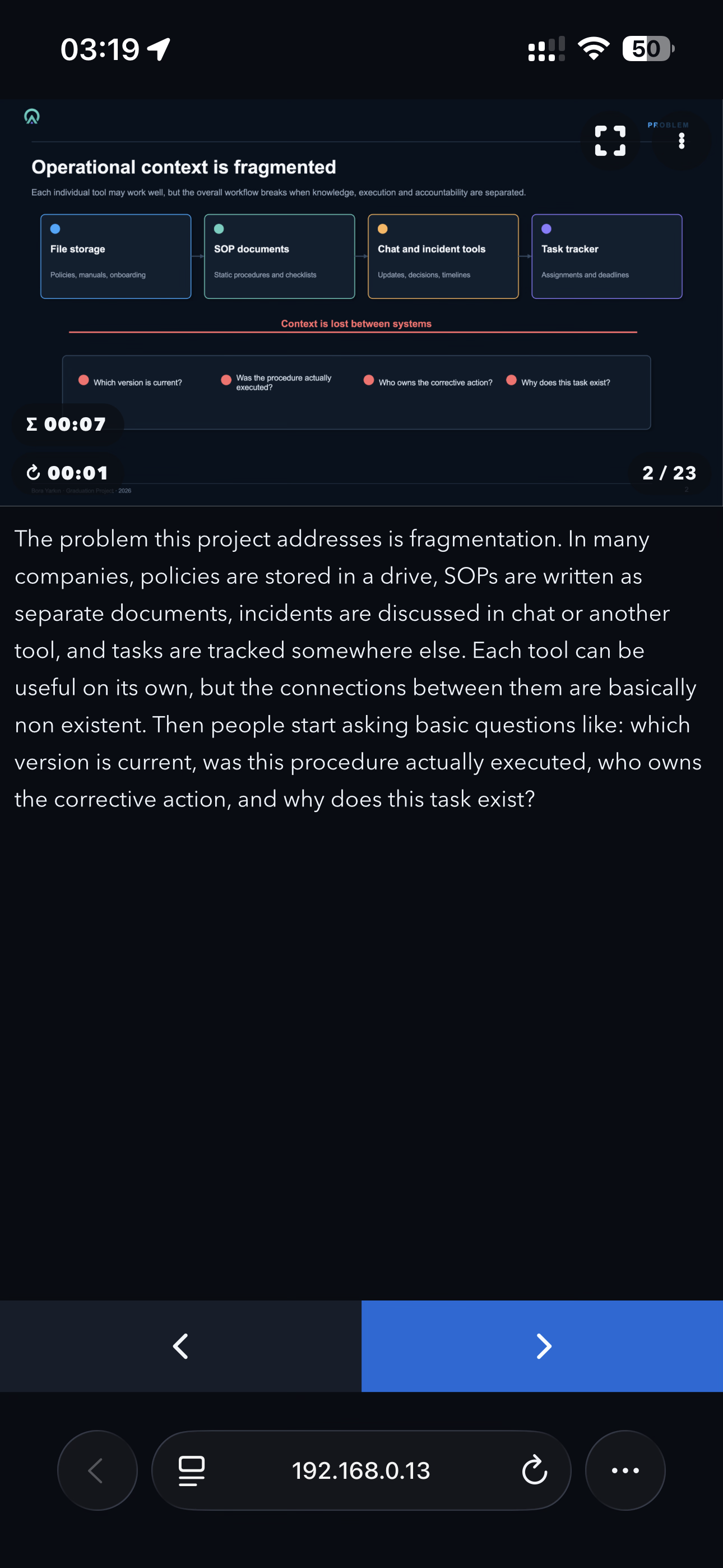
When you start the remote, LibreOffice displays a QR code. Scan it with your phone and the presentation starts from the first slide. The phone interface then shows the current slide, presenter notes, elapsed time and navigation controls.

I tried to make the process as simple as possible: no separate mobile application and no manual pairing codes.

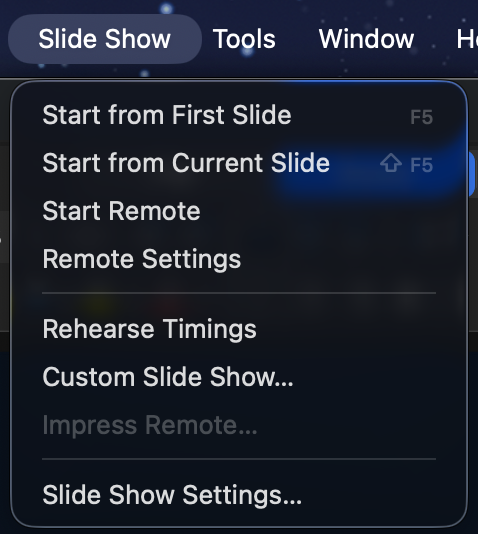
The remote can be opened from the Slide Show menu in LibreOffice’s top application menu bar—the menu alongside File, Edit, View and the other main menus.

This should not be confused with the Slide Show tab inside LibreOffice’s Tabbed user interface. LibreOffice’s UNO extension API does not currently let me add commands to that built-in tab. When using the Tabbed interface, the remote commands are therefore available under the Extensions tab instead.

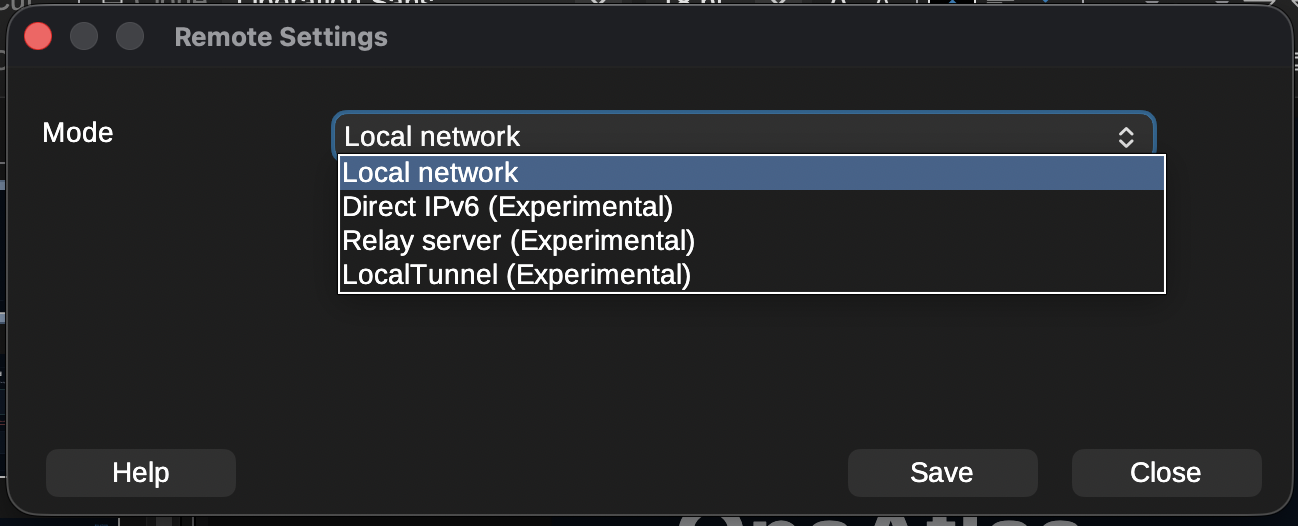
The extension currently provides several connection modes:

  • Local network: The phone connects directly to the computer running LibreOffice through its local IPv4 address. This is the main mode and the one I have tested most thoroughly.
  • Direct IPv6: Works similarly, but uses an IPv6 connection. It is still marked experimental because my home internet connection is currently the only IPv6 network I can properly test with.
  • Relay server: A small Python service that can be hosted on Linux or Windows. It is useful when the phone and computer are on different networks or when direct connections are blocked by carrier-grade NAT, firewalls or other network restrictions. It also supports multiple connections, so an organisation can host one relay server on its own infrastructure.
  • LocalTunnel: An experimental fallback that creates an outbound connection through the LocalTunnel service. I consider this a last-resort option when the other connection methods are unavailable.

The compatible relay-server package is bundled with the extension. It can be downloaded or extracted directly from the Remote Settings window by selecting “Get Relay Server”. The package includes the required documentation and setup instructions.

To install the extension, download the .oxt file from the LibreOffice Extensions website or GitHub and open it with LibreOffice. It can also be installed manually through Tools > Extensions. After installation, restart LibreOffice if requested.

The extension includes translations for more than 100 languages and automatically follows LibreOffice’s interface language. English and Turkish are the two languages I have personally checked. Many of the other translations were created with ChatGPT, so I cannot guarantee their quality and would be very grateful for corrections from native speakers.
Screenshot of Impress Remote

Why did you create it, and what was the process like?

The original inspiration came from Apple Keynote.

When Keynote is installed on both a Mac and an iPhone, the phone can be used to control the presentation while also displaying presenter notes. That feature completely changed the way I give presentations.

Over time, my slides became more professional and less text-heavy. Instead of putting everything on the slide, I started using the presenter notes almost like a teleprompter, with the text I actually planned to say. This helped move the audience’s attention away from reading the screen and back towards me.

That workflow worked perfectly for a long time, but I never really liked Keynote itself. I could not get used to its interface, and Apple’s decision to introduce paid features was the final reason for me to start looking for an alternative.

There were already several possible solutions, but none of them really worked for me.

LibreOffice previously had its own Impress Remote mobile application, but it has not been maintained for a long time and is no longer practical on many current devices and systems.

Browser-based presentation platforms can offer remote-control features, but I did not want my main presentation workflow to depend on an online service. They also do not offer the same flexibility as a full desktop office suite.

Microsoft Office was another possible option, but I am not a fan of Microsoft’s current direction, particularly the increasing integration of Copilot throughout its products.

OnlyOffice Desktop Editors is a good alternative and I used it for a while, but I encountered several bugs and eventually needed features it did not provide.

That brought me to LibreOffice, which I now find more useful and capable than the other office suites I tried. The only thing missing was the remote-presenter experience I had become dependent on with Keynote.

So I decided to build it myself.

I work mainly in IT and I am familiar with programming, but I would not describe myself as an advanced software developer. Before starting this project, I knew almost nothing about LibreOffice’s UNO API.

I began with ChatGPT. I defined the architecture, features, user interface and constraints myself—including requirements such as localisation being mandatory—and used AI to help me understand UNO and implement the code. The result turned out much better than I expected.

The extension was originally only a personal project. The first version was very basic; the web interface did not even have a back button. I had no intention of publishing it. Once it started working reliably, however, I realised that other LibreOffice users might want the same experience. I decided to take the project more seriously and turn it into a complete extension rather than something that only worked on my own computer.

That meant adding a more polished phone interface, connection settings, QR-code generation, IPv6 support, the relay server, LocalTunnel support, localisation, documentation, error handling and packaging.

Publishing it on the LibreOffice Extensions website was much easier than I expected. I created an account, created the project page, entered the information, uploaded the package and submitted it. After roughly a day of review, the extension was available publicly.
Screenshot of Impress Remote

How can people help with testing and further development?

The source code and issue tracker are available on GitHub. The repository includes templates for bug reports, feature requests and pull requests.

My main development and testing setup is macOS with an iPhone. I have also tested the extension on Windows and Linux, but those tests were performed under less-than-ideal conditions, including virtual machines, Remote Desktop sessions and a headless Windows Server installation.

Because of that, testing on real Windows and Linux desktop systems would be especially useful.

The areas where community help would be most valuable are:

  • Testing different LibreOffice versions
  • Testing Windows, Linux and different macOS versions
  • Testing Android devices and different mobile browsers
  • Testing IPv6 connections between genuinely separate networks
  • Testing the relay server in real-world and organisational environments
  • Testing unusual firewall, VPN, NAT and carrier network configurations
  • Reviewing and correcting translations
  • Improving the documentation
  • Reporting bugs and suggesting features
  • Contributing fixes through pull requests

The local IPv4 mode has been tested extensively across different local networks, internet providers and VPN configurations. The IPv6, relay-server and LocalTunnel modes need broader community testing before I would consider them fully proven.

When reporting a connection problem, including the operating system, LibreOffice version, browser, phone type, selected connection mode and basic network configuration would help enormously.

The project started because I wanted this functionality for myself. Now I would like to make it reliable enough that other LibreOffice users and organisations can confidently use it for their own presentations.
Screenshot of Impress Remote

❌